No need to design folders and rule files yourself
Chapters, chapter outlines, characters, settings, foreshadowing and storylines each have a place in the editor; there is no AGENTS.md to write and no worry about a rule file exceeding its size cap.
Codex CLI is OpenAI's open-source terminal agent for local files and commands. Compare its DIY novel setup with Maliang Writer's web editor.
Codex CLI is open source and runs in a local terminal; it reads and writes a whole project and runs scripts, with system-level isolation and approvals. Writing a novel with it, the author builds the folders, writes AGENTS.md, maintains a ledger and uses Git for versions, and views changes as a text diff in the terminal. Maliang builds these into a web editor: a volume-and-chapter table of contents, character cards, story archives and revision comparison you review one by one.
An author used to working in the terminal pulls the open-source project oh-story-claudecode to a local machine and writes a long mystery with Codex CLI. In the project, settings, outline, body text and tracking are kept separately, the JSON in the tracking directory is the structured source of truth, and the context file has a fixed seven columns and stays under 12KB. He commits to Git before each task and looks at the changes with /diff afterwards. The workflow is rigorous, on the condition that he is comfortable with Git and the terminal and willing to follow the rules the project sets. What Maliang does is turn these rules into structure in the editor, so the author doesn’t touch files.
On narrow screens, scroll sideways to see all columns.
| Dimension | Maliang Writer | Codex CLI | Notes |
|---|---|---|---|
| Product form | ✅ Web editor plus AI chat, ready to use in the browser | ✅ An open-source (Apache-2.0) local terminal agent for macOS, Linux and Windows; also available on the web, via IDE extensions, and on iOS | |
| Manuscript structure | ✅ Volumes, chapters and chapter outlines are in the table of contents; characters, settings, foreshadowing and storylines are cards | ⚠️ No official material found on novel-specific features; public practice relies on authors building their own folders and AGENTS.md | |
| Writing rules | ✅ Material such as the master outline and style samples is read by AI as needed when writing | ✅ Layered AGENTS.md (global → project root → current directory), with a combined default cap of 32 KiB; /init generates a skeleton | |
| Memory | ✅ After a chapter is written, story archives are organized: character states, relationships, locations, foreshadowing; anything that doesn’t match is listed as pending confirmation; can be turned off | ⚠️ Local Memories are off by default; the official site recommends putting rules that must be followed in AGENTS.md | |
| Change comparison | ✅ Red deletions and green additions on the original in the editor, each of which can be kept or restored | ✅ /diff shows the Git diff (including untracked files) and /review reviews the workspace; in the terminal it is a text diff | |
| Undo and redo | ✅ Undo the current round, branch from before the round, or edit and resend | ⚠️ The official command list has no /undo and recommends making a Git checkpoint before and after tasks; /fork branches a conversation and codex resume reopens a conversation | |
| Long conversations | ✅ The writer agent brings in only the earlier text and characters this chapter needs; when you reach a new volume, old settings are moved into the archive | ✅ /compact summarizes the visible conversation to free up space | |
| Genre reference | ✅ When starting a book, consult the character and structure breakdowns of more than 1,500 popular serials in the public book library; chapter endings are benchmarked against about 56,000 popular chapter endings | ⚠️ No official material found | |
| Price | ✅ Free sign-up to try; credits are deducted by usage | ✅ Included in ChatGPT plans (Free, Go $8, Plus $20, Pro from $100), or pay by usage with an API key (checked 2026-10) | |
| Regions | ✅ A Chinese-language web product for Chinese-language authors | ⚠️ The OpenAI Help Center says accessing from an unsupported country or region may lead to account suspension; ChatGPT’s official supported-country list does not include Mainland China |
✅ Confirmed in official material or in the product ⚠️ Partly supported, or not stated in official material ❌ Officially not supported · Competitor information comes from their public material.
Chapters, chapter outlines, characters, settings, foreshadowing and storylines each have a place in the editor; there is no AGENTS.md to write and no worry about a rule file exceeding its size cap.
Setting cards are edited as you ask; after a chapter is written and this stretch of writing ends, character states, relationships, locations and foreshadowing are organized in the background, and lists anything that doesn’t match as pending confirmation. It can be turned off.
When AI edits the body text, red deletions and green additions are marked on the original, and each can be kept or restored; if you are unhappy with a whole round, you can undo the current round, branch from before it, or edit and resend, with no Git checkpoints to create yourself.
Codex CLI is open source and runs locally, can look at files, edit files and run commands; in the official words, “Inspect code, make changes, run commands, and automate repeatable work without leaving your terminal”. It has system-level isolation and approvals, network access off by default and telemetry off by default; layered AGENTS.md lets rules be subdivided by directory. Nym Coy, a writer who uses VS Code, observed that “Codex defaults to writing a script”, which is handy for batch processing a manuscript.
Every product suits some scenarios; the advice here covers only one: serialized long-form fiction in Chinese.
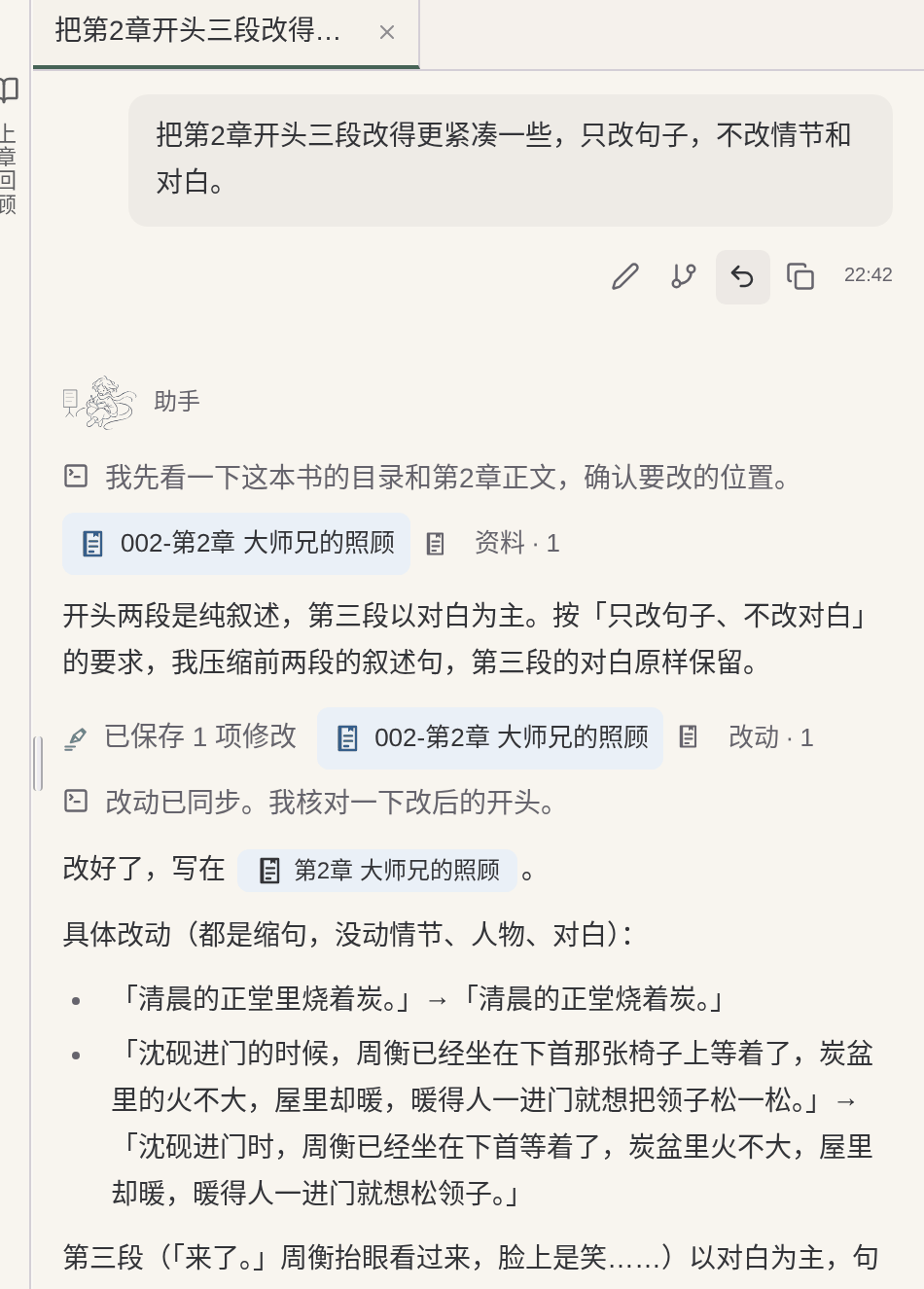
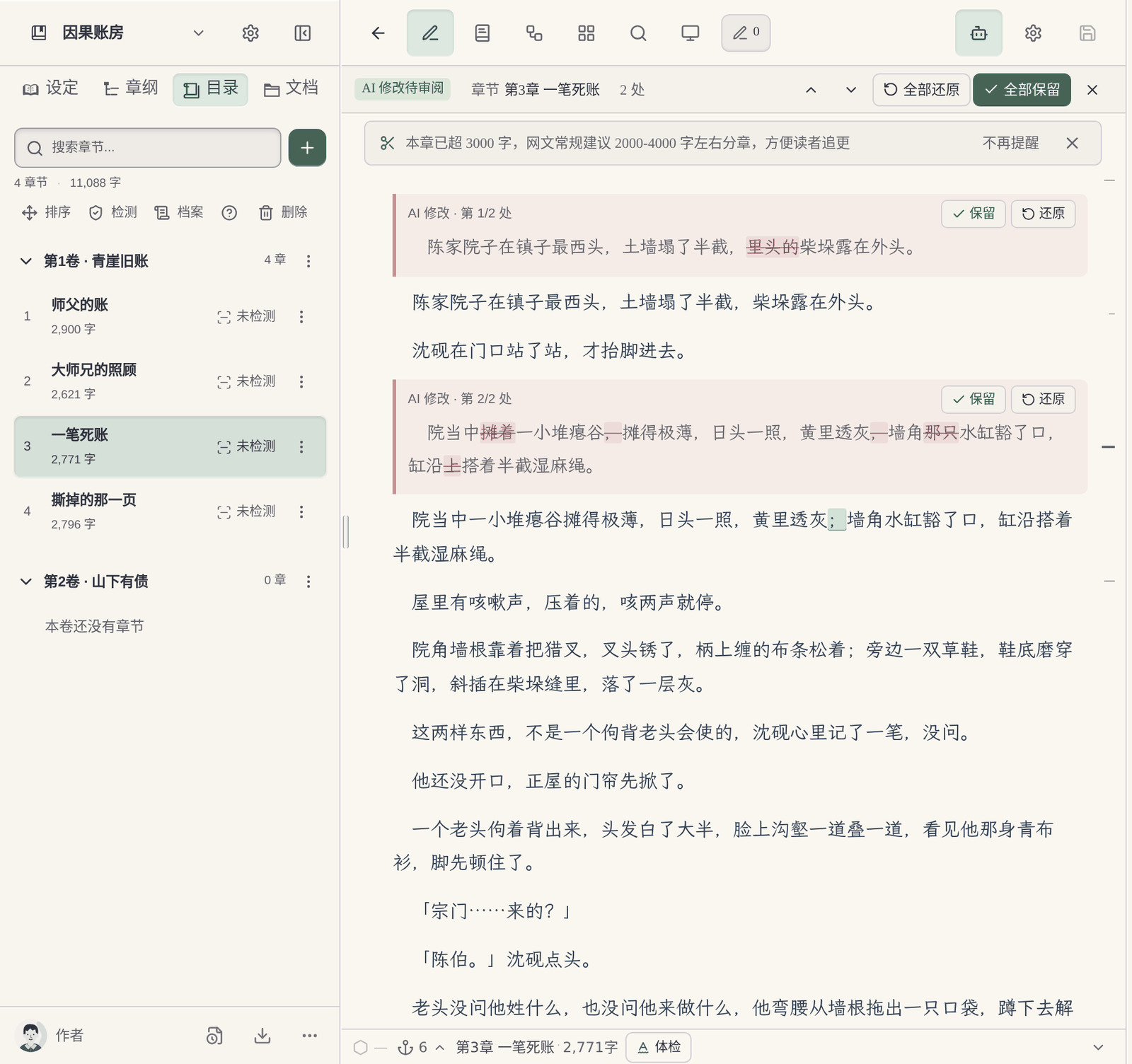
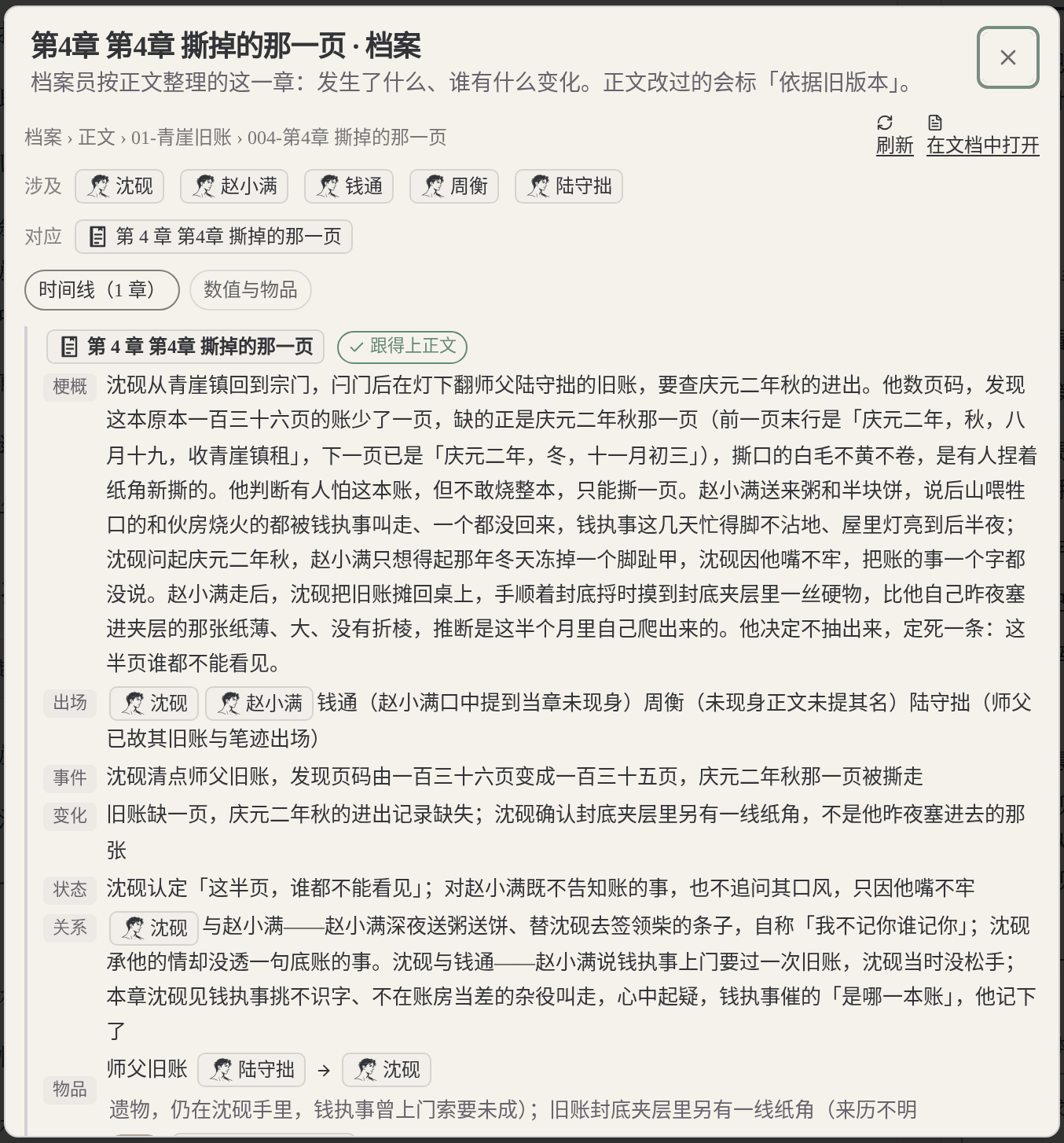
For this page, record in particular how much work the author has to do to prepare folders, writing rules, material updates and revision checks. Don't compare only the prose of a single generation, and don't assume in advance that folder-based tools must be harder to use.
Below is a same-task trial checklist, not a finished comparison experiment. You can use the original teaching material “Jiehuo City” or a manuscript you have the right to handle; record the preparation, the output and the author’s edits for each tool.
Give both tools the same protagonist, core rules and reading preferences; compare the opening directions first, then organize the master outline, the first volume outline and the outlines for the first three chapters.
Check: Can it tell the roles of the three outline levels apart? Can the author confirm a plan before it continues? Were settings that hadn't been settled yet quietly written in as fact?
Use the same book-opening kitUse the same old manuscript you have the right to handle, specify how the last chapter ends and the goal of the next chapter; try writing one scene first, without changing the previous twenty chapters.
Check: What material did you prepare? Did character positions, items and open threads carry over? How are candidate drafts told apart from adopted ones?
See the import-and-continue task checklistPick a real rule that affects earlier chapters; first ask it to list the affected chapters and the evidence, then let the author choose the scope of the change.
Check: Does it say which parts it did not check? Can you review the changes first? Did it wrongly edit text outside the task or write an unadopted plan into the material?
See how to change a settingActually try keeping the text, the order of volumes and chapters, character profiles and world rules, and check whether the output is suitable for further editing; list what cannot be taken along.
Check: Are the format and order recognizable? What material is inside the platform account, what is in local files, and what is in the export? Do not infer usability from a marketing page alone.
Copy the task and result record cardRecord the models, plans or account conditions you actually used, and the time spent preparing materials and editing the text. Leave blank anything you have not tried or cannot confirm; do not let a feature name or a single generation stand in for the full experience.
Yes. Codex CLI reads and writes files and runs commands locally, and open-source projects give it novel folders and AGENTS.md rules. It is a programming tool with no novel-specific features, so the author has to build the folders, rules and ledger.
Install Codex CLI (via npm, Homebrew and so on), sign in with a ChatGPT account or configure an API key, and prepare a manuscript folder and an AGENTS.md; Git is recommended for versions. You can also use an open-source novel project on GitHub as a starting point.
Commonly: style, point of view, forms of address for characters, which file is the source of truth, and which ledgers to update after each chapter. Note that the AGENTS.md files Codex reads have a combined default cap of 32 KiB.
The official command list has no /undo, and the CLI docs recommend making Git checkpoints before and after tasks; an author pointed out in GitHub issue #11626 that rewinding with Esc rewinds only the conversation and not file changes. Maliang can undo the current round, restoring the manuscript to just before that message was sent (manual edits made afterwards will also be reverted, and credits already deducted are not refunded).
Codex is included in ChatGPT plans; the Free tier has a limited quota and Plus is $20/month; you can also pay by usage with an API key (checked 2026-10).
No. Codex CLI is OpenAI’s terminal coding agent; Novelcrafter’s Codex is that writing software’s story bible.
The OpenAI Help Center says accessing from an unsupported country or region may lead to account suspension; ChatGPT’s official supported-country list does not include Mainland China.
Codex’s local memory is off by default, and the official site recommends putting rules that must be followed in AGENTS.md. Character states and foreshadowing in a long novel usually rely on ledger files the author designs. In Maliang, story archives are organized in the background after a chapter is written and lists anything that doesn’t match as pending confirmation.
Claude Code can write novels, and it is very capable: it reads and writes a whole book’s folder, checks continuity across files and makes batch edits. In public practice, authors design the folders, write CLAUDE.md, maintain a setting ledger and work in a terminal or editor plugin, which suits authors who are comfortable on the command line. Maliang builds the table of contents, character cards, story archives and revision comparison into a web editor, and the author starts writing from the chat.
Read the comparison →Cursor can write novels: the editor lets you see files and live diffs, the Rules system is detailed, and the choice of models is wide. In public practice, authors build their own chapter folders, write rules and maintain settings and a ledger, and once there are many chapters they also have to deal with file ordering and merging. Maliang builds the volume-and-chapter table of contents, character cards, story archives and revision comparison into a web editor.
Read the comparison →ChatGPT suits brainstorming, drafting passages and polishing sentences. Projects keeps story files and instructions together, and Memory remembers preferences. In a long serial, how chapters are ordered, where to edit when a setting changes and what this draft changed are still for the author to arrange. Maliang puts volumes and chapters, character cards, story archives and revision comparison in one editor.
Read the comparison →Coding agents are very capable: they read and write across files, make batch edits and run scripts, and technical authors can build very flexible writing workflows. The price is that the folders, rule files, setting ledger and version management all have to be designed and maintained yourself, and the interface is aimed at programmers. Maliang turns these into the cards, table of contents and editor that authors are used to.
Read the comparison →Folders plus Markdown are flexible and transparent, with the files in your own hands, which suits authors who like to define their own formats; the drawback is that once there are many files, which file is the latest and which other places need syncing after one edit are all yours to remember. Character cards plus story archives fix each character and setting as a card and organize states automatically after a chapter is written, which suits authors who don’t want to maintain files. Maliang has both: characters and settings are cards, the master outline is stored separately, and style samples and book-opening material are documents.
Read the comparison →After signing up, create a book or import existing chapters, tell the AI which chapter to continue, then look at what it wrote, what it changed and what it recorded in the archive, and decide whether to move your long novel over.