General chat AI, coding agents and overseas writing tools
Writing Novels with ChatGPT vs Maliang Writer: How Projects and a Novel Editor Divide the Work in a Long Serial
Maliang Writer editorial team · Edited by Maliang · Updated 2026-10-11
ChatGPT Projects keeps story files and Memory keeps preferences, but chapters, setting updates and revisions stay manual. Compare workflow, price and regions.
ChatGPT suits brainstorming, drafting passages and polishing sentences. Projects keeps story files and instructions together, and Memory remembers preferences. In a long serial, how chapters are ordered, where to edit when a setting changes and what this draft changed are still for the author to arrange. Maliang puts volumes and chapters, character cards, story archives and revision comparison in one editor.
Who should pick Maliang WriterAuthors writing a Chinese serial of several hundred thousand characters who want the chapters and settings AI writes to go straight into the table of contents, with every change reviewable one by one.
Who should pick ChatGPTAuthors who mainly chat, brainstorm or write short fiction, or who already use ChatGPT across work and study and live in a region on the official supported list.
Scenario
A concrete writing scenario
An author writing an urban-superpower story uses ChatGPT Projects to manage the book: the project holds a character sheet, a power-system document and volume outlines, and the instructions specify third person, short paragraphs and few adjectives. Each chapter starts in a new conversation and is copied back into the author’s own document when it is done. By chapter forty, the character sheet has been revised five times, the power system has gained two new rules, and the project files are close to the 25-file limit of the Plus tier. Now he has to decide which old file to delete and which to merge, and whether to paste the previous chapter’s ending into each new conversation again. Maliang hands this part to the editor and the background archives.
❦ · Matrix · ❦
Comparison table
11 dimensions compared one by one
On narrow screens, scroll sideways to see all columns.
Maliang Writer vs ChatGPT: key dimensions compared
Dimension
Maliang Writer
ChatGPT
Notes
Product form
✅ Web editor plus AI chat, ready to use in the browser
✅ Web, iOS, Android, desktop apps and a Chrome extension; Plus and above also get an Office add-in
Where story material lives
✅ Characters, settings, foreshadowing and storylines are cards; volumes, chapters and chapter outlines are in the table of contents; the master outline is stored separately; style samples are documents
⚠️ Projects holds chats, files and instructions; file limits are 5 on Free, 25 on Go and Plus, 40 on Pro; no official material found on novel-specific chapter or character management
Memory
✅ After a chapter is written, story archives are organized: character states, relationships, locations, foreshadowing; can be turned off
✅ Global Memory can be viewed, corrected and deleted, and the official explanation says it does not keep every detail; a project can use “project-only memory”
How much fits in one conversation
✅ The writer agent brings in the preceding text and relevant characters this chapter needs according to the chapter outline, so the author doesn’t paste them by hand
✅ GPT Instant: Free 27K, Go and Plus 54K, Pro 128K; reasoning models Plus 256K, Pro 400K
Revision comparison
✅ Red for deletions and green for additions in the editor; keep or restore each change
⚠️ From 2026-05-28 new models no longer offer Canvas and writing moves into writing blocks; paid users can temporarily use older models; no official material found on word-by-word comparison of additions and deletions
When you’re not satisfied
✅ Undo the current round, branch from before the round, or edit and resend; the branch shares the same manuscript as the original conversation
⚠️ No official material found on undoing a whole round against the manuscript
When settings don’t match
✅ Anything that conflicts with existing settings is listed as “pending confirmation” for the author to confirm
⚠️ No official material found
Old settings once you reach a new volume
✅ Characters, places and foreshadowing that only appeared in earlier volumes are moved into the archive; AI no longer consults them when writing new chapters, but they can still be looked up when needed
⚠️ No official material found
Genre reference
✅ When starting a book, consult the character and structure breakdowns of more than 1,500 popular serials in the public book library, learning methods rather than copying
⚠️ No official material found
Price
✅ Free sign-up to try; credits are deducted by usage
✅ Free $0; Go $8/month in the US; Plus $20/month; Pro $100/$200/$500 per month (checked 2026-10)
Regions
✅ A Chinese-language web product for Chinese-language authors
❌ The official supported-country list does not include Mainland China, Hong Kong or Macau; the official site states that accessing from outside the list may lead to account suspension
✅ Confirmed in official material or in the product ⚠️ Partly supported, or not stated in official material ❌ Officially not supported · Competitor information comes from their public material.
How Maliang Writer approaches it
How Maliang Writer handles these problems
№01Maliang Writer
Chapters, cards and documents in one place
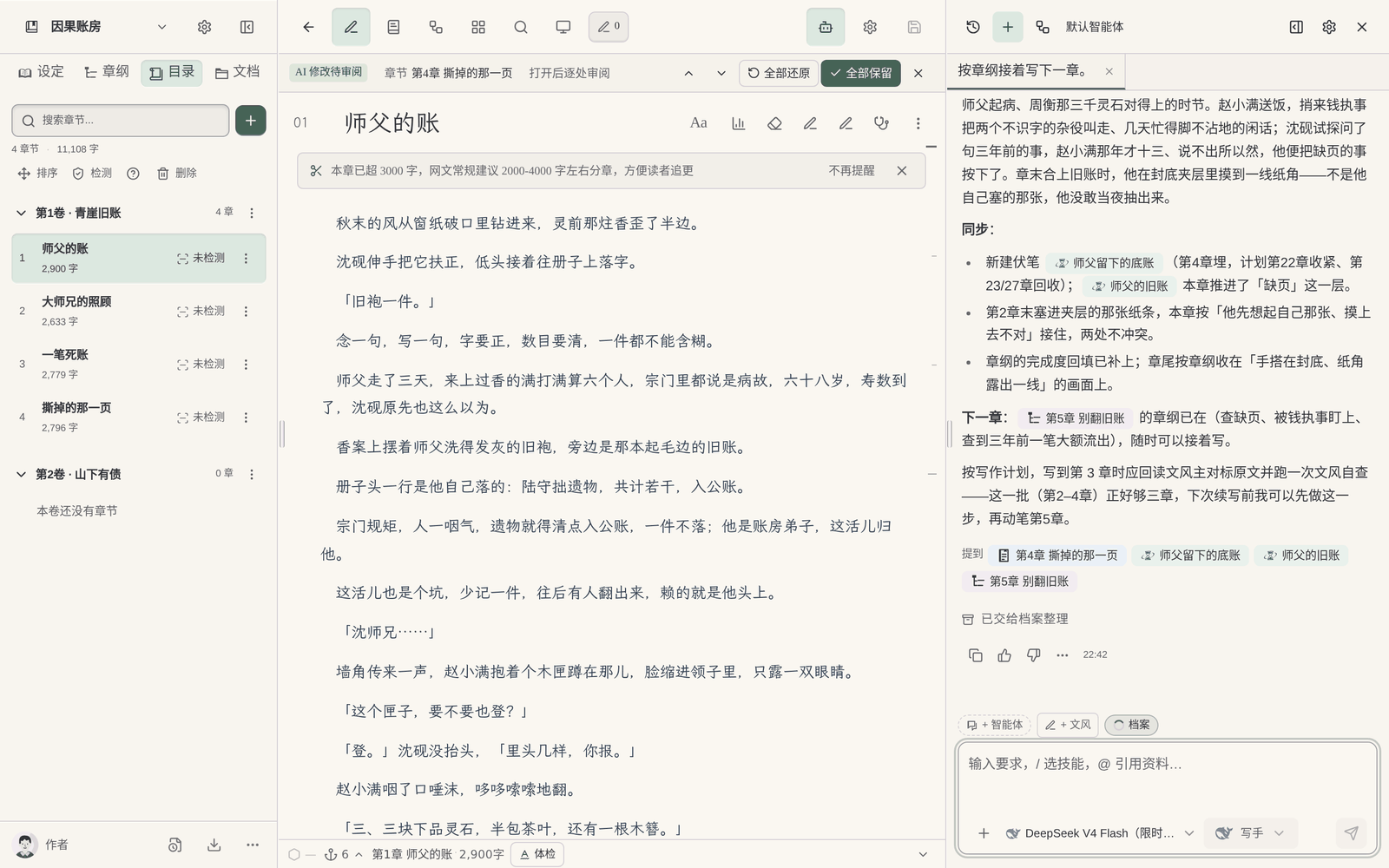
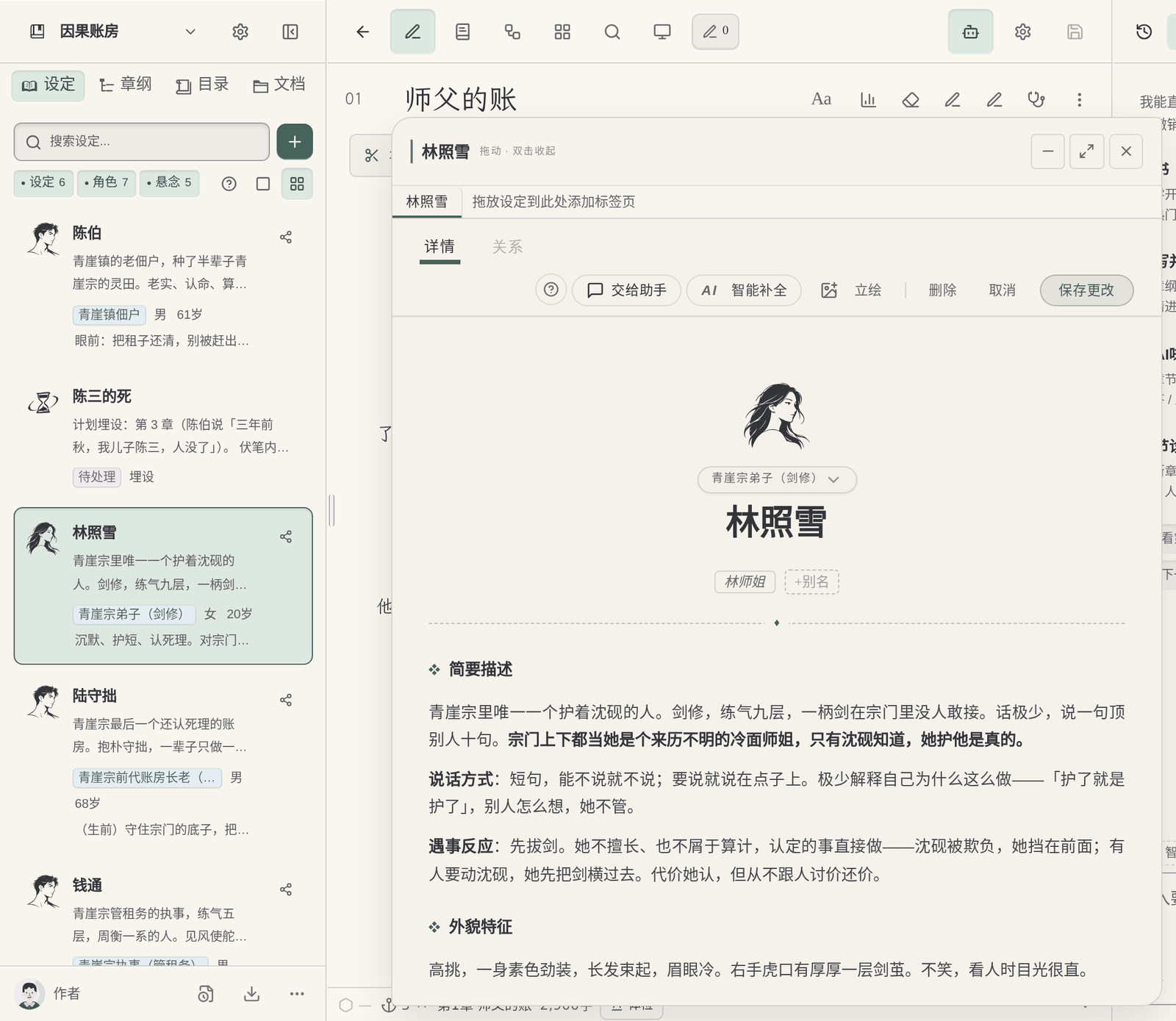
Volumes and chapters are in the left-hand table of contents; characters, settings, foreshadowing and storylines are cards; the master outline is stored separately and style samples are documents. New chapters and settings written by AI appear directly in the table of contents and the sidebar, with no copying and pasting back into your own documents.
№02Maliang Writer
Someone keeps track of setting changes
After a chapter is written and this stretch of writing ends, the background organizes this chapter’s archive: whose state changed, how relationships changed, where people are, which foreshadowing advanced. Anything that conflicts with existing settings is listed as pending confirmation, and you make the call. It can be turned off.
№03Maliang Writer
Revisions are visible and can be restored one by one
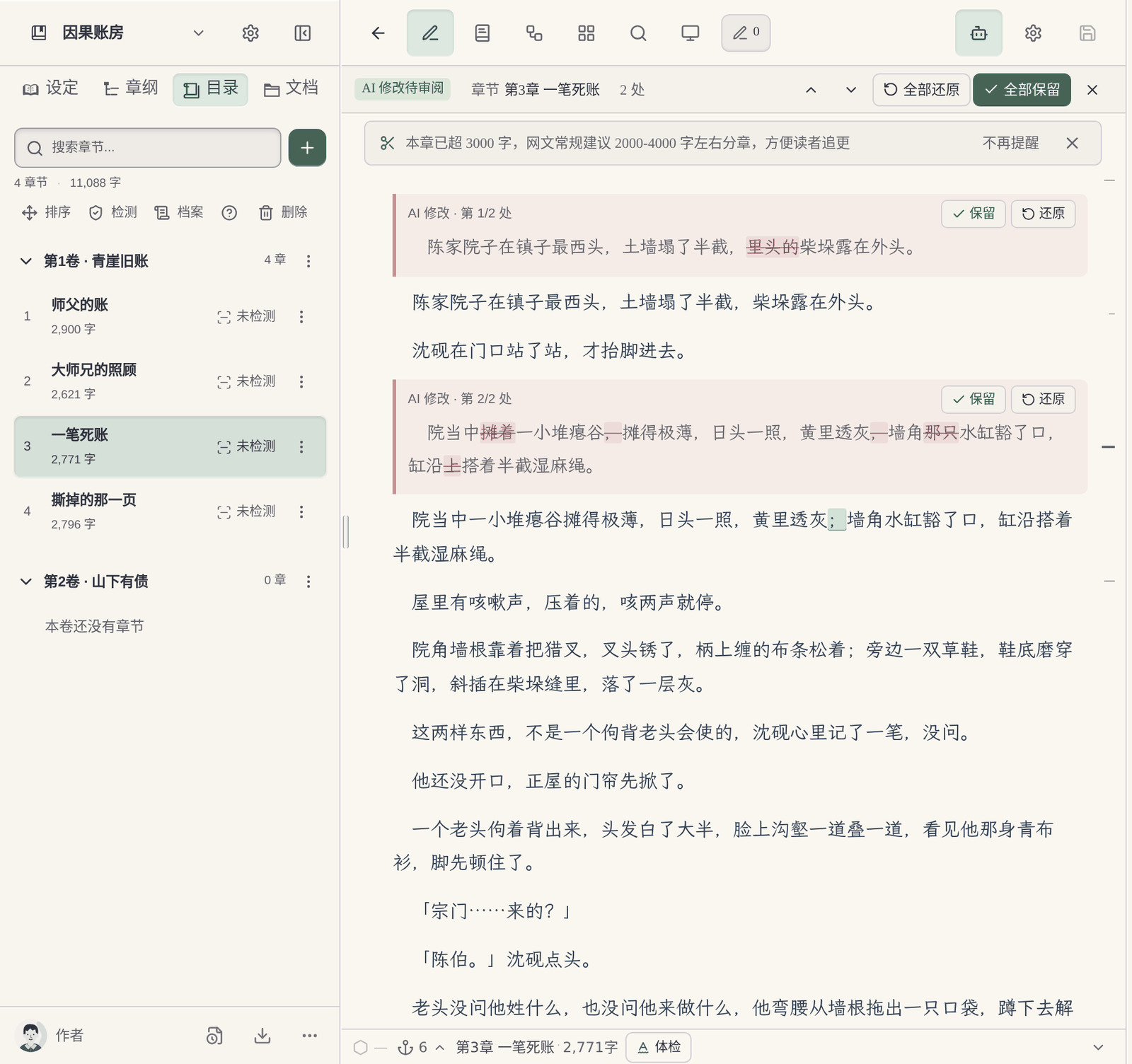
When AI edits the text, deletions are struck through and additions are marked green; you can keep or restore each change, or keep all or restore all. If you are unhappy with a whole round, you can undo the current round, or change one sentence and send it again.
A writer agent and chapter-ending checks: The body text is written by a dedicated writer agent, drawing on this book’s earlier text, the chapter outline and style samples; each chapter comes with a chapter-ending check, benchmarked against more than 2,000 popular web novels and about 56,000 chapter endings. AI-flavor removal and imitation writing can also be used directly in chat (passing detection is not guaranteed).
Reference for Chinese web-novel genres: When you start a book, AI proposes characters and a volume outline based on the character setups and pacing of popular books in the same genre, and writes only after you confirm. The public book library holds character and structure breakdowns of more than 1,500 popular serials.
What you fill in yourself
What the author has to do when writing a long novel directly with ChatGPT
Chapter table of contents and order are yours to manage: Projects is a general-purpose workspace; finished chapters usually have to be copied into your own documents and put in order. Which volume and chapter is which, and which chapters were revised, the author keeps track of.
Setting updates are yours to sync: Memory can remember preferences, and the official explanation also says it does not keep every detail. After a character’s state or a power rule changes, the author has to update the project files and watch the file limit.
For revision comparison you usually have to keep the old draft: From 2026-05-28 new models no longer offer Canvas, and writing is done in writing blocks inside the conversation. To see which sentences this draft changed from the last one, no official material describes a word-by-word comparison, so you usually keep the old draft to compare.
Contradictions are yours to catch: Late in a book, whether how a supporting character is addressed, a location or the timeline matches earlier chapters has to be checked by the author; official ChatGPT material does not describe a chapter-by-chapter setting check.
Where they are strong
What ChatGPT does well
ChatGPT has many entry points (web, phone, desktop, Office add-in) and a low barrier to entry, which suits casual brainstorming and polishing sentences. Projects supports project-level instructions and “project-only memory”, with no limit on the number of projects; global Memory can be viewed and corrected. The context of reasoning models reaches 256K on the Plus tier. For short fiction, brainstorming and everyday writing, it is a very handy tool.
Every product suits some scenarios; the advice here covers only one: serialized long-form fiction in Chinese.
Real interface
Maliang Writer's real interface
The author says “keep writing” in chat, and the new chapter goes straight into the left-hand table of contents.The author reviews AI’s revisions one by one, keeping what works and restoring what doesn’t.The author opens the protagonist’s character card to check current settings.
❦ · Evidence · ❦
Data and sources
Sources and check dates
ChatGPT pricing and context: The pricing page lists the Free / Go / Plus / Pro tiers and the context of GPT Instant and reasoning models on each. (Official docs · chatgpt.com · checked 2026-10)View →
ChatGPT Projects: A project holds chats, files and instructions; file limits are Free 5, Go/Plus 25, Pro 40; project-only memory is optional. (Official docs · help.openai.com · checked 2026-10)View →
Canvas status: From 2026-05-28 GPT-5.5 Instant / Thinking no longer offer Canvas, and writing is done in writing blocks. (Official docs · help.openai.com · checked 2026-10)View →
Memory explanation: Users can view the Memory summary, correct it and delete it; the official explanation says Memory does not keep every detail. (Official docs · help.openai.com · checked 2026-10)View →
ChatGPT supported countries: The official list does not include Mainland China, Hong Kong or Macau; accessing from outside the list may lead to account suspension or deactivation. (Official docs · help.openai.com · checked 2026-10)View →
Maliang: continuing and the writer agent: Say “keep writing” and the writer agent writes the body text from the chapter outline, the preceding text and style samples; the new chapter goes straight into the table of contents. (On-site data · maliangwriter.com · checked 2026-10)View →
Try four real writing tasks before you decide
For this page, record in particular what earlier-chapter and character material has to be provided again before the next chapter starts, and, after switching to a new conversation, how you confirm it is still working from the current manuscript of this book. Rely on actual experience.
Below is a same-task trial checklist, not a finished comparison experiment. You can use the original teaching material “Jiehuo City” or a manuscript you have the right to handle; record the preparation, the output and the author’s edits for each tool.
Start a new book
Give both tools the same protagonist, core rules and reading preferences; compare the opening directions first, then organize the master outline, the first volume outline and the outlines for the first three chapters.
Check: Can it tell the roles of the three outline levels apart? Can the author confirm a plan before it continues? Were settings that hadn't been settled yet quietly written in as fact?
Use the same old manuscript you have the right to handle, specify how the last chapter ends and the goal of the next chapter; try writing one scene first, without changing the previous twenty chapters.
Check: What material did you prepare? Did character positions, items and open threads carry over? How are candidate drafts told apart from adopted ones?
Pick a real rule that affects earlier chapters; first ask it to list the affected chapters and the evidence, then let the author choose the scope of the change.
Check: Does it say which parts it did not check? Can you review the changes first? Did it wrongly edit text outside the task or write an unadopted plan into the material?
Actually try keeping the text, the order of volumes and chapters, character profiles and world rules, and check whether the output is suitable for further editing; list what cannot be taken along.
Check: Are the format and order recognizable? What material is inside the platform account, what is in local files, and what is in the export? Do not infer usability from a marketing page alone.
Record the models, plans or account conditions you actually used, and the time spent preparing materials and editing the text. Leave blank anything you have not tried or cannot confirm; do not let a feature name or a single generation stand in for the full experience.
How to choose
Choose by your situation
If You write a long Chinese serial and want chapters and settings to file themselves → choose Maliang Writer, because Table of contents, cards, archives and revision comparison are all in one editor..
If You mainly brainstorm, write short fiction or revise single passages → choose ChatGPT, because ChatGPT is quick to pick up, and Projects is enough to hold a few setting files..
If You have already done a lot of early setting work in ChatGPT → use both, because Hand the settings to the AI in Maliang to organize into cards and write the following chapters in Maliang; keep using ChatGPT when you want to brainstorm..
If Your region is not on ChatGPT’s official supported list → choose Maliang Writer, because ChatGPT’s official supported-country list does not include Mainland China..
If You also handle lots of work documents, spreadsheets and slides → choose ChatGPT, because ChatGPT’s general capabilities and Office add-in cover more ground..
FAQ
FAQ
Can ChatGPT write a long novel?
It can write, but the author has to manage the skeleton of a long novel: where chapters go, which file to update when a setting changes, and which earlier text to bring along with each chapter. Projects can hold settings and instructions and Memory can remember preferences, but neither is organized by chapter or character.
Can ChatGPT Canvas still be used to write novels?
According to OpenAI’s model release notes, from 2026-05-28 GPT-5.5 Instant / Thinking no longer offer Canvas and writing is done in writing blocks inside the conversation; paid users can use older models temporarily until those models are retired.
How many setting files can a ChatGPT project hold?
5 on Free, 25 on Go and Plus, 40 on Pro and enterprise tiers, and Google Drive and Slack links can also be added as sources (checked against the official Help Center in 2026-10).
Can ChatGPT’s memory remember a novel’s settings?
It can remember some preferences and facts, which users can view and correct; the official explanation says Memory does not keep every detail. Chapter-by-chapter changes in a long book, such as character states and foreshadowing progress, still need to be organized separately. Maliang organizes story archives after each chapter is written.
Does writing a novel with ChatGPT cost money?
There is a free tier; Go is $8/month in the US, Plus is $20/month, and Pro has three tiers at $100, $200 and $500 (checked 2026-10). Maliang is free to sign up and try, and then deducts credits by usage.
Can I use ChatGPT to write novels in Mainland China?
OpenAI’s official supported-country list does not include Mainland China, Hong Kong or Macau, and states that accessing from outside the list may lead to account suspension or deactivation.
Whose prose is better, Maliang’s or ChatGPT’s?
Prose quality depends mainly on the model used and the instructions you give. Maliang lets you choose from several models, and the model that writes the body text can be chosen separately (see the in-product list for specifics); what sets Maliang apart is long-form management: cards, archives, revision comparison and chapter-ending checks.
Can Maliang guarantee consistent settings?
No. After a chapter is written, Maliang organizes the archives and lists anything that conflicts with existing settings as pending confirmation, helping you spot problems earlier; the final decision on how to fix them is yours.
After signing up, create a book or import existing chapters, tell the AI which chapter to continue, then look at what it wrote, what it changed and what it recorded in the archive, and decide whether to move your long novel over.