Coding agents are very capable: they read and write across files, make batch edits and run scripts, and technical authors can build very flexible writing workflows. The price is that the folders, rule files, setting ledger and version management all have to be designed and maintained yourself, and the interface is aimed at programmers. Maliang turns these into the cards, table of contents and editor that authors are used to.
Who should pick Maliang WriterAuthors who are not familiar with the terminal and Git, or who don’t want to build folders, write rules and maintain a ledger themselves and just want to concentrate on writing a long novel.
Who should pick Coding agentsAuthors who are familiar with the terminal, Git and Markdown, want full control over every file and every rule, and are willing to maintain the whole workflow themselves.
Scenario
A concrete writing scenario
Since 2025, more and more people have discovered that coding agents can write novels too: save each chapter as a Markdown file, create folders for settings, outlines and tracking, put a CLAUDE.md or AGENTS.md at the root spelling out the rules, and let Claude Code, Cursor or Codex CLI read the whole folder and write. GitHub already has quite a few open-source templates like this, such as webnovel-writer and oh-story-claudecode. The method does work and is very flexible. But in publicly shared practice, a few kinds of problems keep coming up: settings and requirements are forgotten after long conversations, style and characters drift, usage costs climb, Chinese chapter files sort out of order, and the barrier is not low for authors who don’t write code. In the end, coding agents are for programmers managing code; to write a novel with one, you first have to be half an engineer and build the book’s structure and rules.
❦ · Matrix · ❦
Comparison table
10 dimensions compared one by one
On narrow screens, scroll sideways to see all columns.
Maliang Writer vs Coding agents: key dimensions compared
Dimension
Maliang Writer
Coding agents
Notes
Entry barrier
✅ Open it on the web and use it, nothing to install
⚠️ With the local-file approach you install, sign in and work in a terminal or code editor; some tools also have web or desktop entry points
Codex CLI can be installed with npm or Homebrew; Cursor is a desktop editor; Claude Code also has desktop and web versions
Structure of a book
✅ Volumes, chapters, chapter outlines, characters, settings, storylines and documents are there out of the box
⚠️ The author designs the folders, such as body text, outline, setting library and tracking files
Writing rules
✅ Type / to pick a writing method (continue writing, chapter-outline planning, removing AI-sounding language and so on), and one message can combine several
✅ Write your own rules in CLAUDE.md, AGENTS.md or .cursor/rules
Codex CLI’s AGENTS.md has a combined default cap of 32 KiB
Ledger of character states and foreshadowing
✅ Story archives are organized after a chapter is written; anything that doesn’t match is listed as “pending confirmation”; can be turned off
⚠️ The author or AI maintains ledger files in a format the author designs
Batch edits across files
✅ AI can edit characters, settings and the body text of several chapters as you ask, and the changes can be checked and undone
✅ A strength: it can check and batch-edit across hundreds of files, and can also run scripts
Revision comparison
✅ Red deletions and green additions on the original in the novel editor, each of which can be kept or restored
✅ Cursor has a live diff view; Claude Code can show diffs in the VS Code plugin and the desktop app; Codex CLI shows a text diff in the terminal
Undo
✅ Undo the current round, branch from before the round, or edit and resend
✅ Claude Code has automatic checkpoints plus /rewind; Cursor checkpoints are stored locally and the official site recommends Git for long-term versions; Codex CLI’s official advice is to make a Git snapshot before and after tasks
Chinese chapter ordering and reading
✅ Shown in the table of contents in volume-and-chapter order, with the body text typeset in the editor for reading
⚠️ Kept as files, so the author has to deal with ordering and merging
Some public practice mentions Chinese chapter names coming out of order when sorted alphabetically
Availability in Mainland China
✅ Chinese interface, accessed directly in the browser
⚠️ Claude Code: Anthropic’s official supported-region list does not include Mainland China; Codex comes with ChatGPT plans, and ChatGPT’s official supported-region list does not include Mainland China; Cursor’s official site says some model providers have regional restrictions
Cost
✅ Credits are deducted by usage; free sign-up to try
✅ Claude Code is included from Claude Pro at $20/month; Cursor Hobby is free, Individual $20/month; Codex is included in all ChatGPT plans (checked against the official pricing pages in 2026-10)
✅ Confirmed in official material or in the product ⚠️ Partly supported, or not stated in official material ❌ Officially not supported · Competitor information comes from their public material.
How Maliang Writer approaches it
How Maliang Writer handles these problems
№01Maliang Writer
A book’s structure out of the box
Volumes, chapters, chapter outlines, characters, settings, foreshadowing, storylines and documents are already sorted into categories. What you see are cards and a table of contents; there are no folders to design and no rule files to write.
№02Maliang Writer
The ledger is kept by archive organizing
The “character timeline and foreshadowing ledger” that authors in public practice maintain themselves is done in Maliang by the story-archive organizing after a chapter is written: character states, relationships, locations and foreshadowing, with anything that doesn’t match listed as “pending confirmation”.
№03Maliang Writer
Changes are viewed in the novel editor
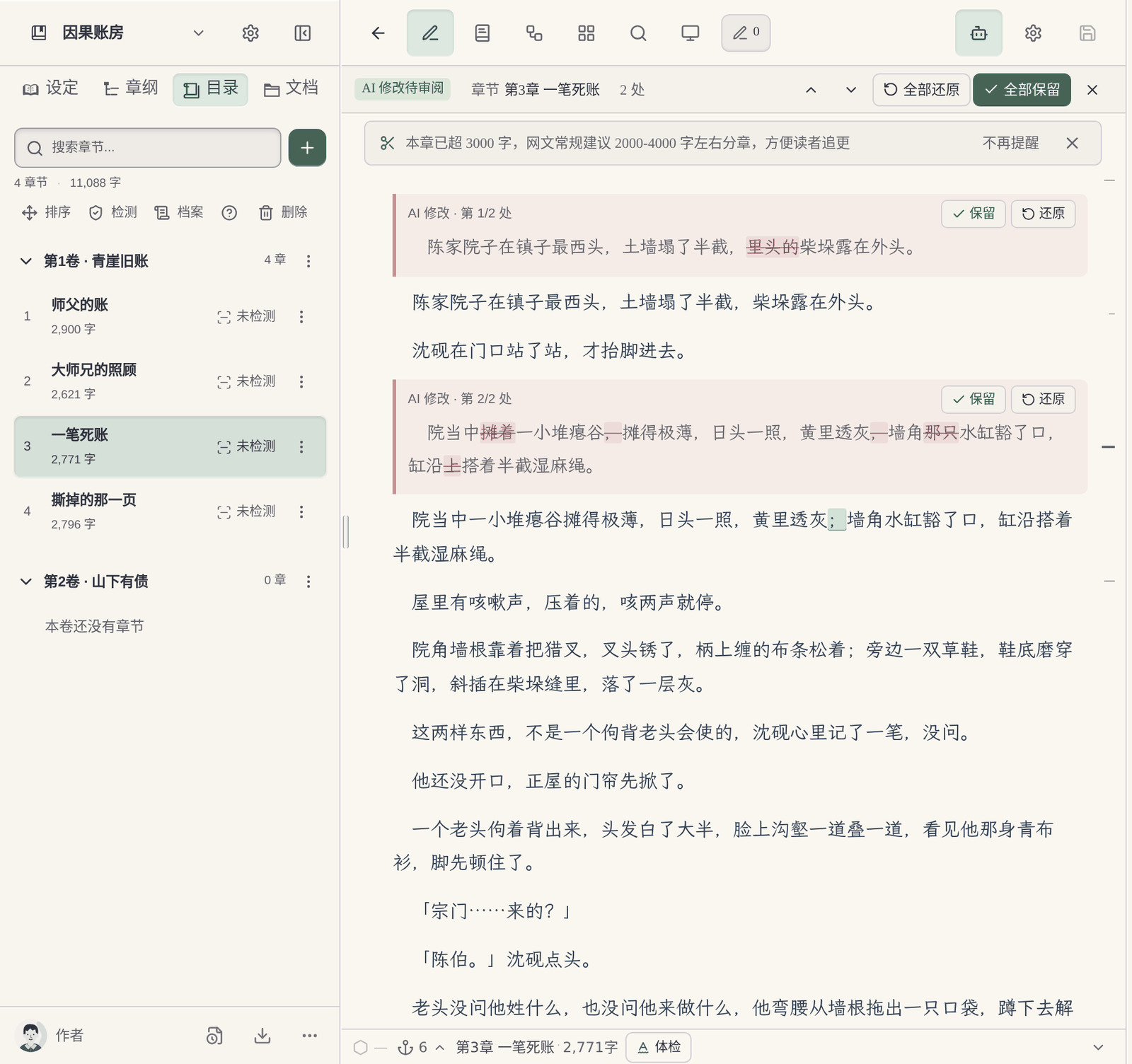
When AI changes the body text, the changes are marked right on the typeset original, and each can be kept or restored, with no code-style file comparison to read.
Pick writing methods with /, no rules to write: Type / to pick writing methods such as continue writing, chapter-outline planning, AI-flavor removal and chapter diagnosis, and @ to specify chapters and characters; one message can combine several.
What you fill in yourself
What the author has to do when writing a long novel directly with Coding agents
Folders and rules are yours to design: Writing a novel with a coding agent starts with designing the folders and rule files. Codex CLI’s AGENTS.md has a combined default cap of 32 KiB, and the official site recommends putting rules that must be followed in AGENTS.md rather than relying only on memory.
The ledger is yours to maintain: Public long-novel practice all designs separate status or tracking files as the source of truth, for example recording “the author’s truth” and “what the reader knows” separately so characters don’t learn the answer too early. The format and the maintenance rules are all for the author to decide.
Problems common in public practice: One author who writes medium and long novels with Cursor says, in their own words, “hallucinations come up often — it either forgets the novel’s settings or forgets my file-creation requirements”; an author on the Cursor forum mentions that a 200-message long conversation makes the model start repeating itself and the prose go flat; another mentions that having Claude merge files one by one used up a lot of quota.
A barrier for authors who don’t write code: One author writes that for non-programmers VS Code sounds intimidating on its own; others think Claude Code is more powerful but also more daunting, and most authors will stay in the chat interface.
Where they are strong
What Coding agents does well
Coding agents are very capable: Claude Code understands a whole project and runs tasks across files, with automatic checkpoints to roll back at any time; Cursor has a detailed rules system, live diffs and models from many vendors to choose from; Codex CLI is open source and can look at files, edit files and run commands in the terminal, with system-level isolation and approvals. Technical authors can do many things with them that writing software can’t: write scripts to count word frequency across the whole book, batch-rename characters, customize check workflows and manage every draft with Git.
Every product suits some scenarios; the advice here covers only one: serialized long-form fiction in Chinese.
Real interface
Maliang Writer's real interface
The author views and edits settings right on the character card, without opening a folder.The author checks AI’s changes one by one in the typeset body text.Unhappy with this round’s result, the author chooses to undo the current round or branch.The author views this chapter’s archive, organized automatically after the chapter is written.
❦ · Evidence · ❦
Data and sources
Sources and check dates
Claude Code memory and checkpoints: Cross-session memory relies on CLAUDE.md and Auto memory; a checkpoint is created automatically with every prompt, the latest 100 are kept, and you roll back with /rewind. (Official docs · code.claude.com · checked 2026-10)View →
Cursor checkpoints: The official docs state that checkpoints are stored locally, separate from Git, and recommend Git for long-term version control. (Official docs · cursor.com · checked 2026-10)View →
Codex CLI AGENTS.md: AGENTS.md is read level by level from global to project, with a combined default cap of 32 KiB; the official CLI docs recommend making Git snapshots before and after tasks so you can roll back. (Official docs · learn.chatgpt.com · checked 2026-10)View →
Anthropic supported regions: The official supported-region list does not include Mainland China, Hong Kong or Macau, covering Claude.ai, Claude Code and the API. (Official docs · anthropic.com · checked 2026-10)View →
Practice of writing medium and long novels with Cursor: One folder per book, rules in .cursor/rules; the author mentions that once the body text takes up a lot of context the model often forgets the settings, and Chinese chapters sort out of order. (Community discussion · juejin.cn · checked 2026-10)View →
Cursor forum: long-conversation problems in long-form writing: The author mentions that a 200-message long conversation raises costs and makes the model start repeating itself or write flat prose. (Community discussion · forum.cursor.com · checked 2026-10)View →
oh-story-claudecode open-source template: Settings, outline, body text and tracking are kept separately, with the tracking-state file as the structured source of truth; it can be installed into Claude Code and Codex CLI. (Community discussion · github.com · checked 2026-10)View →
Writing novels with VS Code: The author mentions that AI has context limits, that merging files one by one used up a lot of quota, and that for non-programmers VS Code sounds intimidating. (Community discussion · substack.aicentral.blog · checked 2026-10)View →
Maliang story archives: After a chapter is written, character states, relationships, locations and foreshadowing are organized. (On-site data · maliangwriter.com · checked 2026-10)View →
Try four real writing tasks before you decide
For this page, record in particular how much work the author has to do to prepare folders, writing rules, material updates and revision checks. Don't compare only the prose of a single generation, and don't assume in advance that folder-based tools must be harder to use.
Below is a same-task trial checklist, not a finished comparison experiment. You can use the original teaching material “Jiehuo City” or a manuscript you have the right to handle; record the preparation, the output and the author’s edits for each tool.
Start a new book
Give both tools the same protagonist, core rules and reading preferences; compare the opening directions first, then organize the master outline, the first volume outline and the outlines for the first three chapters.
Check: Can it tell the roles of the three outline levels apart? Can the author confirm a plan before it continues? Were settings that hadn't been settled yet quietly written in as fact?
Use the same old manuscript you have the right to handle, specify how the last chapter ends and the goal of the next chapter; try writing one scene first, without changing the previous twenty chapters.
Check: What material did you prepare? Did character positions, items and open threads carry over? How are candidate drafts told apart from adopted ones?
Pick a real rule that affects earlier chapters; first ask it to list the affected chapters and the evidence, then let the author choose the scope of the change.
Check: Does it say which parts it did not check? Can you review the changes first? Did it wrongly edit text outside the task or write an unadopted plan into the material?
Actually try keeping the text, the order of volumes and chapters, character profiles and world rules, and check whether the output is suitable for further editing; list what cannot be taken along.
Check: Are the format and order recognizable? What material is inside the platform account, what is in local files, and what is in the export? Do not infer usability from a marketing page alone.
Record the models, plans or account conditions you actually used, and the time spent preparing materials and editing the text. Leave blank anything you have not tried or cannot confirm; do not let a feature name or a single generation stand in for the full experience.
How to choose
Choose by your situation
If You are a programmer and used to managing everything with Git → choose Coding agents, because A coding agent together with Git lets you manage every draft your own way..
If You want to write scripts for whole-book statistics, batch renaming and custom checks → choose Coding agents, because Coding agents can run scripts directly, which writing software may not support..
If You want to write in writing software and occasionally use a coding tool for batch processing → use both, because Keep daily writing, settings and archives in Maliang; leave one-off tasks that need scripts to a coding agent..
If You are not familiar with the terminal or don’t want to build folders and write rules yourself → choose Maliang Writer, because Volumes, chapters, characters and settings are there out of the box, and you pick writing methods with /..
If You have written several dozen chapters with a coding agent and the ledger is getting harder and harder to maintain → choose Maliang Writer, because Character states and foreshadowing are kept by the story-archive organizing after each chapter is written, and anything that doesn’t match is listed as pending confirmation..
FAQ
FAQ
Can Claude Code write novels?
Yes. The common approach is one Markdown file per chapter, separate settings, outline and tracking folders, rules in CLAUDE.md, and Claude Code reading and writing the whole folder. Note that Anthropic’s official supported-region list does not include Mainland China.
Is Cursor good for writing novels?
Cursor lets you reference files with @, set rules and see live diffs, and technical authors find it very flexible. Authors in public practice also mention problems such as forgetting settings after long conversations and Chinese chapters sorting out of order, which you have to solve by designing your own folders and rules.
What do I need to write a novel with Codex?
You need to install Codex CLI, sign in with a ChatGPT account or use an OpenAI API key, and write AGENTS.md rules in the project. The official CLI docs recommend making Git snapshots before and after tasks so you can roll back.
How should I divide the folders when writing a novel with an AI coding tool?
A common split in public templates is four kinds: body text, outline (master outline, volume outlines, chapter outlines), setting library and tracking (status and foreshadowing ledgers), with a rule file at the root and Git for versions. In Maliang these categories are there out of the box, and the archive is organized automatically after a chapter is written.
What should CLAUDE.md for writing a novel contain?
Generally style requirements, hard character settings, prohibitions and which files to read for each chapter. The more rules there are, the more they need trimming from time to time, or they get ignored or conflict with each other. Maliang uses writing methods in place of rule files; type / to pick one.
Can I write novels with Claude Code if I can’t program?
You can learn, but you first need to get comfortable with the terminal, files and folders, and also be able to read file comparisons. If you just want to concentrate on writing the novel, web-based writing software will save you a lot of trouble.
Which is cheaper for writing novels, a coding agent or writing software?
Coding agents are mostly included in subscriptions, such as Claude Pro from $20/month and Cursor Individual at $20/month (checked 2026-10); long conversations and batch operations use more quota. Maliang deducts credits by usage, with each round’s cost shown under the reply, and you can sign up for free and compare.
Can I move my novel files from Claude Code to Maliang?
You can paste the setting files and chapter content to Maliang’s AI and have it organize them into character cards, setting cards and a chapter table of contents; check them and keep writing.
After signing up, create a book or import existing chapters, tell the AI which chapter to continue, then look at what it wrote, what it changed and what it recorded in the archive, and decide whether to move your long novel over.