Folio №09 · vs Cursor · 2026-10-11
General chat AI, coding agents and overseas writing tools

How Good Is Cursor for Writing Novels? Public Practice and How It Differs from Maliang Writer

How authors write novels in Cursor with one Markdown file per chapter and .cursor/rules—and how Maliang Writer compares with built-in archives.

❦ · Verdict · ❦
Bottom line

The short answer

Cursor can write novels: the editor lets you see files and live diffs, the Rules system is detailed, and the choice of models is wide. In public practice, authors build their own chapter folders, write rules and maintain settings and a ledger, and once there are many chapters they also have to deal with file ordering and merging. Maliang builds the volume-and-chapter table of contents, character cards, story archives and revision comparison into a web editor.
Who should pick Maliang WriterAuthors who don’t want to manage a pile of Markdown files and rules, want settings organized automatically as chapters are written, and want to write Chinese web novels directly in the browser.
Who should pick CursorAuthors who are familiar with code editors, want to control files and rules themselves, and already use Cursor.
Scenario

A concrete writing scenario

A web-novel author who can write front-end code follows a tutorial on Juejin and writes a new book in Cursor: one folder per book, holding two files, “novel outline information” and “story progress”, one md per chapter, and the rules in .cursor/rules. Generation is very fast. After several dozen chapters, he starts a few maintenance chores: having AI update the story-progress file after every chapter, checking the order of the chapter files, and writing a script before publishing to merge the chapters into one file. He can do these things and is willing to. Maliang hands these steps to the editor and the background archives.

❦ · Matrix · ❦
Comparison table

11 dimensions compared one by one

On narrow screens, scroll sideways to see all columns.

Maliang Writer vs Cursor: key dimensions compared
DimensionMaliang WriterCursorNotes
Product form✅ Web editor plus AI chat, ready to use in the browser✅ Desktop editor (macOS, Windows, Linux), CLI, and cloud agents on the web
Manuscript structure✅ Volumes, chapters and chapter outlines are in the table of contents; characters, settings, foreshadowing and storylines are cards⚠️ No official material found on novel-specific management; in public practice each chapter is one Markdown file, with settings and a ledger in separate folders
Writing rules✅ Material such as the master outline and style samples is read by AI as needed when writing✅ Project Rules (.cursor/rules/*.mdc), User Rules, Team Rules, AGENTS.md; the official site says models keep no memory between completions and rules provide persistent context
Tracking setting changes✅ After a chapter is written, story archives are organized: character states, relationships, locations, foreshadowing; anything that doesn’t match is listed as pending confirmation; can be turned off⚠️ In public practice authors design ledger files (chapter status, character timeline, foreshadowing) for AI to maintain
Change comparison✅ Red deletions and green additions on the original in the editor, each of which can be kept or restored✅ Officially “The diff view shows changes as they happen”, with Review for line-by-line inspection
Undo and versions✅ Undo the current round, branch from before the round, or edit and resend✅ Before larger changes the agent takes a Checkpoint automatically, stored locally and independent of Git; the official site recommends Git for permanent versions
Chapter ordering✅ Volumes and chapters are shown in the left-hand table of contents in the book’s order⚠️ Sorted by file name; public practice mentions Chinese chapter names sorting out of order and needing a script to merge
Models✅ A choice of several models, see the in-product list for specifics✅ In-house Composer and Grok series, plus Claude, Gemini, GPT, GLM, Kimi and others
Genre reference✅ When starting a book, consult the character and structure breakdowns of more than 1,500 popular serials in the public book library; chapter endings are benchmarked against about 56,000 popular chapter endings⚠️ No official material found
Price✅ Free sign-up to try; credits are deducted by usage✅ Hobby is free (limited agent requests); Individual $20/month; Teams $40/user/month (checked 2026-10)
Regions✅ A Chinese-language web product for Chinese-language authors⚠️ The official site says some model providers have regional restrictions and does not name specific regions

✅ Confirmed in official material or in the product   ⚠️ Partly supported, or not stated in official material   ❌ Officially not supported · Competitor information comes from their public material.

How Maliang Writer approaches it

How Maliang Writer handles these problems

№01 Maliang Writer

No need to design folders and rule files yourself

Chapters, chapter outlines, characters, settings, foreshadowing and storylines each have a place in the editor, and volumes and chapters are arranged in the book’s order, so there is no worry about file-name sorting.

№02 Maliang Writer

Story archives organized after each chapter

Setting cards are edited as you ask; after a chapter is written and this stretch of writing ends, the background organizes character states, relationships, locations and foreshadowing, and lists anything that doesn’t match as pending confirmation. You don’t have to maintain a “story progress” file yourself. It can be turned off.

№03 Maliang Writer

Revision comparison in the editor

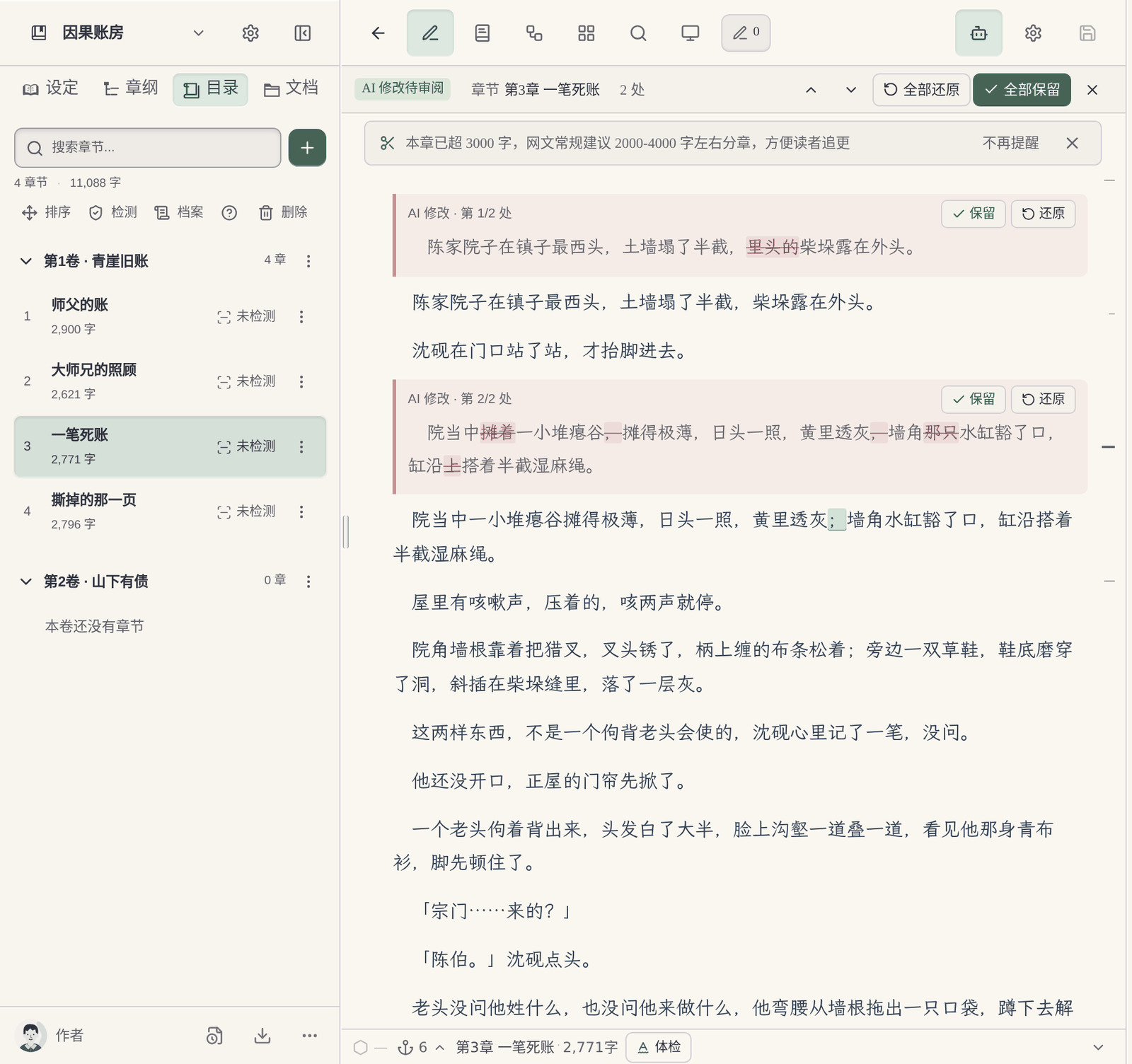
When AI edits the body text, deletions are struck through and additions are marked green, and each can be kept or restored; if you are unhappy with a whole round, you can undo the current round or edit and resend.

  1. Works in the browser, no editor to install: Open the browser and write; new chapters and settings written by AI appear directly in the left-hand table of contents. You can also revise with AI in a phone browser.
  2. Genre reference for Chinese web novels: When starting a book, it consults the character and structure breakdowns of more than 1,500 popular serials; the writer agent writes the body text from this book’s earlier text and style samples, and each chapter comes with a chapter-ending check.
What you fill in yourself

What the author has to do when writing a long novel directly with Cursor

  1. The folders and rules are yours to design: The author of the Juejin tutorial creates one folder per book and one md per chapter, with rules in .cursor/rules/*.mdc; outlines and characters are generated in other tools first and then put in.
  2. Settings and the ledger are yours to maintain: In the codebubby + Cursor practice, the hard constraints the author maintains (style, settings, core characters, main plot) are kept apart from the ledger AI maintains (chapter status, character timeline, foreshadowing), and every chapter loads the setting files and the previous two chapters of text. The author mentions having to deal with character drift, foreshadowing getting out of control and a growing “AI flavor”.
  3. Long conversations are yours to control: The author of Buckram Studio on the Cursor forum uses @ to reference only the small files needed each time, and mentions that “200-message chat threads causes context rot”.
  4. Ordering and merging Chinese chapter files: The Juejin tutorial mentions that Chinese chapter names come out of order when sorted alphabetically, so the author had to write a script to merge the chapters.
Where they are strong

What Cursor does well

Cursor’s Rules system is detailed: three levels of rules (project, user, team) plus AGENTS.md, with globs to control when they apply; the diff view shows changes in real time and Review lets you inspect line by line; models span many vendors, and there are cloud agents and Slack and GitHub entry points. The author of the Juejin tutorial mentions “fifty chapters produced in a little over twenty minutes”. For authors familiar with code editors, it is a flexible and efficient writing environment.

Every product suits some scenarios; the advice here covers only one: serialized long-form fiction in Chinese.

Real interface

Maliang Writer's real interface

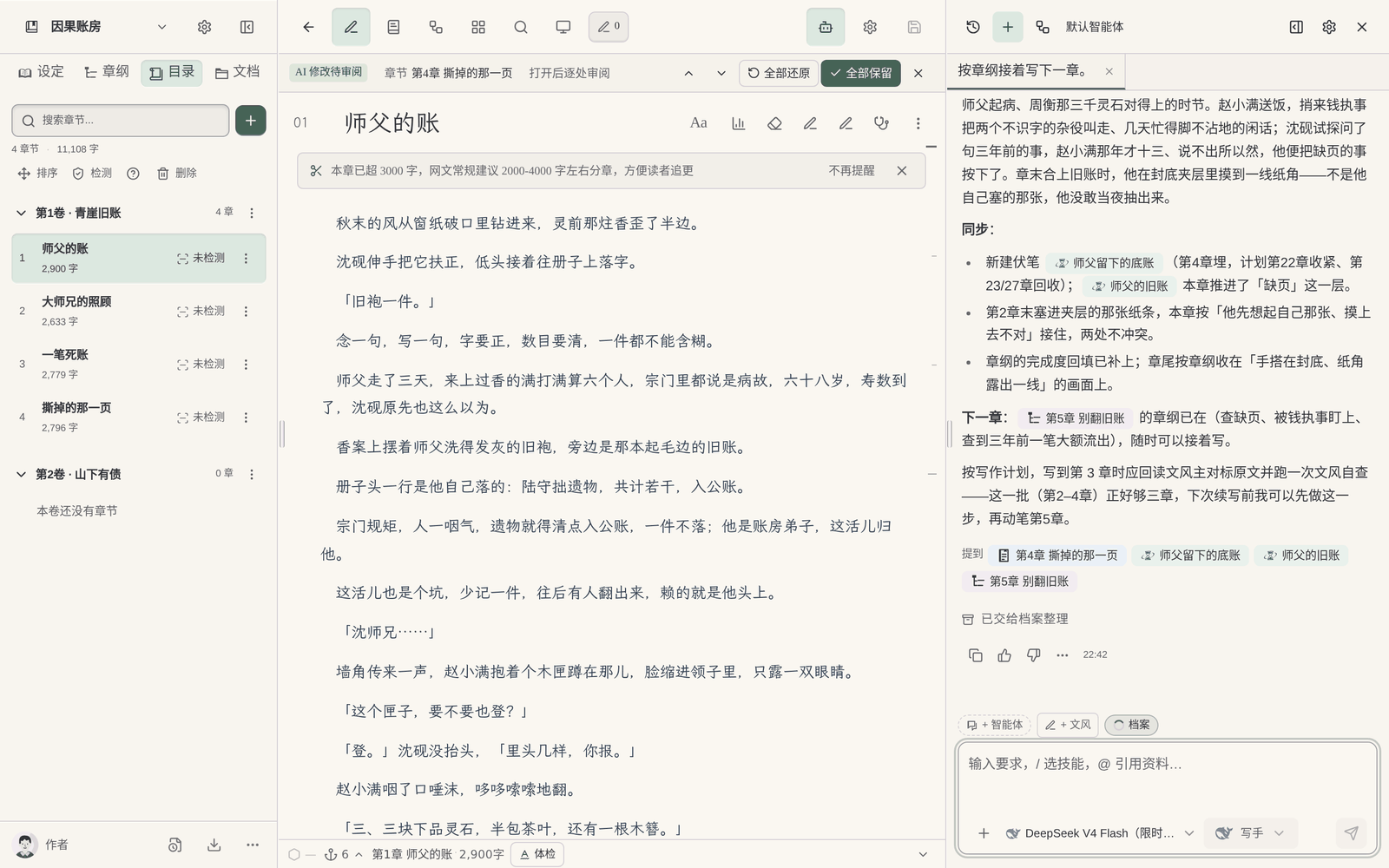
Asking Maliang in chat to keep writing, with a new chapter appearing in the left-hand table of contents and the text
The author says “keep writing”, and the new chapter appears in the table of contents in order, with no file names to worry about.
Maliang’s archive for this chapter
The author checks character states and foreshadowing in this chapter’s archive, with no progress file to maintain.
Red deletions and green additions for AI changes in the Maliang editor
The author reviews AI’s revisions one by one.
❦ · Evidence · ❦
Data and sources

Sources and check dates

Try four real writing tasks before you decide

For this page, record in particular how much work the author has to do to prepare folders, writing rules, material updates and revision checks. Don't compare only the prose of a single generation, and don't assume in advance that folder-based tools must be harder to use.

Below is a same-task trial checklist, not a finished comparison experiment. You can use the original teaching material “Jiehuo City” or a manuscript you have the right to handle; record the preparation, the output and the author’s edits for each tool.

Start a new book

Give both tools the same protagonist, core rules and reading preferences; compare the opening directions first, then organize the master outline, the first volume outline and the outlines for the first three chapters.

Check: Can it tell the roles of the three outline levels apart? Can the author confirm a plan before it continues? Were settings that hadn't been settled yet quietly written in as fact?

Use the same book-opening kit

Continue an existing twenty chapters

Use the same old manuscript you have the right to handle, specify how the last chapter ends and the goal of the next chapter; try writing one scene first, without changing the previous twenty chapters.

Check: What material did you prepare? Did character positions, items and open threads carry over? How are candidate drafts told apart from adopted ones?

See the import-and-continue task checklist

Change a setting that has already appeared

Pick a real rule that affects earlier chapters; first ask it to list the affected chapters and the evidence, then let the author choose the scope of the change.

Check: Does it say which parts it did not check? Can you review the changes first? Did it wrongly edit text outside the task or write an unadopted plan into the material?

See how to change a setting

Take your work and material with you

Actually try keeping the text, the order of volumes and chapters, character profiles and world rules, and check whether the output is suitable for further editing; list what cannot be taken along.

Check: Are the format and order recognizable? What material is inside the platform account, what is in local files, and what is in the export? Do not infer usability from a marketing page alone.

Copy the task and result record card

Record the models, plans or account conditions you actually used, and the time spent preparing materials and editing the text. Leave blank anything you have not tried or cannot confirm; do not let a feature name or a single generation stand in for the full experience.

How to choose

Choose by your situation

FAQ

FAQ

Can Cursor write novels?

Yes. Cursor can read and write files and shows diffs in real time, and some authors use it to write medium and long novels. It is an editor designed for writing code, with no novel-specific chapter or character management, so the author has to build the folders and rules.

How do I organize the folder when writing a novel with Cursor?

The approach in public tutorials is one folder per book, holding the outline information, the story progress and one .md file per chapter, with rules in .cursor/rules/*.mdc; some people also split the hard constraints the author maintains and the ledger AI maintains into two directories.

What should Cursor rules for writing a novel contain?

Commonly: style, point of view, forms of address for characters, file-naming rules, and the progress file to update after each chapter. The official site says rules are used to give the model persistent context, because the model keeps no memory between completions.

Will Cursor forget settings when writing a novel?

Some authors in public practice mention forgotten settings, character drift and context rot in long conversations; the usual remedies are splitting into small files, loading the settings and the previous two chapters for each chapter, and maintaining a ledger. In Maliang, story archives are organized in the background after a chapter is written and lists anything that doesn’t match as pending confirmation.

Does writing a novel with Cursor cost money?

Hobby is free but with limited agent requests; Individual is $20/month; beyond the plan you pay by usage (checked against the official pricing page in 2026-10).

Which models can I use to write novels with Cursor in China?

The official site only says some model providers have regional restrictions and does not name specific regions. Which models you can use depends on the actual model list after you sign in.

What if the chapter order of a novel written in Cursor gets mixed up?

A public tutorial mentions that Chinese chapter names come out of order when sorted alphabetically, and the author merged them with a script. You can put a number before each file name. Maliang’s table of contents is arranged in volume-and-chapter order and does not depend on file names.

Can Maliang and Cursor be used together?

You can divide the work as needed: authors familiar with Cursor can keep using it for their own file handling, and put Chinese serials into Maliang so the archive and revision comparison follow the text.

❦ · Continued · ❦
Related comparisons

Related comparisons

Can Claude Code Write Novels? How Public Practice Works and How It Differs from Maliang Writer

vs Claude Code · updated 2026-10-11

Claude Code can write novels, and it is very capable: it reads and writes a whole book’s folder, checks continuity across files and makes batch edits. In public practice, authors design the folders, write CLAUDE.md, maintain a setting ledger and work in a terminal or editor plugin, which suits authors who are comfortable on the command line. Maliang builds the table of contents, character cards, story archives and revision comparison into a web editor, and the author starts writing from the chat.

Read the comparison →

Can Codex Write Novels? Writing Long Fiction with Codex CLI and How It Differs from Maliang Writer

vs Codex CLI · updated 2026-10-11

Codex CLI is open source and runs in a local terminal; it reads and writes a whole project and runs scripts, with system-level isolation and approvals. Writing a novel with it, the author builds the folders, writes AGENTS.md, maintains a ledger and uses Git for versions, and views changes as a text diff in the terminal. Maliang builds these into a web editor: a volume-and-chapter table of contents, character cards, story archives and revision comparison you review one by one.

Read the comparison →

Coding Agents vs Novel Writing Software: The Trade-offs of Writing Long Fiction with Code Tools

vs Coding agents · updated 2026-10-11

Coding agents are very capable: they read and write across files, make batch edits and run scripts, and technical authors can build very flexible writing workflows. The price is that the folders, rule files, setting ledger and version management all have to be designed and maintained yourself, and the interface is aimed at programmers. Maliang turns these into the cards, table of contents and editor that authors are used to.

Read the comparison →

How to Manage Novel Settings: Folders + Markdown, or Character Cards and Story Archives?

vs Folder + Markdown approach · updated 2026-10-11

Folders plus Markdown are flexible and transparent, with the files in your own hands, which suits authors who like to define their own formats; the drawback is that once there are many files, which file is the latest and which other places need syncing after one edit are all yours to remember. Character cards plus story archives fix each character and setting as a card and organize states automatically after a chapter is written, which suits authors who don’t want to maintain files. Maliang has both: characters and settings are cards, the master outline is stored separately, and style samples and book-opening material are documents.

Read the comparison →
Get started

Try one chapter of the book you're writing

After signing up, create a book or import existing chapters, tell the AI which chapter to continue, then look at what it wrote, what it changed and what it recorded in the archive, and decide whether to move your long novel over.