Folders plus Markdown are flexible and transparent, with the files in your own hands, which suits authors who like to define their own formats; the drawback is that once there are many files, which file is the latest and which other places need syncing after one edit are all yours to remember. Character cards plus story archives fix each character and setting as a card and organize states automatically after a chapter is written, which suits authors who don’t want to maintain files. Maliang has both: characters and settings are cards, the master outline is stored separately, and style samples and book-opening material are documents.
Who should pick Maliang WriterAuthors with many characters and settings who, after several dozen chapters, often can’t find the “latest version of a setting”, and who want AI to find the right cards to read while writing.
Who should pick Folder + Markdown approachAuthors who like to define their own file formats, need files kept locally, or want to process setting files with scripts.
Scenario
A concrete writing scenario
By chapter 50, your settings folder probably holds: protagonist.md, protagonist-revised.md, heroine.md, sect-factions.md, cultivation-system.md, foreshadowing-list.md, and a “story-so-far-summary.md” that hasn’t been updated for three weeks. The upside of managing settings with folders and Markdown is freedom: you define the format, the files are in your own hands, and coding agents and clients like FeelFish can read them directly. The difficulty is upkeep: when the protagonist breaks through a realm, you have to edit the character file and also the comparison table in the cultivation system; when a supporting character dies, you have to remember to cross off the thread he planted in the foreshadowing list. In public long-novel practice, authors have designed “status”, “tracking” and “ledger” files as the source of truth for exactly this, and then written rules for AI to update them every chapter. The other approach is character cards plus story archives: each character is a fixed card, and the changes the plot brings are organized by the software after a chapter is written. Neither approach is better; it is only a question of fit.
❦ · Matrix · ❦
Comparison table
12 dimensions compared one by one
On narrow screens, scroll sideways to see all columns.
Maliang Writer vs Folder + Markdown approach: key dimensions compared
Dimension
Maliang Writer
Folder + Markdown approach
Notes
What settings look like
✅ Characters, settings, foreshadowing and storylines are individual cards; the master outline is stored separately; style samples and book-opening material are documents
✅ One Markdown file per character or setting, sorted into folders
FeelFish projects come with built-in character and setting folders; Novelcrafter’s Codex and Sudowrite’s Story Bible are structured entries
Filing
✅ When starting a book, AI proposes characters and generates cards once you confirm; you can also have AI organize them from existing body text
✅ The author writes them by hand, or has AI generate files in the format the author defines; FeelFish’s smart context can extract rules, an outline and a foreshadowing list
How AI reads them
✅ AI reads the relevant cards and documents as needed when writing; the writer agent gets only the material this chapter needs
✅ The author states in the rules which files to read, or references them with @; FeelFish carries character and setting information when creating
Character states changing with the plot
✅ After a chapter is written, story archives are organized: character states, relationships, locations, foreshadowing; a character card has an “Archive” tab
⚠️ The author or AI maintains status and ledger files
How many places to sync after one edit
✅ Settings are edited on the card; places in already-written body text and chapter outlines that mention the old setting still need checking and editing; when the body text changes, the corresponding archive is marked “based on an older version” and reorganized
⚠️ The author has to remember which files reference this setting
Contradictions
✅ Anything that conflicts with existing settings is listed as “pending confirmation”: change the setting to match the text, change the text, or ignore it
⚠️ No official material found
Outdated settings (Novelcrafter)
✅ When you reach a new volume, characters, places and foreshadowing that only appeared in earlier volumes are moved into the archive and no longer consulted when writing new chapters, but can still be looked up when needed; they go back into regular use when a character returns
✅ Progressions can show settings by point in time, and the author has to add them
Outdated settings (folder approach)
✅ When you reach a new volume, characters, places and foreshadowing that only appeared in earlier volumes are moved into the archive and no longer consulted when writing new chapters, but can still be looked up when needed; they go back into regular use when a character returns
⚠️ The author moves files by hand or states it in the rules
Viewing and visualization (Novelcrafter)
✅ Floating character cards, a planning canvas and storylines; there is also a character-relationship and faction graph for the author to view (a member feature)
✅ Three planning views: Grid, Matrix and Outline
Viewing and visualization (folder approach)
✅ Floating character cards, a planning canvas and storylines; there is also a character-relationship and faction graph for the author to view (a member feature)
⚠️ A file list and Markdown preview; FeelFish’s “character relationship graph” is a document for AI to read
Freedom
⚠️ Card fields are fixed, and there is also a Documents tab for any material, where you can create, rename and drag
✅ The format is entirely up to the author, and scripts can process it in bulk
Where the files are
✅ Stored in your Maliang online account; log in on another device to continue
✅ A local folder; FeelFish can optionally sync to cloud storage
✅ Confirmed in official material or in the product ⚠️ Partly supported, or not stated in official material ❌ Officially not supported · Competitor information comes from their public material.
How Maliang Writer approaches it
How Maliang Writer handles these problems
№01Maliang Writer
Both cards and documents
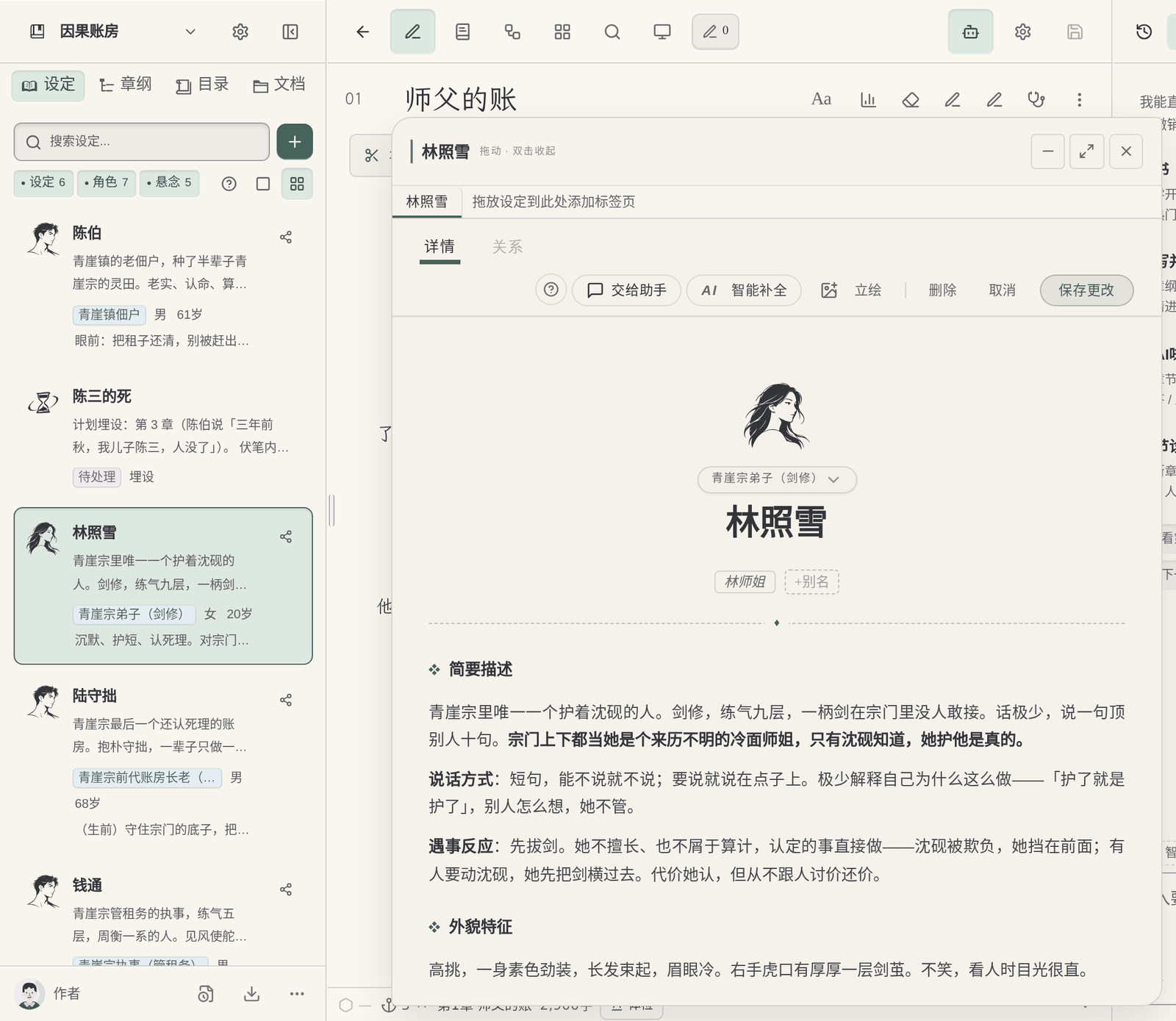
Characters, settings, foreshadowing and storylines are cards; the master outline is stored separately; style samples and book-opening material are documents, and the “Documents” tab in the left column is a file tree where you can create, rename and drag. Use cards where you need a fixed structure and documents where you need to write freely.
№02Maliang Writer
No need to record state changes by hand
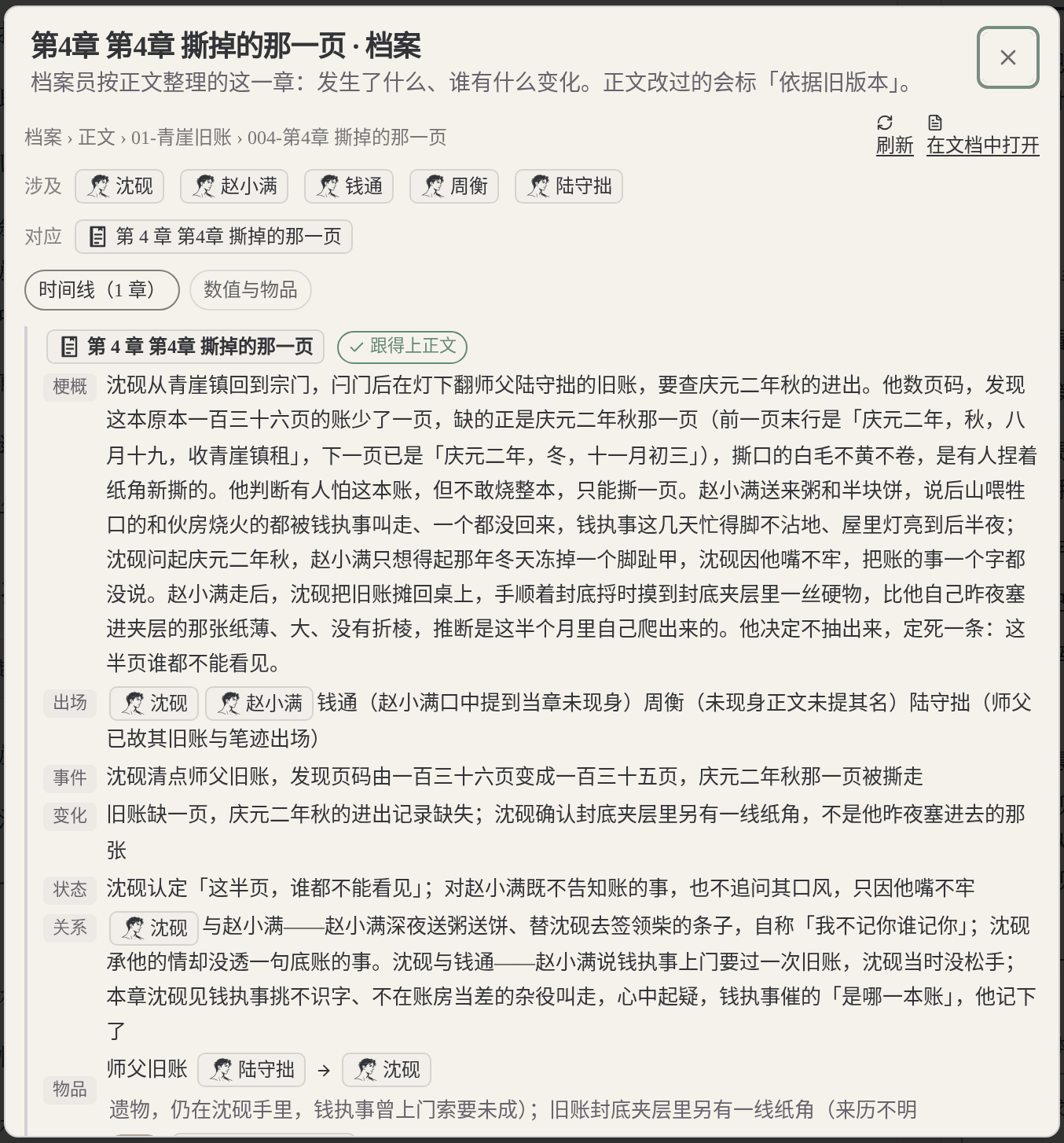
After a chapter is written, story archives are organized: who was injured, whose relationships changed, where people are, which foreshadowing advanced or paid off. The “Archive” tab on a character card shows that character’s changes all the way along.
№03Maliang Writer
Mismatches are raised with you first
Anything that conflicts with existing settings is listed as “pending confirmation”, and you can change the setting to match the text, change the text, or ignore it. It won’t quietly change your settings.
Outdated settings are put away by volume: When you reach a new volume, characters, places and foreshadowing that only appeared in earlier volumes are moved into the archive; AI no longer consults them when writing new chapters, but they can still be looked up when needed, and go back into regular use when a character returns.
What you fill in yourself
What the author has to do when writing a long novel directly with Folder + Markdown approach
Where the latest version is, you have to remember: The same character may be scattered across several files, and how many places need syncing after one edit is all for the author to remember. FeelFish’s official docs also state that large AI models essentially have no memory and the relevant content has to be maintained in the project.
The ledger format is yours to design: Public long-novel templates design status and tracking files specifically, and some record “the author’s truth” and “what the reader knows” separately. Once the format is set, you also have to write rules for AI to update it every chapter.
Rule files keep growing: Rules and settings are both passed to AI through files, and the more you write, the easier it is for them to be ignored or to conflict with each other. Codex CLI’s AGENTS.md has a combined default cap of 32 KiB.
Where they are strong
What Folder + Markdown approach does well
The advantages of folders plus Markdown are real: the files are on your own computer and open in any software; the format is entirely yours, so you can process it in bulk with scripts and manage versions with Git. FeelFish has done a lot of work on this approach: projects come with built-in character and setting folders, smart context can extract rules, an outline and a foreshadowing list from existing content, Diff is editable, and when cloud sync conflicts it keeps two backups. Novelcrafter’s Codex automatically tracks and links entries mentioned in the body text, and Progressions control from which point in time a setting takes effect; Sudowrite’s Story Bible lets you hide entries from AI.
Every product suits some scenarios; the advice here covers only one: serialized long-form fiction in Chinese.
Real interface
Maliang Writer's real interface
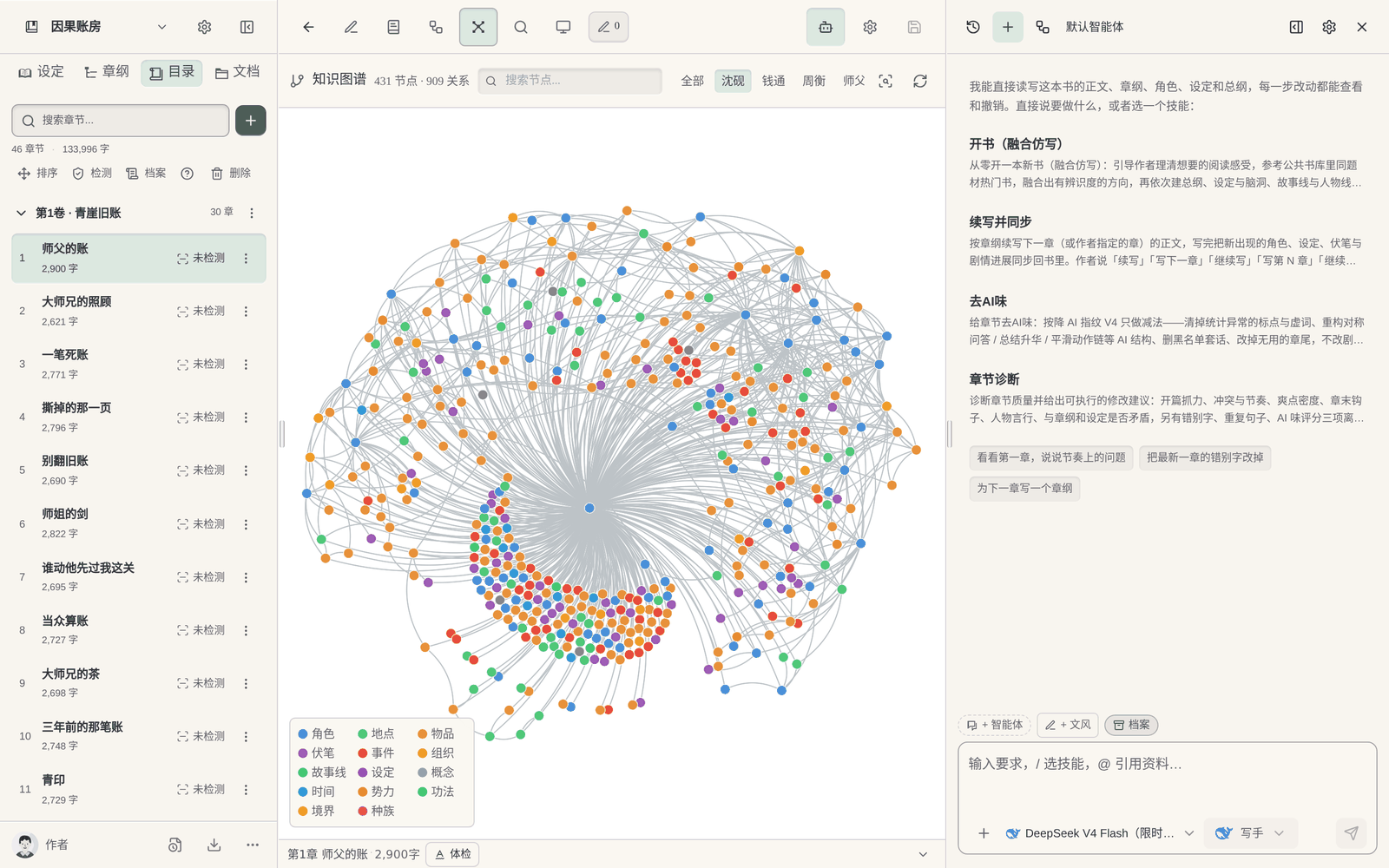
The author opens a floating character card to view a character’s settings.The author sees changes in character states in this chapter’s archive.Members can view only the protagonist’s relationship network in the knowledge graph, with characters, places, foreshadowing and events distinguished by color (sample book, 46 chapters).
❦ · Evidence · ❦
Data and sources
Sources and check dates
FeelFish project structure: “Novel writing” projects come with built-in character and setting folders and carry character and setting information when creating. (Official docs · feelfish.com · checked 2026-10)View →
FeelFish smart context: Extracts information from existing content to generate documents such as creative rules, an outline, a foreshadowing list and a character relationship graph for AI to read. (Official docs · feelfish.com · checked 2026-10)View →
Novelcrafter Codex and context: When assembling an AI request, Codex entries mentioned in the earlier text are brought in automatically, followed by manual references, POV and global entries. (Official docs · novelcrafter.com · checked 2026-10)View →
Sudowrite Story Bible visibility: Character cards and setting entries can be hidden from AI with the eye icon, and Draft marks the entries AI recognized. (Official docs · feedback.sudowrite.com · checked 2026-10)View →
webnovel-writer open-source template: Body text, outline, setting library and review reports are kept apart, plus directories for status, index, summaries and long-term memory. (Community discussion · github.com · checked 2026-10)View →
Writing up to chapter 50 with codebubby + Cursor: The author keeps hard constraints and the ledger AI maintains in two directories, and the ledger covers chapter status, character timeline, foreshadowing and character threads. (Community discussion · deepseek.csdn.net · checked 2026-10)View →
Maliang worldbuilding and character settings: How character cards and setting cards are organized. (On-site data · maliangwriter.com · checked 2026-10)View →
Maliang story archives: After a chapter is written, character states, relationships, locations and foreshadowing are organized. (On-site data · maliangwriter.com · checked 2026-10)View →
Try four real writing tasks before you decide
Pick two or three kinds of tools for a same-task trial, based on your actual stage of writing. Record the complete task, and don't generalize one product's single output into a conclusion about the whole category.
Below is a same-task trial checklist, not a finished comparison experiment. You can use the original teaching material “Jiehuo City” or a manuscript you have the right to handle; record the preparation, the output and the author’s edits for each tool.
Start a new book
Give both tools the same protagonist, core rules and reading preferences; compare the opening directions first, then organize the master outline, the first volume outline and the outlines for the first three chapters.
Check: Can it tell the roles of the three outline levels apart? Can the author confirm a plan before it continues? Were settings that hadn't been settled yet quietly written in as fact?
Use the same old manuscript you have the right to handle, specify how the last chapter ends and the goal of the next chapter; try writing one scene first, without changing the previous twenty chapters.
Check: What material did you prepare? Did character positions, items and open threads carry over? How are candidate drafts told apart from adopted ones?
Pick a real rule that affects earlier chapters; first ask it to list the affected chapters and the evidence, then let the author choose the scope of the change.
Check: Does it say which parts it did not check? Can you review the changes first? Did it wrongly edit text outside the task or write an unadopted plan into the material?
Actually try keeping the text, the order of volumes and chapters, character profiles and world rules, and check whether the output is suitable for further editing; list what cannot be taken along.
Check: Are the format and order recognizable? What material is inside the platform account, what is in local files, and what is in the export? Do not infer usability from a marketing page alone.
Record the models, plans or account conditions you actually used, and the time spent preparing materials and editing the text. Leave blank anything you have not tried or cannot confirm; do not let a feature name or a single generation stand in for the full experience.
How to choose
Choose by your situation
If You need the setting files kept locally and openable in any software → choose Folder + Markdown approach, because Folders plus Markdown are universal; FeelFish centers on local projects..
If You want to process settings in bulk with scripts, or manage versions with Git → choose Folder + Markdown approach, because Plain files are easy to handle with scripts and Git..
If You already have a set of Markdown settings and want to keep writing with cards instead → use both, because Paste the Markdown settings to the AI in Maliang to organize into cards and keep the original files as a backup; free-form material can go into the Documents tab..
If You have many characters and settings and often can’t find the latest version → choose Maliang Writer, because Each character gets one card, state changes are organized by story archives, and anything that doesn’t match is listed as pending confirmation..
FAQ
FAQ
What software is best for managing novel settings?
It depends on which approach you’re used to. If you like to define your own formats and want files kept locally, use folders plus Markdown, or a client like FeelFish; if you want a fixed structure and help keeping track of states, use software with character cards and story archives, such as Maliang. For writing in English, look at Novelcrafter’s Codex.
What are the benefits of writing novel settings in Markdown?
The format is free, plain text is universal, Git can manage versions, and coding agents and many writing clients can read it directly. The drawback is that once there are many files, syncing and finding the latest version are all up to you.
What should a novel character setting card contain?
Commonly: name, identity, appearance, personality, surface goal and deeper desire, abilities and limits, key relationships, catchphrase or way of speaking. Maliang’s character-building guide has a fuller approach and examples from popular books.
If a character changes in the plot, does the setting card have to change too?
Fixed settings (background, core personality) go on the card, while states that change with the plot (injuries, realm, location, relationship changes) are best recorded separately. In Maliang, after a chapter is written these changes are organized into the story archive, and you can see them in the “Archive” tab of the character card.
With so many settings, will AI misuse them when writing?
There is that risk, so you need to control the material handed to AI for each chapter. Maliang’s writer agent gets only the settings this chapter needs; when you reach a new volume, characters, places and foreshadowing that only appeared in earlier volumes are moved into the archive and no longer consulted when writing new chapters.
Can I use cards and documents together?
Yes. In Maliang, characters, settings, foreshadowing and storylines are cards and the master outline is stored separately; style samples and book-opening material are documents, and the “Documents” tab in the left column lets you freely create, rename and drag.
How do FeelFish and Maliang differ in managing settings?
FeelFish is a desktop client that manages characters and settings in local project folders, and its smart context generates documents such as rules, an outline and a foreshadowing list for AI to read. Maliang is a web platform where characters and settings are cards, story archives are organized after each chapter is written, and outdated settings are put away by volume.
After signing up, create a book or import existing chapters, tell the AI which chapter to continue, then look at what it wrote, what it changed and what it recorded in the archive, and decide whether to move your long novel over.