
Changing Novel Settings Midway: How to Sync Earlier Chapters
Changing a name, age, character, or power system mid-novel? Find the impact, revise chapter by chapter, and recheck, with a Maliang Writer example.
In this article 8 sections
The Conclusion First: List the Impact Range, Then Edit Chapter by Chapter, Then Recheck
Almost everyone writing a long novel runs into changing settings: the protagonist’s age was set too young, the realm system turns out to be insufficient a volume later, a supporting character would be more dramatic as an undercover mole than as a brother. Changing the setting itself isn’t hard; what’s hard is that the related content scattered through earlier chapters isn’t fully updated, and readers can spot at a glance that things no longer line up.
A reliable method has three steps:
- Write a change sheet stating what changes and from where it takes effect;
- Find the impact range and list it out;
- Edit chapter by chapter, then recheck.
Below we first cover the general method that doesn’t depend on any tool, then how to do it in Maliang Writer.
Step 1: Write a Change Sheet and First Decide “Whether to Go Back and Revise”
Before you start, write the change in a few lines:
- Before: what it was;
- After: what it is now;
- Reason: why you’re changing it (this item helps you judge how big the change range needs to be);
- How it takes effect: revise earlier text, or have the change happen in the story from a certain chapter on.
That last item deserves some thought. Many changes don’t need to revise earlier text: if the protagonist’s power system isn’t enough, you can have him discover in the story that “there’s another layer above”; if a supporting character goes from brother to undercover mole, you can start laying threads from a certain chapter, and the brotherhood in earlier chapters becomes a setup for the twist. For a change that can be explained within the story, don’t touch chapters you’ve already written, especially chapters that have been published and read by readers.
Cases where you must revise earlier text are usually hard facts such as names, ages, times and numbers, or when earlier descriptions directly conflict with the new setting and can’t be explained by the plot.
Step 2: Find the Impact Range, Distinguishing Explicit from Implicit
The impact of a change falls into two kinds.
Explicit impact can be found by searching:
- Names: the full name, short forms, nicknames, and what others call him (“Third Senior Brother”, “Old Zhou”) all need to be searched;
- Numbers: age, time (“three years ago”), distance, price, realm names;
- Proper nouns: technique names, place names, organization names.
Implicit impact can’t be searched for and is easy to miss:
- Time arithmetic: if the protagonist’s age goes from 17 to 19, “he was twelve that year” and “the junior sister two years younger than him” may both need changing;
- Who knows what: if someone knew a secret earlier, then his earlier “surprised” reactions no longer hold;
- Causal chains: if the cause of an event changes, the dialogue and flashbacks that later refer to it all need to change too;
- Ability boundaries: if an ability is weakened, the predicaments previously solved with it must be figured out again.
After checking, list a table with four columns per row: chapter, location, original sentence, how you plan to change it. Once the table is out, the amount of change is clear at a glance, and it also helps you decide whether to revise earlier text or switch to an in-story explanation.
Step 3: Edit Chapter by Chapter, From Front to Back
- Edit in chapter order. Earlier changes may affect how later text is written, and editing backwards tends to mean repeated rework.
- After finishing a chapter, update the cards to match. Character cards, setting entries and the foreshadowing list should change along with it; don’t wait until everything is done to fill them in.
- After a search-and-replace, read the context. The common problem with mechanical replacement is changing the name without changing the tone, or changing the number without changing the related description.
- Pay special attention to information in dialogue. Ages, dates and old events that characters mention offhand in dialogue are often where edits get missed.
- The parts not yet written need changing too. If the volume outline, chapter outlines and foreshadowing plan you’ve already laid out use the old setting, they must be updated as well. The root of many “I changed the setting and later it got written back” problems is a chapter outline that wasn’t changed: when you get to that chapter, what gets written from the old chapter outline is naturally the old setting.
Step 4: Recheck
After everything is changed, do three more things:
- Search again with the old names and old numbers to confirm nothing remains;
- Read the most heavily changed chapters from the start to see whether the transitions are natural;
- Check against the foreshadowing list to see whether any foreshadowing has lost its meaning because of this change, or needs a different payoff.
If the chapters have already been published on a platform, whether and how they can be edited is subject to the platform’s rules. If the change is large, you can briefly explain it in the author’s note.
A Full Example: Changing a Supporting Character From Brother to Undercover Mole
Suppose you’re at chapter 40 and decide that the protagonist’s good brother Chen Mo is actually a mole planted by the opponent. The change sheet could read:
Before: Chen Mo is the protagonist’s hometown friend, following him all the way.
After: Chen Mo is an informant planted by the Black Water Gang, exposed in chapter 45.
Reason: Volume two lacks a betrayal with some weight.
How it takes effect: Don’t revise earlier plot; only add hints in three places; start laying threads from chapter 41.
Next, find the impact range. For the explicit part, search “Chen Mo”, “Brother Mo” and “Black Water Gang”; for the implicit part, you need to reason it out:
- On what occasions did he leave alone? In those places you can add an unremarkable line of description as a clue for when readers look back later;
- What secrets did the protagonist tell him? Did those secrets later leak? If not, either add a leak or explain why he didn’t pass them on;
- Did he ever save the protagonist at a critical moment? If so, you need to think through why a mole would do that, which can often become a very dramatic conflict in him.
Listed out, only about four or five places need touching, two of which add a single sentence rather than rewriting a whole passage. That is the benefit of writing the change sheet first and first deciding “whether to go back and revise”: the amount of change is controllable, and the brotherhood in earlier chapters also becomes a setup for the betrayal.
How to Do It in Maliang Writer

- Change the card first. In the story bible panel on the left, open the corresponding character or story bible card and update it to the new version.
- Have the AI list the impact range first, and don’t rush to change. Say in the chat: “I’m changing Lin Yao’s age from 17 to 19. Help me find the affected places in the earlier text, including times worked out from her age and dialogue where others mention her age, listing the chapters and original sentences, and don’t change anything yet.” The AI reads the earlier text and gives you the list. For a book with many chapters, you can have it dispatch a research task to read through the whole book, which will cost extra credits.
- Change after confirming. After looking at the list, tell it which to change and which to turn into in-story explanations, for example “change chapters 3, 7 and 12 per the list, and leave the one in chapter 20 alone”. For mechanical changes like a pure rename, you can also handle it yourself with the editor’s search and replace.
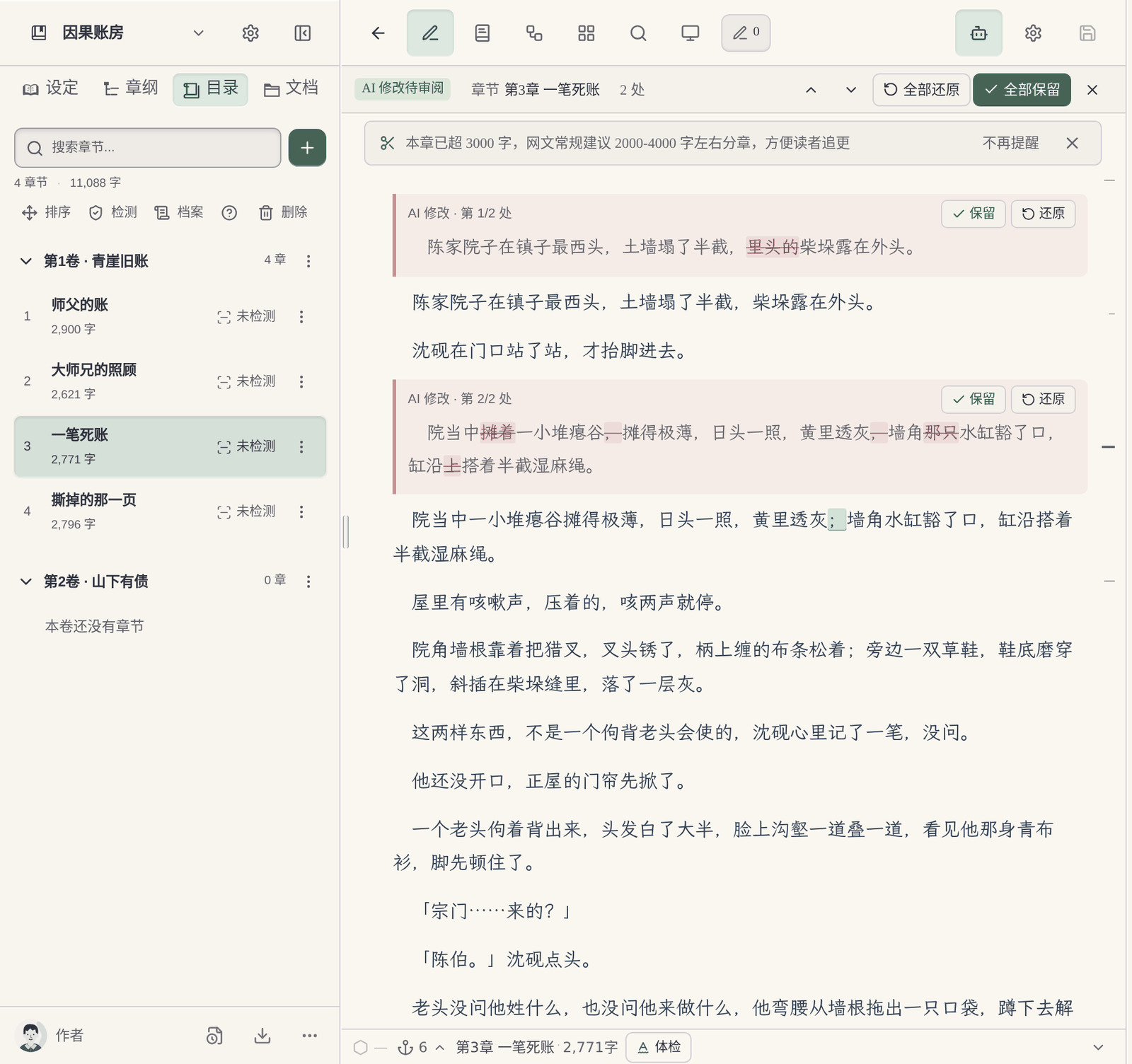
- Review the changes one by one. The body text the AI has changed is marked directly in the editor: deletions struck through and additions marked green, and you can keep or revert each one, or keep all or revert all. For the specific steps see How to Review and Undo AI Revisions.
- The archives update along with it. After the body text changes, the story archive for the corresponding chapter is marked “based on an old version”, and then re-organized against the new body text. If, during the re-organization, places are found where the body text and the settings still don’t line up, they are listed under “Pending Confirmation”, and you can choose to change the settings to match the body text, go and change the body text, or ignore them. When one change touches many chapters, the archives don’t automatically re-organize all of them, and will first ask you to confirm.
For the specific contents of the archives see Story Archives, and for how settings are organized see Worldbuilding.
FAQ
Q: If I want to change settings midway through a novel, do I have to rewrite all the earlier chapters?
Usually not. First judge whether the change can be explained in the story, for example by having a character discover a new fact in a certain chapter. If it can be explained, start changing from that chapter and leave earlier text alone; only when hard facts like names, ages and numbers conflict do you need to revise earlier text.
Q: I changed the protagonist’s name; how do I replace it across the whole text without missing any?
Besides the full name, also search short forms, nicknames and what others call him. After replacing, read the context to confirm the tone and forms of address still fit. After finishing, search again with the old name to confirm nothing remains.
Q: How do I know which chapters a setting change affects?
Explicit impact relies on search: names, numbers, proper nouns. Implicit impact relies on reasoning: time arithmetic, who knows what, the causality of events. List both kinds as a “chapter, location, original sentence, how to change” list, then start working.
Q: Can I change settings in chapters that are already published?
Whether the platform allows editing published chapters, and whether they are re-reviewed after editing, is subject to the platform’s rules. For changes that can be explained in the story, try not to touch published content; the reading experience will be more coherent for readers.
Q: What if the AI’s continuation keeps using the old setting?
Usually the old version is still in the material you give it: an old character card, an old chapter outline, or descriptions in earlier text that weren’t fully updated. First change the cards and chapter outlines to the new version, then check whether the earlier chapters it reads during continuation still contain the old wording.
Q: Will Maliang automatically change my earlier text?
It won’t change automatically. It changes only when you ask it to; you can first have it list just the affected places, and then change after you confirm. All the changed body text can be reviewed one by one, reverted if you’re not satisfied, and you can also undo the round.