General chat AI, coding agents and overseas writing tools
Can Claude Code Write Novels? How Public Practice Works and How It Differs from Maliang Writer
Maliang Writer editorial team · Edited by Maliang · Updated 2026-10-11
How authors write novels in Claude Code with custom folders, CLAUDE.md and tracking files—and how Maliang Writer compares with built-in story archives.
Claude Code can write novels, and it is very capable: it reads and writes a whole book’s folder, checks continuity across files and makes batch edits. In public practice, authors design the folders, write CLAUDE.md, maintain a setting ledger and work in a terminal or editor plugin, which suits authors who are comfortable on the command line. Maliang builds the table of contents, character cards, story archives and revision comparison into a web editor, and the author starts writing from the chat.
Who should pick Maliang WriterAuthors who don’t want to design folders and rule files themselves, want settings organized automatically as chapters are written, and want to write Chinese web novels directly in the browser.
Who should pick Claude CodeAuthors who are comfortable with the command line and Git, want full control over file structure and rules, and need batch processing across a whole book.
Scenario
A concrete writing scenario
An amateur author who works in back-end development wants to write a 500,000-character science-fiction novel with Claude Code. Following an open-source project online, he creates the folders chapters, characters, outline and tracking, writes the style, forms of address and a rule of “update the tracking file after every chapter” in CLAUDE.md, and keeps versions in Git. The workflow suits him well, and he knows exactly what every file is for. If he wanted to recommend the same workflow to friends who don’t write code, he would first have to teach them to set up the environment, read the folders and read diffs. What Maliang does is build this structure directly into a web editor.
❦ · Matrix · ❦
Comparison table
11 dimensions compared one by one
On narrow screens, scroll sideways to see all columns.
Maliang Writer vs Claude Code: key dimensions compared
Dimension
Maliang Writer
Claude Code
Notes
Product form
✅ Web editor plus AI chat, ready to use in the browser
✅ Terminal CLI, plus VS Code / JetBrains plugins, a desktop app and a web version
Manuscript structure
✅ Volumes, chapters and chapter outlines are in the table of contents; characters, settings, foreshadowing and storylines are cards; the master outline is stored separately; style samples are documents
⚠️ No official material found on novel-specific management; in public practice authors build their own chapters, characters, outline and tracking folders
Where writing rules go
✅ Material such as the master outline and style samples is read by AI as needed when writing
✅ CLAUDE.md and Auto memory provide cross-session memory, and the author writes the rules
Tracking setting changes
✅ After a chapter is written, story archives are organized: character states, relationships, locations, foreshadowing; anything that doesn’t match is listed as pending confirmation; can be turned off
⚠️ In public practice authors mostly design tracking files or ledgers and have AI update them by rule
Reading and writing the whole project
✅ AI can read and write this book’s chapters, characters, settings and documents, and changes go straight back into the editor
✅ The official site says it “understands your entire codebase” and can run tasks across files
Change comparison
✅ Red deletions and green additions on the original in the editor, each of which can be kept or restored
✅ The VS Code plugin and the desktop app can show diffs
Undo and redo
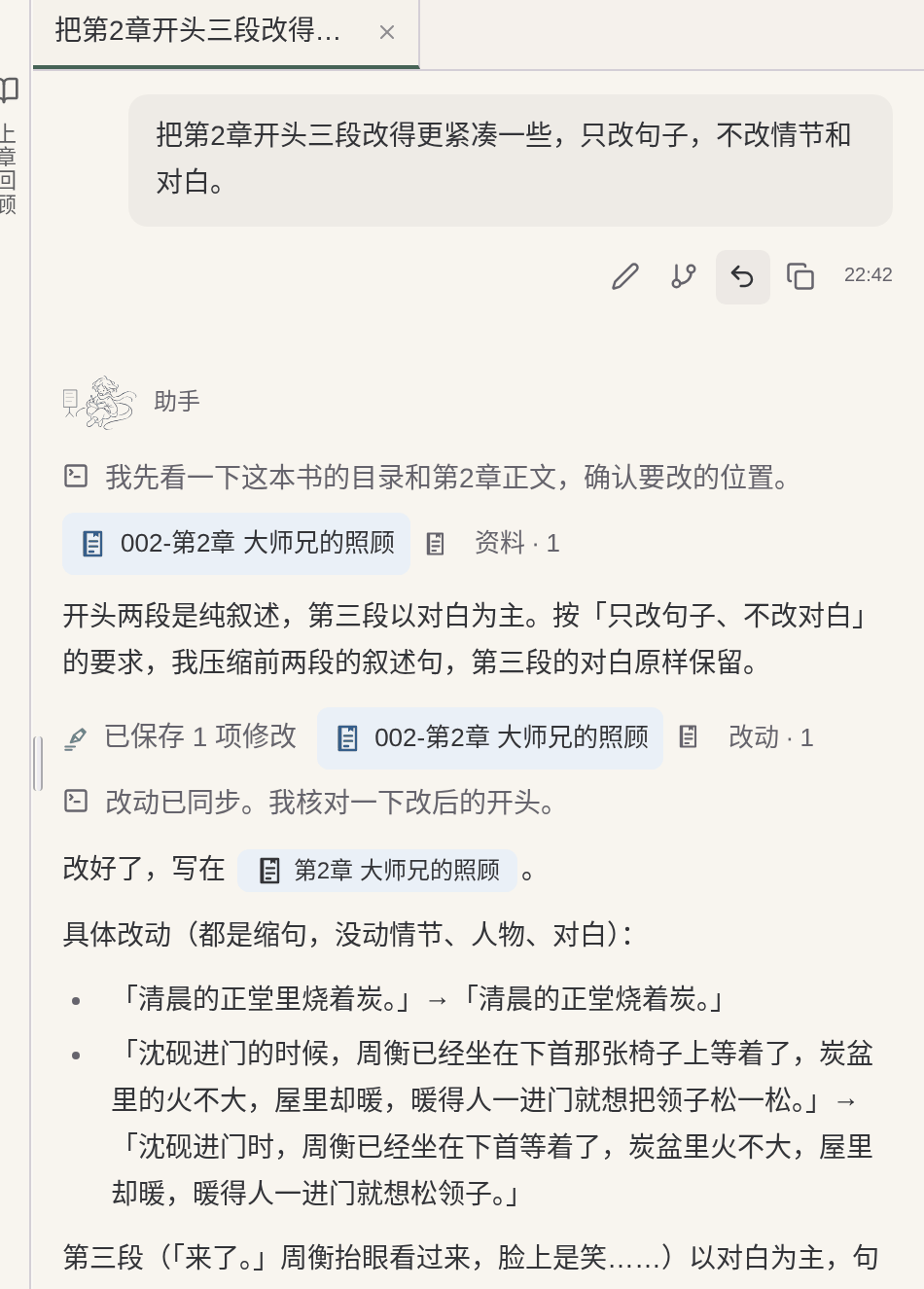
✅ Undo the current round, branch from before the round, or edit and resend
✅ A checkpoint is created automatically with every prompt, the latest 100 are kept, and you roll back with /rewind
Old settings once you reach a new volume
✅ Characters, places and foreshadowing that only appeared in earlier volumes are moved into the archive; AI no longer consults them when writing new chapters, but they can still be looked up when needed
⚠️ No official material found (the author can achieve it by designing their own folders)
Genre reference
✅ When starting a book, consult the character and structure breakdowns of more than 1,500 popular serials in the public book library; chapter endings are benchmarked against about 56,000 popular chapter endings
⚠️ No official material found
Price
✅ Free sign-up to try; credits are deducted by usage
✅ Not included in the Free tier; included from Pro at $20/month (checked 2026-10)
Regions
✅ A Chinese-language web product for Chinese-language authors
❌ The official supported-region list does not include Mainland China, Hong Kong or Macau, and the restriction covers Claude Code
✅ Confirmed in official material or in the product ⚠️ Partly supported, or not stated in official material ❌ Officially not supported · Competitor information comes from their public material.
How Maliang Writer approaches it
How Maliang Writer handles these problems
№01Maliang Writer
No need to design folders and rule files yourself
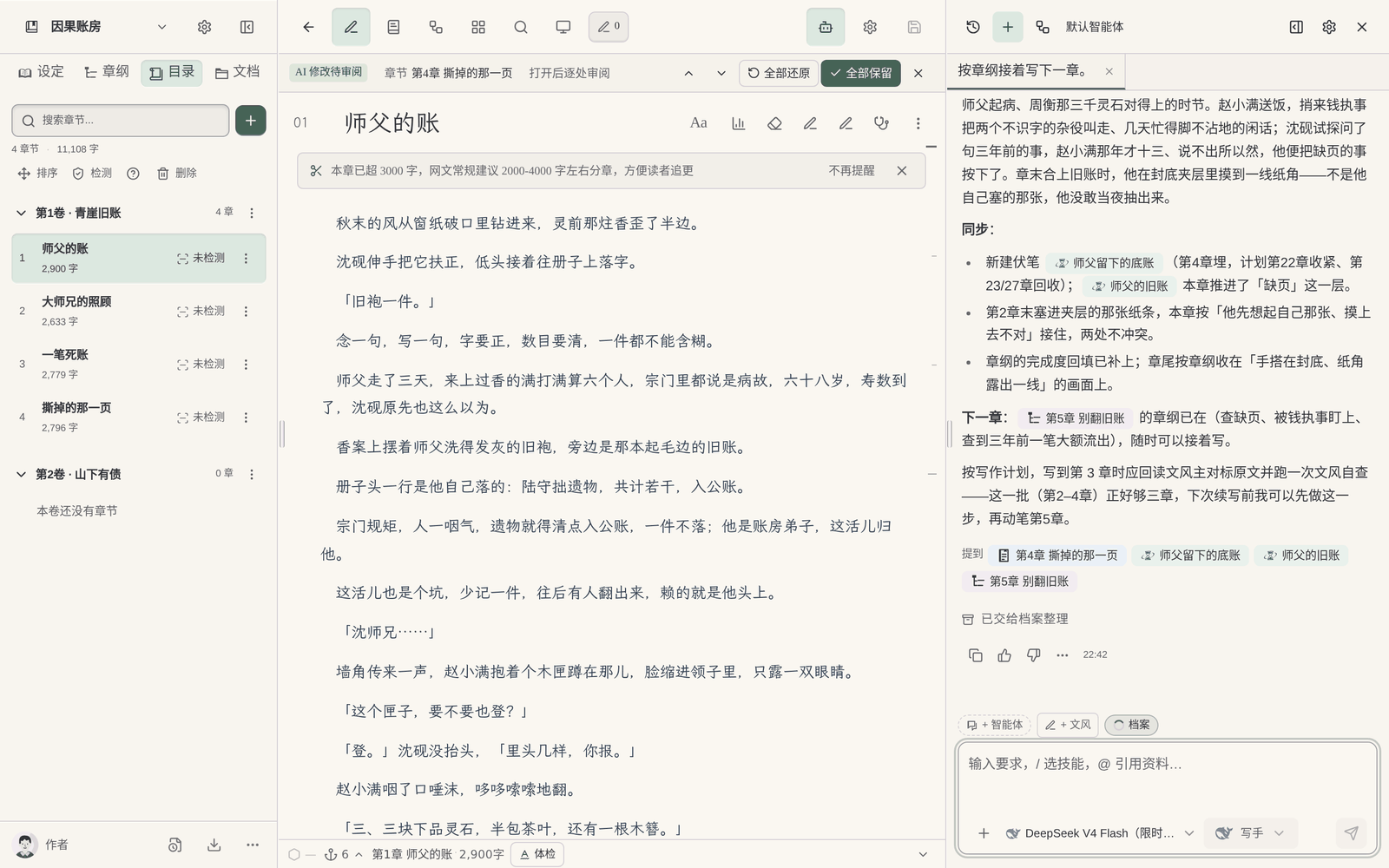
Chapters, chapter outlines, characters, settings, foreshadowing and storylines each have a place in the editor, and what the author sees is a table of contents and cards, not a file tree. The master outline is stored separately, style samples are documents, and AI reads them as needed when writing.
№02Maliang Writer
Story archives organized after each chapter
After a chapter is written and this stretch of writing ends, the background organizes this chapter’s archive: character states, relationships, locations, foreshadowing, and lists anything that doesn’t match as pending confirmation. You don’t have to write a rule for “update the ledger after every chapter”. It can be turned off.
№03Maliang Writer
Revision comparison in the editor
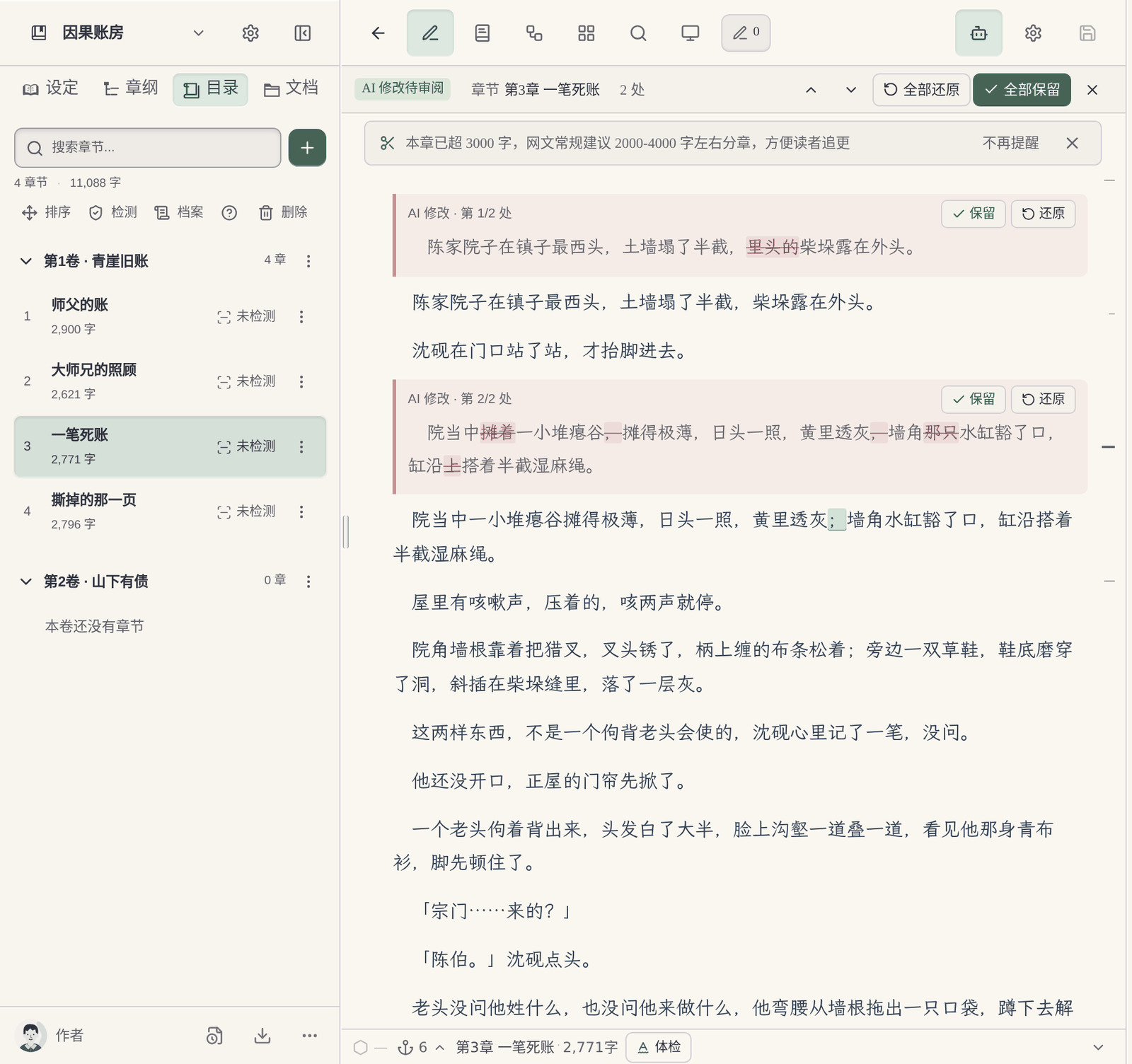
When AI edits the body text or a document, changes are marked on the original as red deletions and green additions, and each can be kept or restored. If you are unhappy with a whole round, you can undo the current round, branch (sharing the same manuscript) or edit and resend.
Works in the browser, no command line to install: Open the browser and write: there are no terminal tools to install, no environment to configure and no Git to learn. New chapters and settings written by AI appear directly in the left-hand table of contents.
Genre reference for Chinese web novels: When starting a book, it consults the character and structure breakdowns of more than 1,500 popular serials, learning methods rather than copying; each chapter comes with a chapter-ending check, benchmarked against more than 2,000 popular web novels and about 56,000 chapter endings.
What you fill in yourself
What the author has to do when writing a long novel directly with Claude Code
Folder structure and rule files are yours to design: In public practice, authors decide for themselves where chapters, characters, outlines and tracking files go, and spell out the rules in CLAUDE.md or AGENTS.md. forsonny’s Claude-Code-Novel-Writer keeps manuscript, planning, characters and worldbuilding separately; oh-story-claudecode uses JSON in a tracking directory as the structured source of truth.
The setting ledger is yours to maintain: An author on r/ClaudeAI who finished a 301,000-word novel wrote the text with Claude and then used Claude Code to check continuity across files. He maintained a 56,000-word story bible and a record of what each character knows at each point in time, fed in the relevant settings, the previous 2–3 chapters, the chapter outline and sample passages for every chapter, and described setting drift while writing as “constant and relentless”.
Needs a command-line environment and a subscription: Claude Code is offered only on Pro and above. Before running someone else’s repository you need to review its hooks and scripts, and some projects also require Python 3, Bash or an API key.
A barrier for non-programmers: Chelle Honiker describes Claude Code as “more powerful (and more intimidating)” and believes most authors will mainly use Chat and Cowork.
Where they are strong
What Claude Code does well
Claude Code reads and writes a whole folder and runs tasks across files, with a 1M context, checkpoint rollback and diff viewing. Some authors have used it for continuity checks and batch edits across 113 files, and there are open-source projects that provide a complete novel folder layout and rules for it, compatible with Claude Code, Codex CLI and other tools. For authors comfortable on the command line it offers great freedom: folders, rules and check scripts can all be designed as you see fit.
Every product suits some scenarios; the advice here covers only one: serialized long-form fiction in Chinese.
Real interface
Maliang Writer's real interface
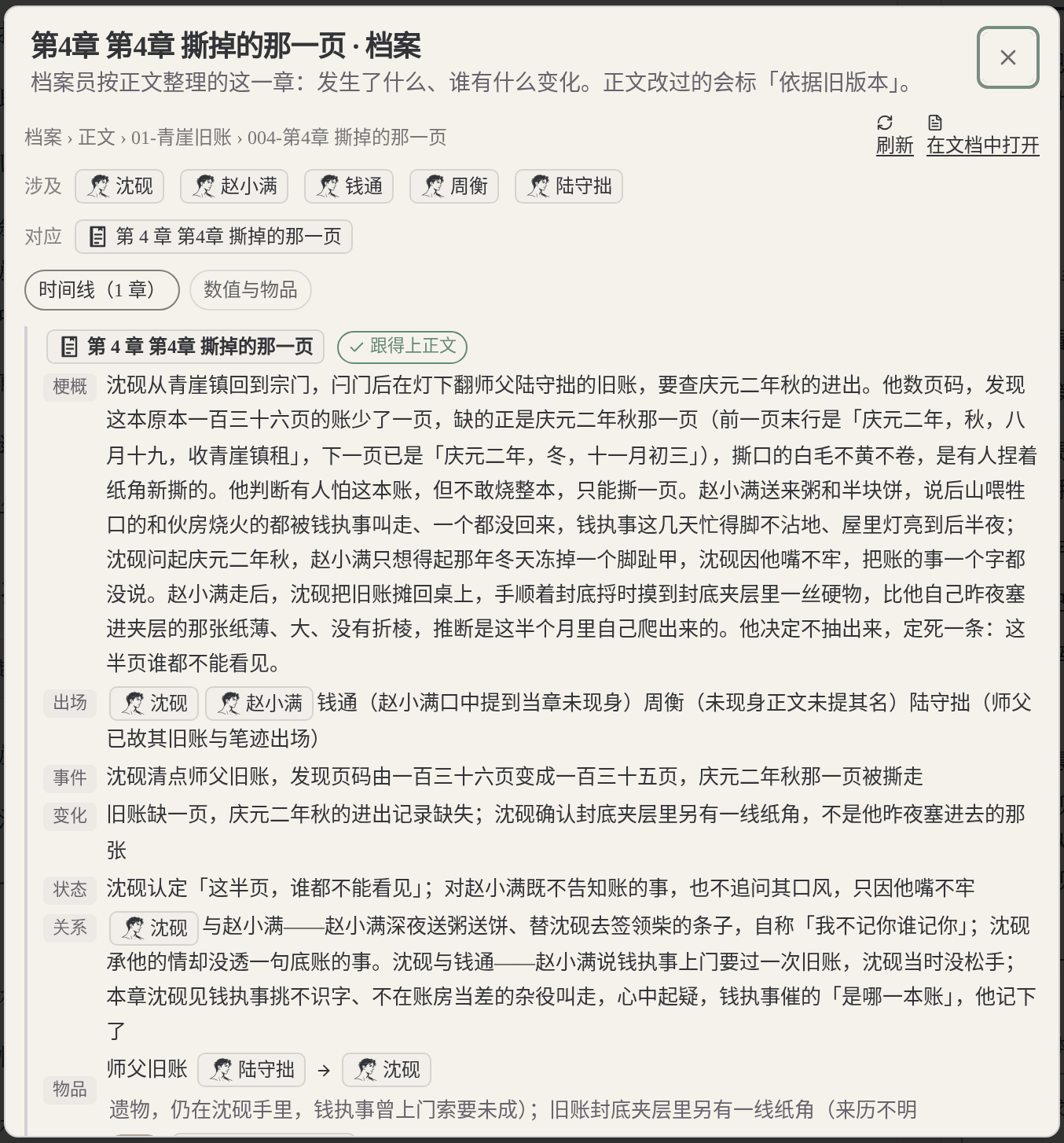
The author doesn’t maintain a ledger; after a chapter is written they check character states and foreshadowing in this chapter’s archive.The author reviews AI’s changes one by one in the editor, with no terminal diff to read.Unhappy with this round, the author chooses to undo the current round or edit and resend.The author says “keep writing”, and the new chapter appears directly in the table of contents.
❦ · Evidence · ❦
Data and sources
Sources and check dates
Claude Code official overview: A terminal CLI, plus IDE plugins, a desktop app and a web version; the official site says it can understand a whole codebase and run tasks across files. (Official docs · code.claude.com · checked 2026-10)View →
Claude Code memory and checkpoints: Cross-session memory relies on CLAUDE.md and Auto memory; a checkpoint is created automatically with every prompt, the latest 100 are kept, and you roll back with /rewind. (Official docs · code.claude.com · checked 2026-10)View →
Writing a 301,000-word novel with Claude (r/ClaudeAI): The author maintains a 56,000-word story bible and uses Claude Code to check continuity across 113 files; mentions style drift and setting drift. (Community discussion · reddit.com · checked 2026-10)View →
oh-story-claudecode(GitHub): Settings, outline, body text and tracking are kept separately, the tracking-state JSON is the structured source of truth, context files are capped at 12KB; the root has CLAUDE.md and AGENTS.md. (Community discussion · github.com · checked 2026-10)View →
Claude-Code-Novel-Writer(GitHub): The body text is the source of truth, AGENTS.md is the general standard and CLAUDE.md imports it; hooks and scripts must be reviewed before running, and Python 3 and Bash are required. (Community discussion · github.com · checked 2026-10)View →
Claude for Authors(Chelle Honiker): Calls Claude Code “more powerful (and more intimidating)”, and says most authors will mainly use Chat and Cowork. (Community discussion · chellehoniker.com · checked 2026-10)View →
Claude supported regions: The official supported-region list does not include Mainland China, Hong Kong or Macau, and the restriction covers Claude Code. (Official docs · anthropic.com · checked 2026-10)View →
Maliang: story archives: After a chapter is written, character states, relationships, locations and foreshadowing are organized, and anything that doesn’t match is listed as pending confirmation. (On-site data · maliangwriter.com · checked 2026-10)View →
Try four real writing tasks before you decide
For this page, record in particular how much work the author has to do to prepare folders, writing rules, material updates and revision checks. Don't compare only the prose of a single generation, and don't assume in advance that folder-based tools must be harder to use.
Below is a same-task trial checklist, not a finished comparison experiment. You can use the original teaching material “Jiehuo City” or a manuscript you have the right to handle; record the preparation, the output and the author’s edits for each tool.
Start a new book
Give both tools the same protagonist, core rules and reading preferences; compare the opening directions first, then organize the master outline, the first volume outline and the outlines for the first three chapters.
Check: Can it tell the roles of the three outline levels apart? Can the author confirm a plan before it continues? Were settings that hadn't been settled yet quietly written in as fact?
Use the same old manuscript you have the right to handle, specify how the last chapter ends and the goal of the next chapter; try writing one scene first, without changing the previous twenty chapters.
Check: What material did you prepare? Did character positions, items and open threads carry over? How are candidate drafts told apart from adopted ones?
Pick a real rule that affects earlier chapters; first ask it to list the affected chapters and the evidence, then let the author choose the scope of the change.
Check: Does it say which parts it did not check? Can you review the changes first? Did it wrongly edit text outside the task or write an unadopted plan into the material?
Actually try keeping the text, the order of volumes and chapters, character profiles and world rules, and check whether the output is suitable for further editing; list what cannot be taken along.
Check: Are the format and order recognizable? What material is inside the platform account, what is in local files, and what is in the export? Do not infer usability from a marketing page alone.
Record the models, plans or account conditions you actually used, and the time spent preparing materials and editing the text. Leave blank anything you have not tried or cannot confirm; do not let a feature name or a single generation stand in for the full experience.
How to choose
Choose by your situation
If You are comfortable with the command line and Git and want to design your own folders and rules → choose Claude Code, because Claude Code gives you full control of the folders, and rules and checks can all be customized..
If You need batch checks or batch edits across a finished whole book → choose Claude Code, because Claude Code is good at tasks across files, and some authors have used it to check continuity across over a hundred files..
If You don’t write code and want to write Chinese web novels directly in the browser → choose Maliang Writer, because The table of contents, cards, archives and revision comparison are already built; open the browser and write..
If You have already built a writing workflow with Claude Code and want to compare the upkeep → use both, because Try the first few chapters of a new book in Maliang and see whether the setting ledger and revision comparison save effort..
If Your region is not on Claude’s official supported list → choose Maliang Writer, because Anthropic’s official supported-region list does not include Mainland China, and the restriction covers Claude Code..
FAQ
FAQ
Can Claude Code write novels?
Yes. Claude Code reads and writes a whole folder, and some authors use it to write long novels, check continuity and make batch edits. It is a tool designed for programming, so for writing novels the author has to build the folder structure, rule files and setting ledger.
How do I organize the folder when writing a novel with Claude Code?
A common approach in public practice: keep settings, characters, outlines (master outline, volume outlines, chapter outlines) and body text in four separate places, add a status or tracking file as the overall source of truth, put hard rules in CLAUDE.md or AGENTS.md at the root, and use Git for versions.
What should I put in CLAUDE.md for writing a novel?
Public projects usually include: style and point-of-view requirements, forms of address for characters, which files are the source of truth, which tracking files to update after each chapter, and settings that must not be changed. The more rules there are, the more carefully they must be maintained.
Will Claude Code forget settings in a long novel?
Some authors in public practice mention style drift and setting drift, and say you need to feed in the relevant settings, the previous few chapters and sample passages for each chapter, and maintain tracking files. In Maliang, the background organizes story archives after a chapter is written and lists anything that doesn’t match as pending confirmation.
Is Claude Code free?
No. Claude’s free tier does not include Claude Code; it is included from Pro ($20/month) and above (checked against the official pricing page in 2026-10).
Can I write novels with Claude Code if I don’t use the command line?
Claude Code also has a desktop app and a web version, but most public practice for writing novels is based on local folders and rule files. One author describes it as “more powerful (and more intimidating)”. If you don’t want to deal with file structure, you can use a web writing tool like Maliang directly.
What’s the difference between Claude Code and the Claude web version for writing novels?
The Claude web version uses Projects to hold material and writes in conversation; Claude Code reads and writes all the files in a local folder and can make batch edits across files, but you have to organize the files yourself. For a comparison of writing novels in the Claude web version, see the “Claude novel writing vs Maliang Writer” page.
Can I use Claude Code to write novels in China?
Anthropic’s official supported-region list does not include Mainland China, Hong Kong or Macau, and states that the restriction covers Claude Code.
Can Maliang’s AI also edit a whole book the way Claude Code does?
Maliang’s AI can read and write this book’s chapters, characters, settings and documents, with changes going straight back into the editor and body-text changes reviewable one by one. When a change touches many chapters, the background archive organizing will ask for your confirmation first.
After signing up, create a book or import existing chapters, tell the AI which chapter to continue, then look at what it wrote, what it changed and what it recorded in the archive, and decide whether to move your long novel over.