
Novel Folder and CLAUDE.md Rules for Writing with Coding Tools
Use Claude Code, Cursor, or Codex CLI for a long novel: folder structure, CLAUDE.md rules, and ledgers for characters and foreshadowing.
In this article 9 sections
The Conclusion First: Four Kinds of Folders, Hard Constraints in the Rules File, Ledgers Updated Every Chapter
Claude Code, Cursor and Codex CLI were originally tools for writing code, but more and more authors are using them to write novels. The reasons are practical: they can read and write a whole folder, one change can span dozens of files, and there are ways to roll back when something breaks (Claude Code and Cursor have built-in checkpoints, and Codex CLI officially recommends using Git for checkpoints), which suits managing a long novel with hundreds of files.
Writing novels with them, public practice has more or less converged on the same approach:
- Keep settings, characters, outline and body text as four separate kinds of files;
- Put one rules file in the root directory (Claude Code uses CLAUDE.md, Codex uses AGENTS.md, Cursor uses rule files under .cursor/rules), and write hard constraints in it;
- Set up a separate group of ledgers (character state, foreshadowing, timeline), updated after every chapter, as the single reference for “where the story is now”;
- Manage versions with Git or the tool’s built-in checkpoints.
Below we go through each item, and finally cover when switching to writing software is easier. The public practices mentioned in this article were all checked on 2026-10-11.
Folder Structure: A Skeleton You Can Copy Directly
Drawing on public projects and tutorials, the directory of a Chinese long novel can be built like this:
- CLAUDE.md (or AGENTS.md): the rules file
- settings/: worldbuilding.md, power-system.md, factions.md, locations.md
- characters/: one file per important character, such as lin-yao.md
- outline/: master-outline.md, volume-outlines/volume-1.md, chapter-outlines/001.md ...
- manuscript/: 001-rainy-night.md, 002-joining-the-sect.md ...
- ledgers/: character-states.md, foreshadowing.md, timeline.md, progress.md
- style/: sample-passages.md
- archive/: retired characters, old locations
A few details:
- Start chapter file names with a three-digit number. Chinese chapter names sort chaotically in alphabetical order; an article on Juejin about writing a long novel with Cursor mentioned this problem, and in the end had to write a script to merge the chapters (source). A name like “001-rainy-night.md” avoids it.
- Put only one character or one kind of setting in a file. With small files, the AI reads only the few it needs each time; the author who shared Buckram Studio on Cursor’s official forum works this way, referencing only the files relevant to the chapter being written (source).
- Separate what the author writes from what the AI writes. One CSDN tutorial splits the directory into two halves: hard constraints maintained by the author (style, overall settings, core characters, main plot) and ledgers maintained by the AI (chapter status, character timelines, foreshadowing, character threads), where the AI isn’t allowed to change the former (source).
What to Write in CLAUDE.md: Only What Must Be Followed Every Time
The rules file takes effect according to each tool’s loading rules, and the longer it is, the more context it occupies, so keep it short and write only hard constraints. It can include these points:
- A one-line introduction to the book: genre, point of view, target readers;
- Files that must be read before writing a chapter: this chapter’s chapter outline, the cards of characters appearing, the character states in the ledgers, and the previous two chapters of body text;
- Hard writing rules: person and point of view, word-count range per chapter, banned stock phrases and sentence patterns;
- What must be done after finishing a chapter: update the four ledgers of character states, foreshadowing, timeline and progress;
- Files that must not be changed: settings and character cards may be changed only by the author, and when the AI finds a conflict it lists it rather than changing anything on its own;
- Who prevails in a conflict: facts already written in the body text take priority over the outline, and the ledgers go by the latest chapter.
Restraint is needed on length. Taking Codex as an example, the official documentation states that the combined size of AGENTS.md has a default cap of 32 KiB (source); Codex officially recommends putting must-follow rules in AGENTS.md rather than relying only on the memory feature (source); and Cursor’s documentation also explains that the model keeps no memory between two completions, with rules serving to provide persistent context (source).
Ledgers: The Key to Whether a Long Novel Can Keep Going
The rules file governs “how to write”, and the ledgers govern “where the writing is now”. The more mature practices in public projects come down to three points:
- Recognize only one source of truth. oh-story-claudecode keeps tracking state in one file as the master source of structured state, plus a “context” summary with fixed sections and a size cap (source). webnovel-writer likewise stores the master outline, volume outlines, timeline, chapter outlines and state index separately (source).
- Record “what the author knows” and “what the reader knows” separately. oh-story-claudecode does this to prevent characters from knowing the answer ahead of time.
- Update after every chapter. Character state (where, injuries, strength, what they know), foreshadowing (which chapter it was planted in, when it pays off), and the timeline (how many days have passed in the book). A Reddit author who finished a 300,000-word novel with Claude recorded “what each character knows at each point in time” for every character, and had Claude Code run continuity checks across hundreds of files (source).
Versions: Besides Checkpoints, You Also Need Git
- Claude Code automatically creates a checkpoint on each prompt, and you can roll back with /rewind; the official documentation states that the most recent 100 are kept (source).
- Cursor’s checkpoints are stored locally, separate from Git, and the official advice is to use Git for long-term version management (source).
- Codex CLI officially recommends creating Git checkpoints before and after tasks so you can roll back (source).
So a safer habit is: commit to Git after finishing every chapter, with the chapter number in the commit message.
Problems That Keep Recurring in Public Practice
Collecting these public tutorials and discussions, a few problems come up fairly often:
- Long conversations turn “muddy”. The author of Buckram Studio mentions that a long conversation of two hundred messages shows context degradation, rising cost, repetition and generic text (source); that Juejin article also says it often “forgot the novel’s settings”.
- Character and style drift. The CSDN tutorial’s own words are “the protagonist’s power waxes and wanes, as if he’d been swapped for someone else”; the Reddit author mentions that by chapter 80 it no longer had chapter 12’s rhythm, and sample passages had to be provided again and again.
- Usage and cost. Having the AI merge files one by one uses up quota quickly (source).
- A barrier for non-programmers. The same article mentions that VS Code “sounds scary” to non-programmers; another article holds that you can get started without a computer science degree, while also judging that most authors will mainly use chat interfaces (source).
All of these problems can be mitigated: split files small, update the ledgers every chapter, read only the files needed for each chapter, and start a new conversation regularly. The cost is that the author must design the directory, write the rules, maintain the ledgers, and read file diffs.
When to Switch to Novel-Writing Software
A coding agent gives you complete control: the files are local, you decide the structure, and switching models or tools is easy. For authors who like this way of working and are familiar with the terminal and Git, writing novels with it is a good choice.
When the following situations appear, consider switching to dedicated writing software:
- The time spent maintaining ledgers and rules files starts to exceed the time spent writing body text;
- You’re not familiar with the terminal or Git, and have to puzzle over a file diff every time you look at changes;
- You want to write anytime on the web or on your phone, rather than being tied to one computer;
- You want to see character cards, a table of contents and a foreshadowing list, rather than a pile of Markdown files;
- Network or account conditions are restricted. For example, Claude’s official list of supported regions does not include mainland China, and this restriction covers Claude.ai, Claude Code and the API (source).
Which Steps Maliang Writer Automates
Here is how Maliang Writer corresponds to the directory, rules and ledgers above:
- Each of the four kinds of files has its place. Characters, story bible entries, foreshadowing and storylines are cards in the story bible panel on the left; the master outline is stored separately; style samples and book-setup materials are documents in “Documents”. The AI reads them as needed while writing, and what you see are cards and a table of contents, with no folder for you to maintain.
- The ledgers are organized by the archivist. After a chapter is written, or after a stretch of writing ends, the archivist organizes the story archives from the body text: character states, relationships, locations, foreshadowing. Places that don’t match existing settings are listed under “Pending Confirmation”, and you decide which side to change. If you don’t want it, you can turn it off in “Archives”.
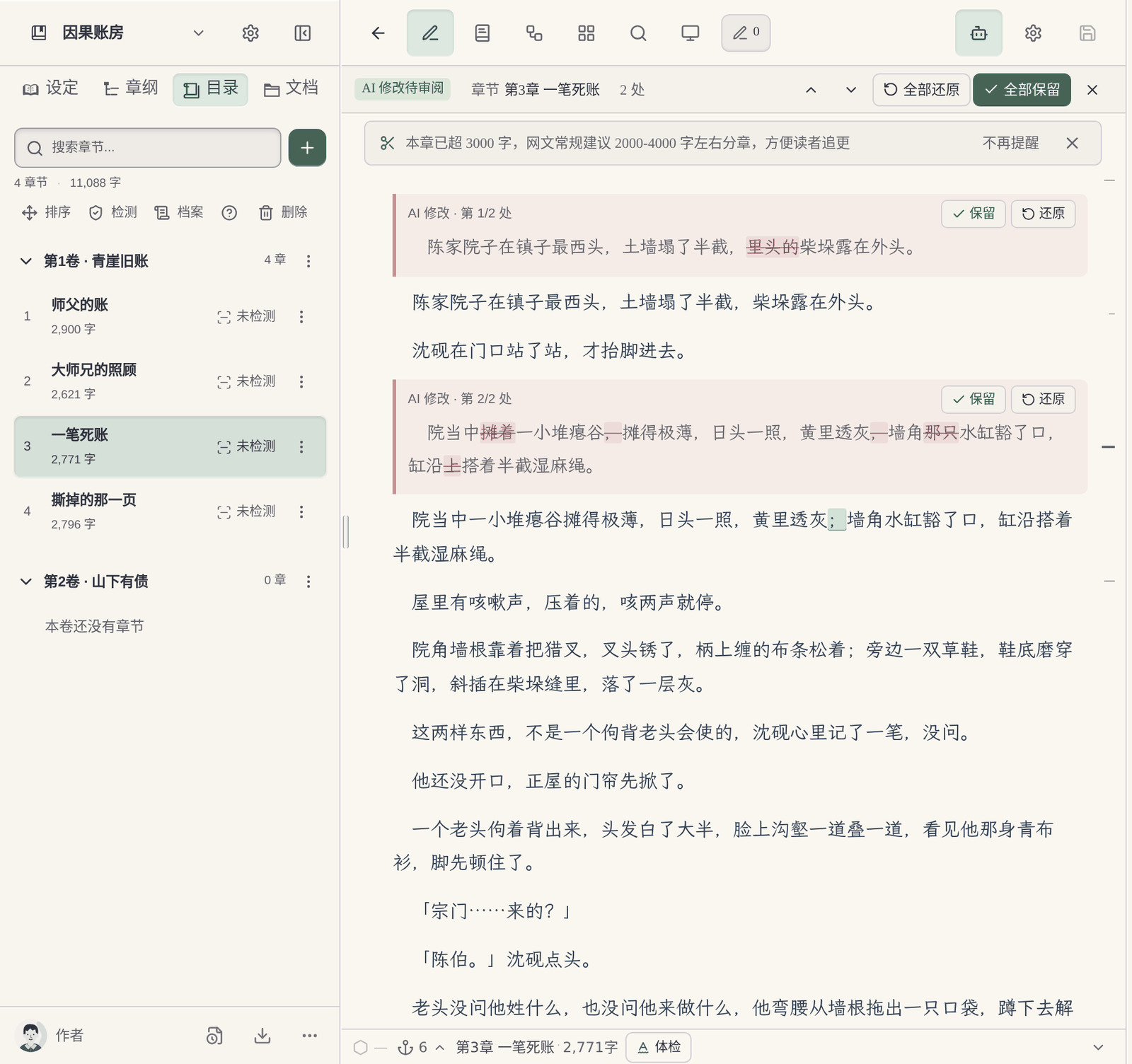
- Comparison and undo are in the editor. Body text the AI has changed shows deletions and additions directly, and you can keep or revert them one by one; if you’re not satisfied you can undo this round, branch from before this round, or edit and resend. A branch and the original chat share the same manuscript.
- Body text is left to the writer agent. When continuing, the writer agent gets only the material this chapter needs: the chapter outline, relevant character settings, earlier text and style samples.
- Old settings are put away by volume. When you reach a new volume, characters, places and foreshadowing that appeared only in earlier volumes are moved into the archive, and the AI no longer references them when writing new chapters, though they can still be looked up when needed.
- Use it directly on the web, with nothing to install.

For detailed comparisons of the two approaches, see Claude Code vs Maliang Writer, Coding Agent vs Novel-Writing Software: How to Choose and Folders vs Structured Writing: How to Choose.
FAQ
Q: Can Claude Code write novels?
Yes. It can read and write a whole folder and edit across files, has built-in checkpoints for rolling back, and authors have already finished long novels using Claude for the body text and Claude Code for cross-file checks. You need to design the directory yourself, write CLAUDE.md, and maintain the character-state and foreshadowing ledgers.
Q: What should CLAUDE.md contain?
Only what must be followed every time: a one-line introduction to the book, the files that must be read before writing a chapter, hard writing rules, the ledgers to update after finishing a chapter, which files the AI may not change, and who prevails in a conflict. Keep it short.
Q: How do I set up rules for writing novels in Cursor?
Create rule files under the project’s .cursor/rules directory, stating the required reading files and the hard rules; you can also use AGENTS.md. Split settings and characters into small files, and reference only the ones relevant to the chapter being written. Cursor’s checkpoints are stored locally, and the official advice is to manage long-term versions with Git.
Q: Can Codex CLI write novels?
Yes, the approach is similar to Claude Code: write rules in AGENTS.md, and organize settings, outline and body text by directory. The official documentation states that AGENTS.md has a default combined size cap of 32 KiB, so the rules must be concise.
Q: Do I need to know programming to write novels with Claude Code?
You don’t need to write code, but you do need to be comfortable with a terminal or editor, understand a bit of file and directory management, and managing versions with Git is more convenient. For authors completely unfamiliar with these, there will be a period of adjustment.
Q: Can I use Claude Code in China?
Claude’s official list of supported regions does not include mainland China, and this statement covers Claude.ai, Claude Code and the API. Go by the official page for specifics.
Q: When should I switch from a coding agent to writing software?
When the time spent maintaining ledgers and rules exceeds the time spent writing body text, when you don’t want to use a terminal and Git, when you want to write on the web or on your phone, or when you’re more used to looking at cards than files, consider switching to dedicated novel-writing software.