Gemini’s long context can take in a large amount of earlier text at once, Gems and Notebooks keep material fixed, and Canvas edits drafts directly and lets you page through earlier and later versions, which suits reading through, summarizing and rewriting whole passages. In a long serial, which setting is the latest, where a character is now and which sentence this draft changed are still for the author to manage. Maliang turns these into cards, story archives and revision comparison in the editor.
Who should pick Maliang WriterAuthors writing a long Chinese serial who don’t want to stuff the whole book into the conversation every time and want changes in settings and text to be recorded.
Who should pick GeminiAuthors who want to read through hundreds of thousands of characters at once for a summary or review, use Google Docs and Drive a lot, and live in an officially supported region.
Scenario
A concrete writing scenario
An author writing alternate history subscribes to Gemini AI Pro, pastes the entire three hundred thousand characters already written into the conversation, and asks it first to summarize the relationships between characters and then to continue with chapter one hundred and one. The summary is thorough. The questions that follow: are the character relationships used for the continuation the ones from chapter one or the ones after chapter ninety? Is the chapter eighty he revised last week the new version this time? Where does the finished new chapter go? Gemini can hold a large amount of earlier text, but “which version is the latest” and “who is where now” have to be spelled out by the author. Maliang turns this part into cards and archives.
❦ · Matrix · ❦
Comparison table
11 dimensions compared one by one
On narrow screens, scroll sideways to see all columns.
Maliang Writer vs Gemini: key dimensions compared
Dimension
Maliang Writer
Gemini
Notes
Product form
✅ Web editor plus AI chat, ready to use in the browser
✅ Web, Android / iOS and a Mac app (macOS 15+), integrated into Chrome and the Workspace side panel
How much earlier text fits at once
✅ The writer agent brings in the preceding text, relevant characters and style samples this chapter needs according to the chapter outline
✅ No subscription 32K, AI Plus 128K, AI Pro / Ultra 1M tokens (officially about 1,500 pages)
Fixed material
✅ Characters, settings, foreshadowing and storylines are cards, the master outline is stored separately, and style samples are documents
✅ Gems can take uploaded files in Knowledge as fixed context; Notebooks remember material, instructions and discussions; from November 2026 Gems on personal accounts become skills
Tracking setting changes
✅ After a chapter is written, story archives are organized: character states, relationships, locations, foreshadowing; anything that doesn’t match is listed as pending confirmation; can be turned off
⚠️ Cross-conversation memory requires age 18+, a personal account and Keep Activity turned on, and is not available in Gems; no official material found on tracking character states chapter by chapter
How revisions are made
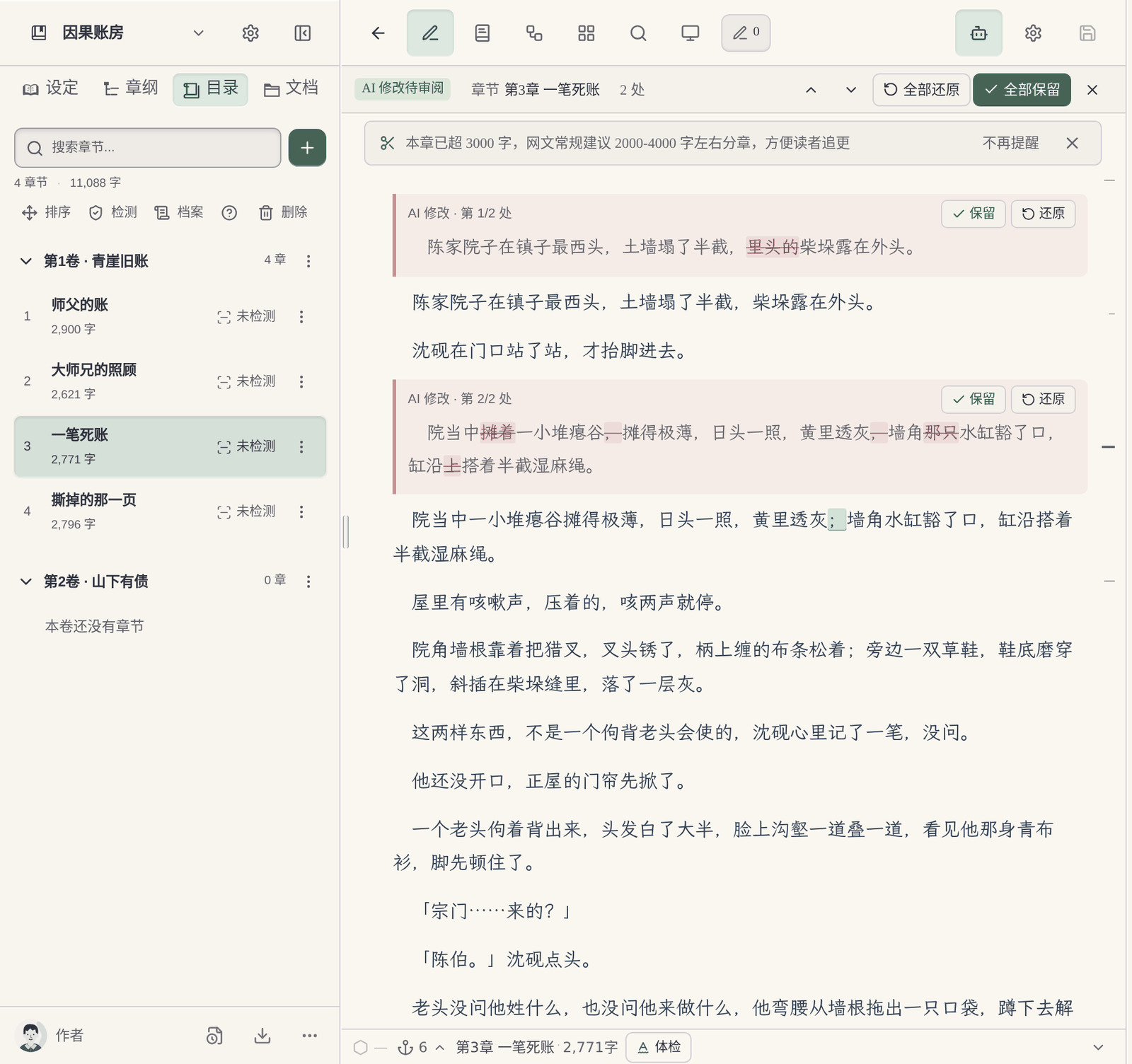
✅ AI changes are marked directly on the original in the editor, red for deletions and green for additions, and each can be kept or restored
⚠️ Canvas allows direct editing, rewriting a selected passage or Suggest edits, and Previous/Next Version lets you page through earlier versions; no official material found on word-by-word comparison of additions and deletions in documents
When you’re not satisfied
✅ Undo the current round, branch from before the round, or edit and resend
⚠️ Canvas can go back to an earlier version; no official material found on undoing a whole round
Volume and chapter table of contents
✅ Volumes, chapters and chapter outlines are in the left-hand table of contents, and new chapters AI writes appear there directly
⚠️ No official material found on novel-specific chapter or character management
Old settings once you reach a new volume
✅ Characters, places and foreshadowing that only appeared in earlier volumes are moved into the archive; AI no longer consults them when writing new chapters, but they can still be looked up when needed
⚠️ No official material found
Genre reference
✅ When starting a book, consult the character and structure breakdowns of more than 1,500 popular serials in the public book library
⚠️ No official material found
Price
✅ Free sign-up to try; credits are deducted by usage
✅ Free; AI Plus $4.99/month; AI Pro $19.99/month; AI Ultra from $99.99/month (checked 2026-10)
Regions
✅ A Chinese-language web product for Chinese-language authors
⚠️ The supported-region list states that Mainland China is supported for Workspace accounts only; Simplified Chinese is supported
✅ Confirmed in official material or in the product ⚠️ Partly supported, or not stated in official material ❌ Officially not supported · Competitor information comes from their public material.
How Maliang Writer approaches it
How Maliang Writer handles these problems
№01Maliang Writer
No need to paste the whole book every time
When writing a new chapter, the writer agent brings in the preceding text, relevant characters and style samples this chapter needs according to the chapter outline. You don’t have to decide which chapters to paste this time, or worry that what you pasted is an old version.
№02Maliang Writer
An archive for where characters stand “now”
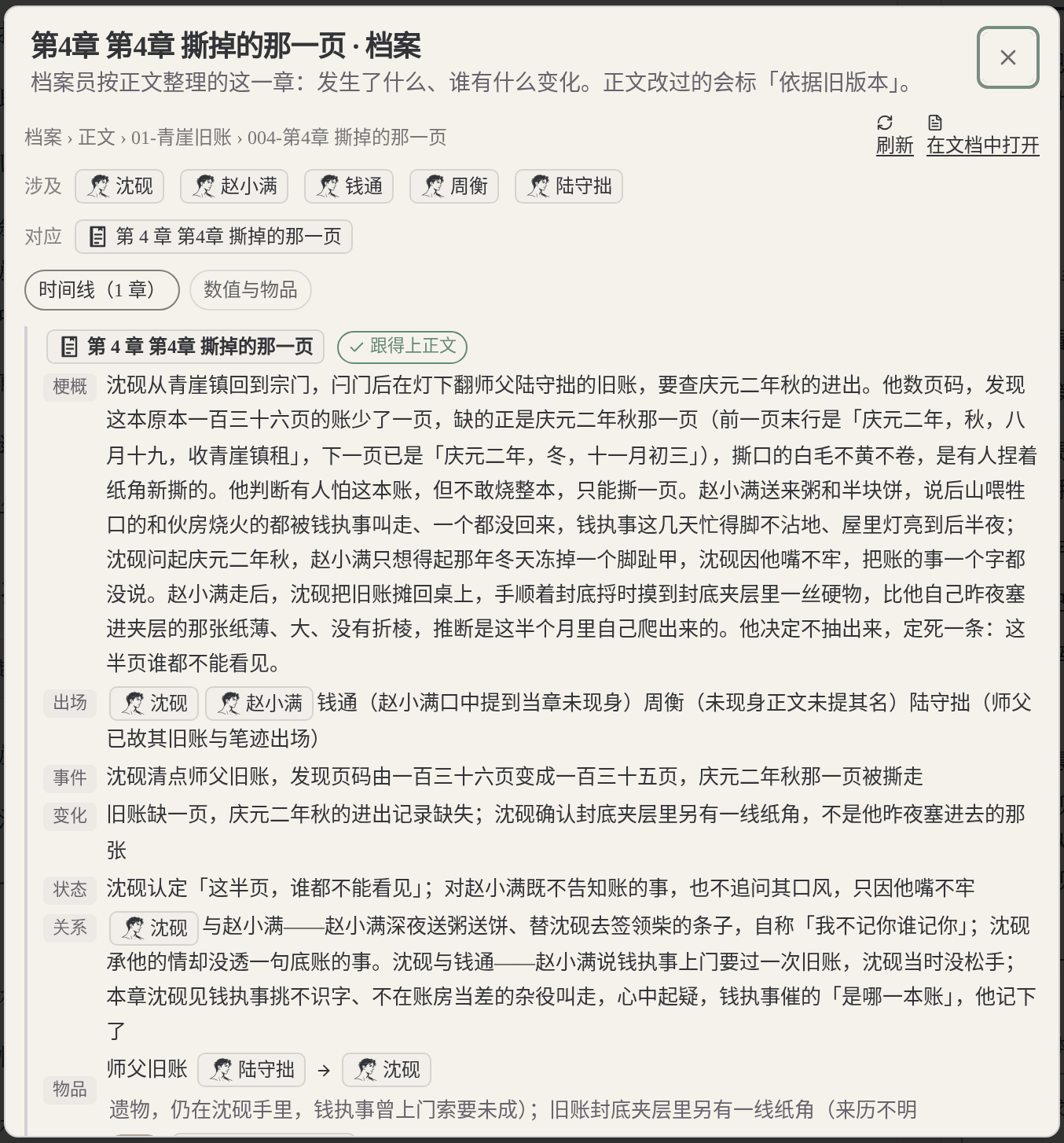
After a chapter is written and this stretch of writing ends, the background organizes this chapter’s archive: character states, relationships, locations, foreshadowing progress. The next time a new chapter is written, it draws on the archive that has been organized; anything still waiting to be organized or confirmed still needs you to check it. It can be turned off.
№03Maliang Writer
Which sentence changed is marked right on the original
When AI edits the body text, deletions are struck through and additions are marked green; you can keep or restore each change, or keep or restore them all. If you are unhappy with a whole round, you can undo the current round or edit and resend.
Reaching a new volume, old settings are put away: Characters, places and foreshadowing that only appeared in earlier volumes are moved into the archive; AI no longer consults them when writing new chapters, but they can still be looked up when needed, and go back into regular use when a character returns.
Character relationships at a glance: The character cards and setting cards in the left sidebar can be checked at any time; members can also view a character-relationship and faction graph, which helps you sort out the factions yourself.
What you fill in yourself
What the author has to do when writing a long novel directly with Gemini
It fits, but you have to say which version is the latest: A 1M context can hold fairly long material, but the earlier text you paste in contains old and new settings together. After a character levels up, changes name or switches sides, the author has to say in the instructions which chapter takes precedence.
Fixed material is yours to update: Knowledge in Gems and Notebooks can hold material fixed, but after settings change the author has to re-upload or edit it; from November 2026 Gems on personal accounts will also become skills.
The chapter table of contents and where finished text is kept are yours to arrange: Gemini is a general-purpose assistant; finished chapters have to be put back into your own documents or Drive, and the author maintains the order of volumes and chapters.
For word-by-word change comparison you have to keep the old draft: Canvas lets you page through earlier and later versions, and the code view has Show recent changes; no official material found on word-by-word comparison of additions and deletions for documents.
Where they are strong
What Gemini does well
Gemini’s long context suits reading a whole book through to summarize, find repetition and sort out the timeline; Canvas can edit directly, rewrite part of a text, adjust length and tone, and even turn a document into an audio overview or slides. It is connected to Google apps such as Gmail and Drive, subscriptions come with large cloud storage, and the AI Plus tier is not expensive. When you need to read and organize material at scale, Gemini is a good fit.
Every product suits some scenarios; the advice here covers only one: serialized long-form fiction in Chinese.
Real interface
Maliang Writer's real interface
The author checks this chapter’s archive to confirm changes in the protagonist’s state and relationships.The author reviews AI’s revisions one by one and decides whether to keep or restore each.
❦ · Evidence · ❦
Data and sources
Sources and check dates
Gemini context: No subscription 32K, AI Plus 128K, AI Pro / Ultra 1M tokens (about 1,500 pages). (Official docs · support.google.com · checked 2026-10)View →
Gemini subscription prices: Free, AI Plus $4.99/month, AI Pro $19.99/month, AI Ultra from $99.99/month. (Official docs · gemini.google · checked 2026-10)View →
Gemini Canvas: Direct editing and Suggest edits, with Previous/Next Version to browse earlier versions. (Official docs · support.google.com · checked 2026-10)View →
Gems becoming skills: From November 2026 Gems on personal accounts are automatically converted to skills. (Official docs · support.google.com · checked 2026-10)View →
Gemini supported regions: The web version’s supported-region list says “Mainland China (Workspace only)”. (Official docs · support.google.com · checked 2026-10)View →
Maliang: story archives: After a chapter is written, character states, relationships, locations and foreshadowing are organized, and anything that doesn’t match is listed as pending confirmation. (On-site data · maliangwriter.com · checked 2026-10)View →
Try four real writing tasks before you decide
For this page, record in particular what earlier-chapter and character material has to be provided again before the next chapter starts, and, after switching to a new conversation, how you confirm it is still working from the current manuscript of this book. Rely on actual experience.
Below is a same-task trial checklist, not a finished comparison experiment. You can use the original teaching material “Jiehuo City” or a manuscript you have the right to handle; record the preparation, the output and the author’s edits for each tool.
Start a new book
Give both tools the same protagonist, core rules and reading preferences; compare the opening directions first, then organize the master outline, the first volume outline and the outlines for the first three chapters.
Check: Can it tell the roles of the three outline levels apart? Can the author confirm a plan before it continues? Were settings that hadn't been settled yet quietly written in as fact?
Use the same old manuscript you have the right to handle, specify how the last chapter ends and the goal of the next chapter; try writing one scene first, without changing the previous twenty chapters.
Check: What material did you prepare? Did character positions, items and open threads carry over? How are candidate drafts told apart from adopted ones?
Pick a real rule that affects earlier chapters; first ask it to list the affected chapters and the evidence, then let the author choose the scope of the change.
Check: Does it say which parts it did not check? Can you review the changes first? Did it wrongly edit text outside the task or write an unadopted plan into the material?
Actually try keeping the text, the order of volumes and chapters, character profiles and world rules, and check whether the output is suitable for further editing; list what cannot be taken along.
Check: Are the format and order recognizable? What material is inside the platform account, what is in local files, and what is in the export? Do not infer usability from a marketing page alone.
Record the models, plans or account conditions you actually used, and the time spent preparing materials and editing the text. Leave blank anything you have not tried or cannot confirm; do not let a feature name or a single generation stand in for the full experience.
How to choose
Choose by your situation
If You write a long Chinese serial with daily updates → choose Maliang Writer, because The writer agent gathers material automatically, archives record setting changes, and new chapters go straight into the table of contents..
If You want to read a whole book through at once to summarize or review it → choose Gemini, because Gemini AI Pro’s 1M-token context suits reading at scale..
If You have finished a volume and want a review of the whole volume → use both, because Use Gemini to read the whole volume through and find problems, then come back to Maliang to revise chapter by chapter, reviewing each change in the editor..
If Your material is all in Google Drive and Gmail → choose Gemini, because Gemini connects directly to Google apps..
If You use a personal account and are in Mainland China → choose Maliang Writer, because Gemini’s supported-region list states that Mainland China is supported for Workspace accounts only..
FAQ
FAQ
Can Gemini’s 1M context write a long novel?
It can hold a large amount of earlier text, which suits reading through and summarizing. The other half of writing a long novel is managing change: what state a character is in now, which chapters were revised, which foreshadowing threads haven’t been paid off. In Gemini the author has to spell this out; Maliang keeps track with cards and story archives.
Can the free version of Gemini write novels?
Yes. The free tier has a 32K-token context, which suits single chapters and passages; the 1M tokens come only with AI Pro and above (checked against the official Help Center in 2026-10).
Are Gemini’s Gems good for holding novel settings?
You can upload setting files in a Gem’s Knowledge as fixed context. Note that you have to update the files yourself after settings change, and from November 2026 Gems on personal accounts will be automatically converted to skills.
Can Gemini Canvas show a revision comparison?
Canvas lets you page through earlier versions with Previous/Next Version, and the code view has Show recent changes; no official material found on word-by-word comparison of additions and deletions for documents. In Maliang’s editor, AI’s changes are marked directly on the original, red for deletions and green for additions.
Can I use Gemini to write novels in Mainland China?
Gemini’s web version supported-region list states that Mainland China is supported for Workspace accounts only; personal accounts are not on the list.
What’s the difference between giving AI the whole book and using Maliang?
When you give it the whole book, old and new settings are all in there, and you have to tell the AI which chapter takes precedence. Maliang’s writer agent brings in only the earlier text and characters this chapter needs, the latest state of each character is kept in the archive, and when you reach a new volume the old settings are moved into the archive.
Can I choose Gemini models in Maliang?
Maliang offers a choice of several models, and chat and body text can be chosen separately; see the in-product list for specifics.
How much does it cost to write a novel with Gemini?
The free tier is usable; AI Plus is $4.99/month, AI Pro $19.99/month, and AI Ultra starts at $99.99/month (checked 2026-10). Maliang is free to sign up and try, with credits deducted by usage.
After signing up, create a book or import existing chapters, tell the AI which chapter to continue, then look at what it wrote, what it changed and what it recorded in the archive, and decide whether to move your long novel over.