
First AI Novel: From One Idea to Chapter One in Five Steps
Only a one-line idea? Expand it to three sentences, compare directions with AI, set characters and volume one’s outline, draft chapter one and revise, with a checklist.
In this article 8 sections
The Conclusion First: Set the Direction, Then the Characters and Volume, and Only Then Write Chapter One
The first time using AI to write a novel, many people simply type “Help me write a cultivation novel.” The AI can indeed produce a few thousand characters right away, but it’s mostly a directionless opening: it’s unclear who the protagonist is, unclear what he wants, and by chapter three you don’t know where to go.
A steadier order is five steps:
- Prepare: expand a one-line idea into three sentences, and read a few books in the same genre;
- Book-start conversation: have the AI give a few directions, and you choose;
- Characters and volume outline: set the protagonist, the opponent, the core supporting characters and the direction of volume one;
- Write chapter one: plan the scenes first, then write the body text;
- Revise: check against the checklist, and edit one spot at a time.
Throughout the process, the AI proposes options and writes first drafts, while you choose and make the calls.
Step 1: Prepare, Expanding a One-Line Idea into Three Sentences
“Transmigrating into the villain’s master” is an idea, not yet a book. Expand it into three sentences:
- Who the protagonist is and what he wants: an ordinary office drone who transmigrates into the villain’s master, wanting to steer the apprentice back before he turns dark, to save his own life;
- What stands in his way: the inertia of the original plot, the apprentice’s suspicious nature, and the orthodox side actually wanting him dead more;
- Why readers keep reading: every “lesson” is misread by the apprentice as an even deeper scheme, bringing laughs and twists from the master–apprentice contrast.
Once the three sentences are clear, every later discussion has an anchor. Then decide two more things: which platform to publish on (readers’ preferences vary a lot between platforms), and roughly how long it will be (the pacing of several hundred thousand characters and several million characters is completely different).
Then spend an hour or two reading the first few chapters of three to five popular books in the same genre. Not to imitate them, but to see what readers of this genre are waiting for: what situation the protagonist is in in chapter one, which chapter brings the first payoff moment, and what kinds of people are usually placed around the protagonist.
Step 2: Book-Start Conversation, Having the AI Give a Few Directions
When starting a book with the AI, give it the three sentences, genre, platform and length together, and ask it to give several directions for you to compare, rather than settling on one directly:
I want to write a novel like this: (three sentences). The genre is xuanhuan, planned for Fanqie, about one million characters in length. Please give me three different directions for how it could unfold, each explaining the main-line conflict, the main selling points, roughly how the first thirty chapters go, and the risks of that direction.
After getting the directions, don’t rush to accept them wholesale. Pick the one closer to your idea, and take the points you like from the other two and merge them. You call the shots in this step; the AI’s directions are just material.
Step 3: Characters and Volume Outline
Once the direction is set, set the people:
- The protagonist: what he wants, what he fears, what his weakness is, how he speaks;
- The opponent: what lets him suppress the protagonist, and what he himself wants;
- Two or three core supporting characters: each with a functional slot, such as the one who protects his own, the one who undermines, and the one who complements the protagonist and is complemented in turn.
For how to write character cards see How to Write Novel Characters, or you can first produce a version with the free character profile generator and then revise it.
Then plan the volume-one outline: where this volume starts, what the protagonist is to gain this volume, a few major events in between, and where the volume ends. Then roughly lay out the chapter outlines for the first ten chapters, one or two lines each is enough. For a volume-outline template see Novel Outline Templates.
Step 4: Write Chapter One
Chapter one has few jobs, but each must be done well:
- The protagonist appears early, with a clear situation: where he is and what trouble he’s run into;
- The core conflict or hook shows up: readers should know in chapter one where this book’s appeal lies;
- The ending leaves a question that makes people want to click the next chapter.
Things not to do: a long introduction to the worldbuilding at the start, seven or eight characters arriving at once, the protagonist spending the whole time recalling the past.
Before writing, break chapter one into three or four scenes, one sentence each: who, where, what happens, what the result is. For example, chapter one of the “transmigrated into the villain’s master” book above could be planned like this:
- The protagonist wakes up and finds he has become the master who is killed by his own apprentice in the original story, and the apprentice’s voice comes from outside the door;
- The apprentice brings in medicine, the protagonist tries to show kindness but gets one of the original owner’s catchphrases wrong, and the apprentice’s eyes turn cold;
- In a flash of quick thinking, the protagonist passes off the slip as a “test”, and the apprentice mistakenly believes the master saw through him long ago;
- Chapter end: after the apprentice withdraws, the protagonist finds the medicine is poisoned, and in the original story this bowl of medicine only appeared three years later.
Every scene has a small turn, and the chapter end leaves the question “the plot is unfolding ahead of schedule”. Then have the AI write scene by scene. The material you give it includes: this chapter’s scenes, the cards of the protagonist and the characters appearing, the settings to obey, and you can add a passage or two of style reference you like. A web-novel chapter is commonly two to three thousand characters, depending on platform and genre habits.
For ways to write an opening, see How to Hook Readers in the Opening.
Step 5: Revise
The first chapter the AI writes is a first draft. Check it against this list:
- Read it aloud once: sentences that snag and dialogue that sounds awkward are what needs changing;
- Look for stock phrases: sentences like “a faint smile tugged at his lips” or “a wave of emotion welled up inside him”, delete them or swap in concrete actions;
- Look for summary sentences: sentences at the end of a paragraph such as “He finally understood...” that draw conclusions for the reader can mostly be deleted;
- Check character voice: cover the names and see whether you can tell who is speaking;
- Check the chapter end: whether the last paragraph leaves a question, or ends flatly.
When revising, for local problems doing it yourself is often faster; if the overall direction is wrong, have the AI rewrite. When having the AI edit, limit the scope, such as “change only the dialogue” or “only delete stock phrases and add nothing”. After the first three chapters are written, you can go through them again with the Golden Three Chapters check.
How to Do It in Maliang Writer
Maliang Writer is used directly on the web, free to register and try, with credits deducted by usage. From a one-line idea to chapter one, the process goes like this:
1. Book-start conversation. Say your idea in the chat, for example “I want to write a xuanhuan about transmigrating into the villain’s master, to publish on Fanqie”. The AI refers to the character setups and pacing of popular books in the same genre from the public book library, and gives direction, character and volume-outline proposals, which you confirm, revise, or switch direction on. The public book library includes character and structure breakdowns of over 1,500 popular serials, learning methods without copying plots or character names. It produces only the layer you ask for—for example, characters only, with no volume outline; when the scope isn’t clear, the AI asks once first.
2. Characters and volume outline become cards. Once confirmed, the characters, settings, volume outline and chapter outlines appear directly in the left settings sidebar and table of contents, and you can click in to edit. When starting a book you can also pull human-written passages from benchmark works as style references, to compare against when writing body text for each chapter afterward.
3. Write chapter one. Say “write chapter one per the chapter outline”, and the body text is handed to the writer agent: it takes only the material this chapter needs, including the chapter outline, relevant character settings and style samples. During writing, the body text appears in the chat passage by passage, and when finished goes straight into the left table of contents and the editor. The model that writes body text can be chosen separately under “Writer” at the bottom of the input box, with multiple models to choose from, subject to the in-product list. After each chapter is written, a chapter-ending check is attached, referencing over 2,000 popular web novels and about 56,000 chapter endings.
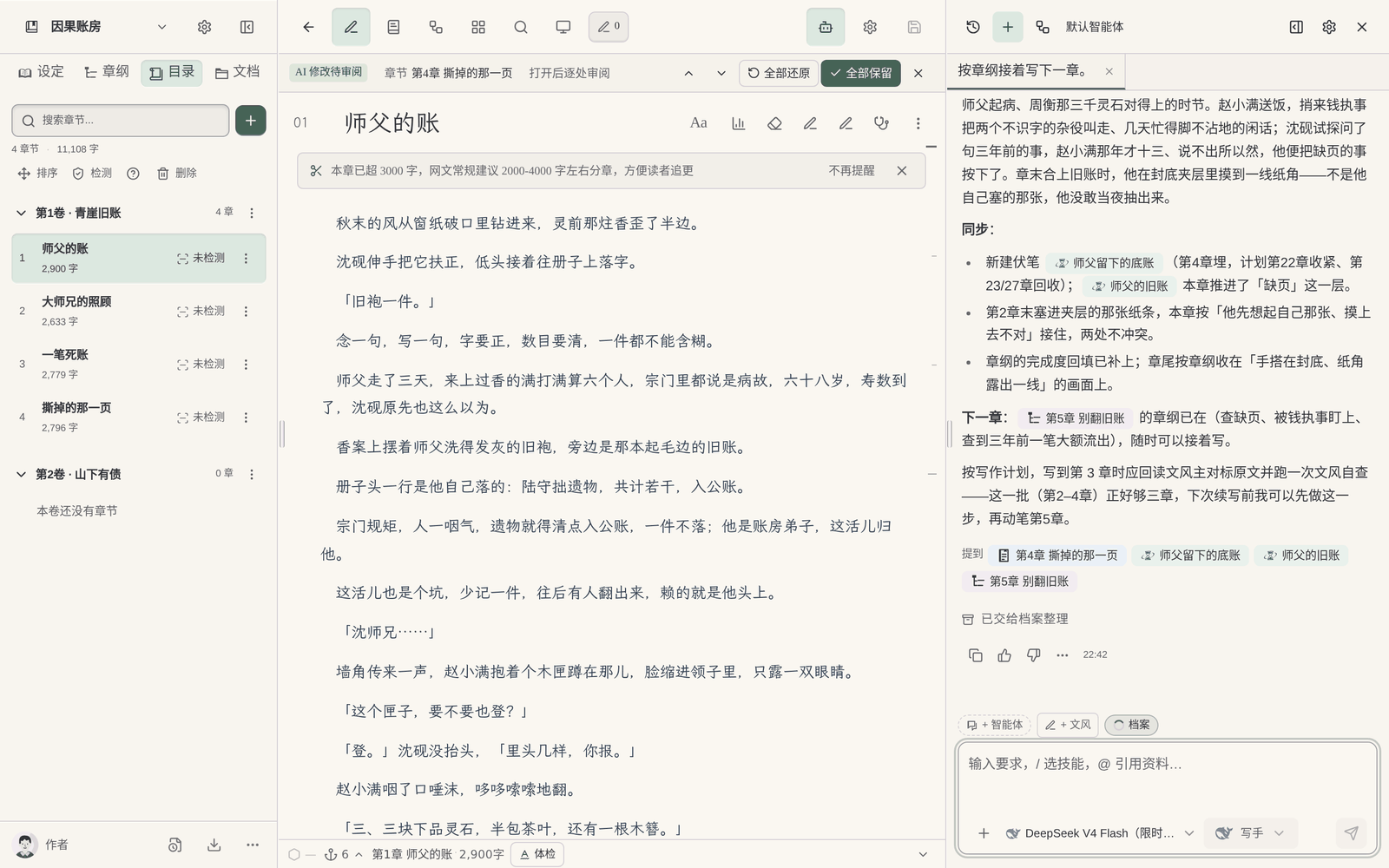
4. Revise. Edit yourself in the editor; or have the AI change a particular passage, and the places it changed are marked with deletions and additions, to keep or revert one by one. If you’re unhappy you can undo this round, or edit one line of the request and resend. If it feels too AI-flavored, you can use the AI-flavor removal rewrite, but it doesn’t guarantee passing any detection. For the full way to revise see How to Review and Undo AI Revisions.
After chapter one is written, when the chapter is finished and this stretch of writing ends, the archivist organizes character states, relationships, locations and foreshadowing from the body text, to prepare for later continuation; see Story Archives.
FAQ
Q: Where should I start the first time I use AI to write a novel?
First expand a one-line idea into three sentences: who the protagonist is and what he wants, what stands in his way, and why readers keep reading. Then discuss a few directions with the AI, set the characters and volume-one outline, and only then write chapter one.
Q: Can I write a novel with AI from just a one-line idea?
Yes. One line is enough to start a book-start conversation, but have the AI give a few directions for you to choose from first, and spend a bit more time at the character and volume-outline stages. Having it write body text directly easily gets you a directionless opening.
Q: If I just say “help me write a novel”, can the AI write a whole book?
The AI can write many chapters in a row, but the direction of a book, the choices for characters, and each volume’s climax need to be decided by you. With the author making the calls and the AI executing, the book that results is yours.
Q: How many Chinese characters should a novel’s first chapter run?
A web-novel chapter is commonly two to three thousand characters, depending on platform and genre habits. The key to chapter one isn’t length, but a clear situation for the protagonist, the hook showing, and a question left at the chapter end.
Q: What if the first chapter the AI writes is very AI-flavored?
First delete stock phrases and summary sentences, then revise the dialogue so each character speaks differently. Giving the AI a passage or two of style reference you like also improves it noticeably. AI-flavor removal tools can help, but they don’t guarantee passing detection.
Q: Is starting a book by referencing popular novels considered plagiarism?
Referencing character setups, pacing and genre conventions is a common way of learning; don’t copy character names, settings or specific plots. What Maliang references when starting a book is breakdowns of popular books, learning methods without copying.
Q: How much does it cost to write a novel with AI?
Different tools bill differently. Maliang Writer is free to register and try, with credits deducted by usage, and the cost depends on the chosen model and the number of characters written; go by what the product displays for specifics.