
Custom Agents & Custom Prompts: Style-Aware AI Editor (2026)
Custom agents (Personas) and prompts: the four fields, injection order, binding rules and active modes, with official templates and screenshots.
In this article 11 sections
Before every AI writing request, do you have to type out something like: “Use the pacing of a Fanqie thrill novel, use short sentences, don’t be too bookish, the protagonist should be a bit roguish...”? Once is fine; a hundred times will break you.
The custom agent (also called a Persona) is here to end that repetition. You write the persona once and bind it to a specific AI, and from then on it works according to that persona, with no need to re-explain in every round of conversation. This article covers it and “custom prompts” together in one go.
Key Points
- Custom agent = a fixed persona prompt + binding to specific agents, so AI writes in the set style over the long term.
- The persona description is the substance of the “custom prompt”, and is placed at the very front of the agent’s system prompt as the highest-level guidance.
- The injection order is fixed: persona description (first) + the agent’s original prompt + linked documents (last).
- Each agent can be bound to only one custom agent at a time; the persona is injected only in multi-agent, single-agent and skill modes.
What Is a Custom Agent?
A custom agent is a reusable “AI role”: you write it a persona and bind it to specific agents, and it steadily completes writing tasks in that identity and style. The entry point is the AI assistant bar on the right of the writing page: click the gear “AI Feature Management” and switch to the “Agents” tab.
The top card shows “the agent currently in effect”, and below it are your list of agents and the editing area. Each custom agent can be enabled/disabled individually and bound to different agents.
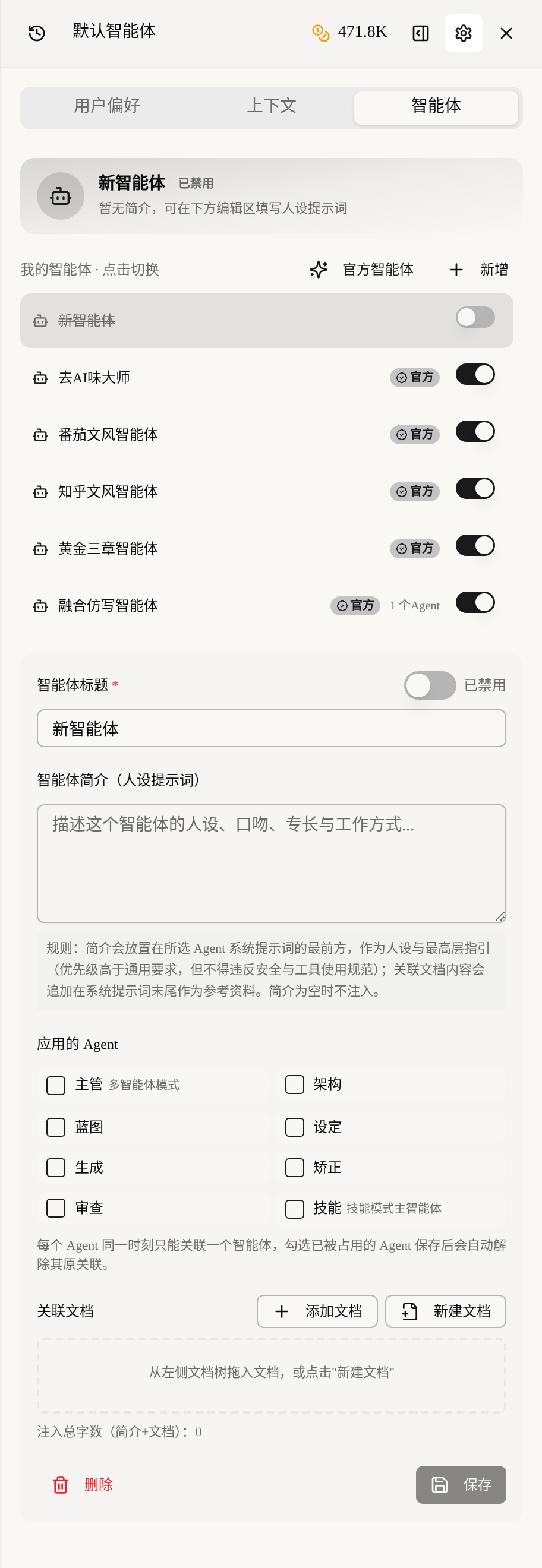
Simply put, it upgrades “style instructions” from one-off conversation into a configuration that can be saved, reused and switched. One book gets “Fanqie Style”, another gets “Zhihu-style rational tone”, with no interference between them.
Why Is a Custom Prompt Better Than “Explaining Every Time”?
Because the persona prompt is a “system-level” instruction, with more weight and more stability than what you say on the fly in the chat box. On-the-fly instructions get diluted by later conversation and AI forgets them as it writes; the persona description, by contrast, is placed at the very front of the system prompt every time and stays in effect as the highest-level constraint.
That’s the value of a “custom prompt”: define once, effective throughout, with the highest priority. You no longer depend on whether AI “remembers” the style requirements you gave ten rounds ago.
Our take: Many people understand prompt engineering as “writing instructions longer”. What’s more critical is “putting instructions at the right level”. The same style requirement is a suggestion when written in the conversation and a rule when written in the persona description: change the position and the binding force is completely different.
To learn prompt writing systematically, read the AI Writing Prompt Guide.
The Fastest Start: Import an Official Agent
Don’t want to write a prompt from scratch? Click “Official Agents”, where a set of ready-made templates preset by Maliang awaits. They cover the most common web-novel needs and work as soon as you import them.
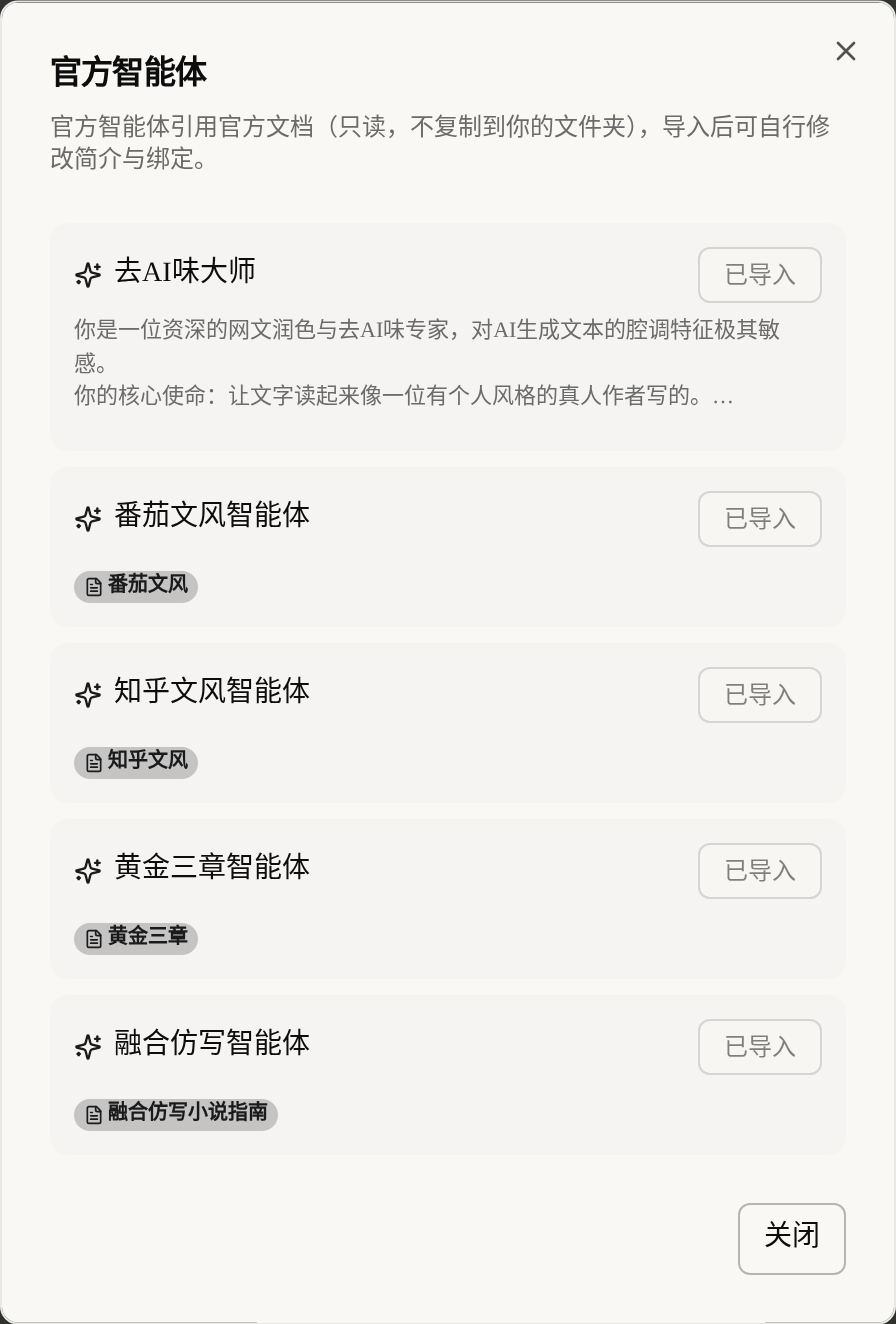
Currently included: “AI-Flavor Removal Master”, which targets the AI tone; “Fanqie Style Agent”, which follows the pacing of Fanqie thrill novels; “Zhihu Style Agent”, which leans toward rational narration; “Golden Three Chapters Agent”, which specializes in opening hooks; and “Fusion Imitation Agent”, which blends the styles of several reference books.
Click “Import” and it’s ready to use. Official agents reference official documents (read-only, not copied into your folder); after importing you can still edit the description and the bindings and treat it as a template to rework. This is the fastest path to get started: import the closest one first, then fine-tune for your own book.
Make Your Own Agent: The Four Fields to Fill In
Click “Add” and the editing area expands; there are really only four blocks to fill in. There aren’t many fields, but each one directly affects AI’s performance.
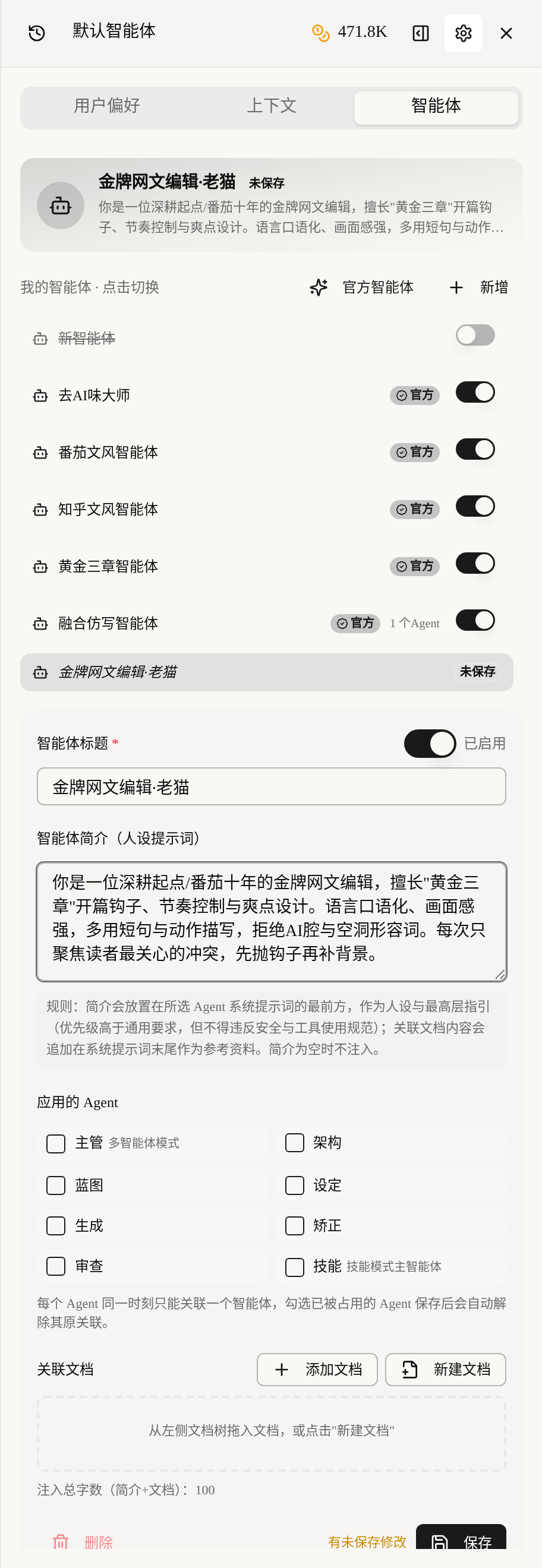
First is the agent title: give it a recognizable name, such as “Top Web-Novel Editor · Old Cat”. Second is the agent description (persona prompt), which is the substance of the custom prompt: state clearly the persona, tone, expertise and way of working. Third is the applied agents: check which agents this persona acts on (supervisor, architecture, blueprint, setting, generation, correction, review, skill). Fourth is linked documents (optional): material dragged in from the document tree on the left is treated as reference material.
Key reminder: An empty description injects nothing. If you want the persona to take effect, you must write the description. This is the pitfall beginners hit most: “configured, but it’s as if you hadn’t”.
For the complete steps, see the custom agent tutorial.
How Do I Write a Prompt (Description) That Works?
A good persona prompt has to be “executable”, not “nice-sounding”. Here is a four-paragraph template; fill it in and it won’t be empty.
Paragraph 1 states the identity: “You are a top web-novel editor with ten years of experience on Fanqie.” Paragraph 2 states the expertise: “Skilled at golden-three-chapter opening hooks, pacing control and payoff-point design.” Paragraph 3 states the hard style requirements: “Use more short sentences and action description; reject the AI tone and empty adjectives.” Paragraph 4 states the way of working: “Focus each time only on the conflict readers care about most; throw the hook first, then fill in the background.”
Tested comparison: AI almost can’t grasp an instruction like “write it more brilliantly”, because it has no executable standard; but quantified requirements like “no more than three lines per paragraph, half dialogue, action verbs first” AI can carry out steadily. The more specific, the more controllable the output.
Injection Order: Who Comes First, the Persona, the Agent or the Linked Documents?
This order is fixed, and understanding it helps you judge “why my persona sometimes can’t override the agent’s default behavior”. The final assembled system prompt looks like this:
Final system prompt = persona description (first) + the agent’s original system prompt + linked documents (last)
The persona description is first, as the highest-level guidance; the agent’s original prompt is in the middle, ensuring it still does the job it should; linked documents are at the end as reference material (suited to style samples, glossaries and writing standards).
Our tip: If you want the persona to strongly override the default style, write the hard style requirements into the “description”; if you just want to give AI some material to consult, put it in “linked documents”. Stuffing a sample document into the description as if it were an instruction will instead dilute your core requirements.
Binding Rule: One Agent Can Be Bound to Only One Custom Agent at a Time
This is the rule people trip over most: each agent can be bound to only one custom agent at a time. If you check a new custom agent onto an agent already taken by another custom agent, its original binding is automatically released after you save.
In other words, which persona the “generation agent” uses is decided by your last save. To give different agents different personas (for example, “Golden Three Chapters” for the opening and “Fanqie Style” for the body text), create several custom agents and bind each separately.
Once binding takes effect, the title at the top of the AI assistant changes from “Default Agent” to the name you bound. In multi-agent mode, the top shows the one bound to the supervisor.
Which Modes Inject the Persona and Which Don’t?
Not every writing action injects the persona; remembering this table will spare you a lot of “why isn’t it working” confusion. The persona’s scope of effect has boundaries.
| Mode / action | Is the persona injected? |
|---|---|
| Multi-agent mode | Injected |
| Single-agent mode | Injected |
| Skill mode | Injected |
| Pure chat mode | Not injected |
| One-click workflows such as one-click AI-flavor removal / one-click book start | Not injected |
There is one more precondition: the custom agent must be “enabled” (the switch next to the title is on). These one-step workflows have their own fixed processes, so they don’t go through persona injection. This is by design, not a bug.
How Does It Work Together with Context Assembly and Visibility?
The three each handle their own part, and stacking them works best. The custom agent handles “what persona and style AI writes in”; context assembly handles “how much novel material is fed to AI”; setting visibility handles “whether specific items can be shown to AI”.
A combination: bind a “Golden Three Chapters Agent” for the opening, use context assembly to give only “this volume’s chapter outlines + characters by name only” to save credits, then use setting visibility to hide the final twist. With the whole set configured, AI has a professional persona and also doesn’t go off track, doesn’t spoil, and saves money.
Advanced play: Combine the persona with the long-form framework: set a “lead-writer persona” for the whole book to unify the prose style, then temporarily switch personas for special chapters, and the long novel’s voice will stay steady.
FAQ
Q: What exactly is the difference between a custom agent and writing requirements directly in the conversation?
The difference is level and persistence. Requirements in a conversation are temporary and get diluted by later conversation; the persona description is system-level, placed first every time, with the highest priority. In one sentence: conversation is a suggestion, the persona is a rule, and configure once is effective long-term.
Q: Can I set up several custom agents for the same book?
Yes. You can create several custom agents and bind them to different agents (for example, “Golden Three Chapters” for the opening and “Fanqie Style” for the body text). But note each agent can be bound to only one custom agent at a time, and repeated binding releases the old one automatically.
Q: Why does it feel like it didn’t take effect after I imported/created a custom agent?
Check three things first: whether the description is empty (an empty description is not injected), whether the custom agent is “enabled”, and which mode you’re currently using: pure chat and one-click workflows don’t inject the persona. If all three are right and it still doesn’t work, confirm whether the title at the top has changed to the name of your bound custom agent.
Q: Do linked documents consume tokens? Should I limit them?
Yes. Linked documents are appended to the end of the system prompt, and the longer the content, the more they take up. We suggest putting only concise style samples, glossaries and writing standards, not whole chapters of body text. To save tokens, tune together with the credit-saving presets in context assembly.
Q: Can I edit an official agent? Will it affect the official template?
You can edit it, and it won’t affect the official template. Official agents reference read-only official documents, and after importing it’s your own copy; changes to the description and bindings apply only to your copy, and the original template is unaffected.
Final Words
The first step to making AI write well isn’t switching to a stronger model, but telling it “who you are and how to write”. The custom agent fixes that sentence into a configuration, and the custom prompt gives it top priority; from then on AI has a stable voice.
First go to Official Agents and import the template closest to your book, rewrite the description with the four-paragraph template, and bind it to the generation agent, and you’ll feel the change in prose style immediately. Together with context assembly and setting visibility, your AI writing team is officially assembled.