
Progressive Disclosure: Stop AI Novel Spoilers by Volume
Stop AI leaking the mastermind, hidden power-up, or final twist: hide settings by volume, singly or in batch, with context assembly.
In this article 10 sections
You fed AI a complete character file, including “she is actually the princess who went missing ten years ago”. Then, while writing volume one, AI had a passerby blurt out that origin, and three volumes of suspense were ruined by one case of “knowing too much”.
This isn’t AI’s fault; you gave it, too early, something it shouldn’t know yet. The fix is called progressive disclosure: let character settings and foreshadowing open up to AI layer by layer, like peeling an onion, according to plot progress, instead of laying everything out at once.
Key Points
- Progressive disclosure = multi-level “hide and open” for characters/settings, so AI knows the right information only at the right volume.
- Maliang Writer provides three visibility states: fully visible, hidden from AI, and opened progressively by volume.
- The logic of opening progressively by volume: you check “public from which volume”, and it unlocks automatically once your writing progress reaches that volume.
- Visibility is the “red line” and context assembly is the “quota”: hidden items never enter the context no matter how assembly is set.
What Is Progressive Disclosure?
Progressive disclosure is an information-layering strategy: schedule settings by “which volume the reader should learn this in”, and keep AI’s awareness in step with the reader’s. Put plainly, when AI writes volume one, it should know only what volume one should know.
Its essence is “controlling AI’s information timeline”. The traditional approach feeds in all the settings at once; AI has an omniscient view and naturally tends to use up later material early. Progressive disclosure does the opposite: it lets AI, like your protagonist, gradually “unlock” the truth as the story advances.
Our take: Many authors take “spoiler prevention” to mean “give fewer settings”, and AI then writes vaguely for lack of information. The real fix isn’t “give less” but “give by time”: hide what should be hidden for good, release what should be released in full, and neither suffers.
Why Does AI Love Spoiling Plots When Writing Novels?
Because large models have no sense of time: they assume they have all the information you gave and tend to use it up. Every setting you feed in is, to AI, material it can “write right now”; it won’t automatically judge that “this one should be saved for volume three”.
Worse is the chain reaction. Once AI plants a wrong line earlier, it keeps inventing along that error, snowballing. By the time you notice, you may have written several chapters that need reworking.
Observed in testing: In our internal tests, assembling complete settings that contain “true identity” and “final ending” directly for AI made early spoilers significantly more likely than assembling only “information the current volume should know”. The information boundary decides whether it leaks more than how smart the model is.
To learn the underlying mechanism of AI consistency, read How a Knowledge Graph Prevents Continuity Errors.
Multi-Level Hiding and Disclosure: Three Visibility States
Maliang Writer splits “show it to AI or not” into three levels, covering every need from “fully public” to “locked down completely”. Every setting, character and suspense can be configured individually:
| Visibility state | Can AI see it? | When to use |
|---|---|---|
| Fully visible (default) | Always visible | The protagonist’s basic file, worldbuilding already made public |
| Hidden from AI | Never visible | The true culprit’s identity, the final ending, a hidden cheat |
| Open progressively by volume | Visible only from the specified volume | Origins, foreshadowing and hidden factions revealed in stages |
These three levels are the core of “multi-level hiding and disclosure”. Fully visible is the foundation, hidden from AI is the safe, and open progressively by volume is the timer. Combined, they can express almost any “when should AI know what” requirement.
How Do I Set Visibility on a Single Character Setting?
The entry point is the materials panel on the left of the writing page. Click “Settings” at the top, open any setting, character or suspense, scroll down the detail card, and find the “❖ AI Visibility” block, where you will see two switches.
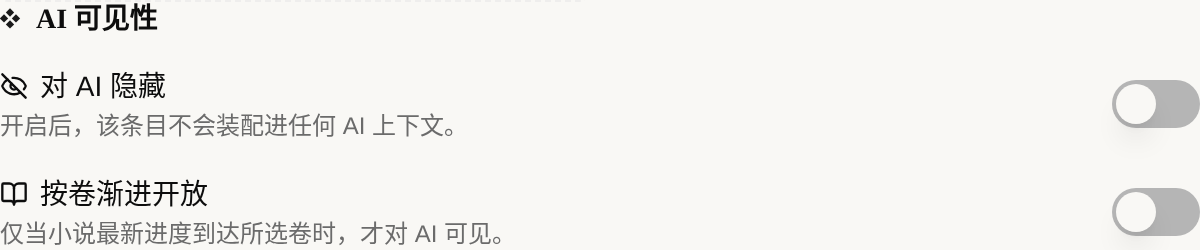
Once “Hide from AI” is on, this item is not assembled into any AI context, and is skipped even if you have “Settings” on in context assembly. Once “Open progressively by volume” is on, the item is normally invisible to AI and unlocks automatically only when your writing progress reaches the specified volume.
Tip: For a setting you’re unsure about, set “Hide from AI” first; that’s far safer than turning it on by mistake and causing a spoiler. Once you’ve worked out which volume it should appear in, change it to open progressively by volume.
For the complete steps, see the tutorial on hiding settings and opening them progressively by volume.
How Do I Use Opening Progressively by Volume?
One sentence is all you need to remember: what you check is “from which volume to go public”, and when your writing progress reaches the earliest volume you checked, the setting automatically becomes visible to AI. After you turn the switch on, all volumes of the book are listed below for you to check.
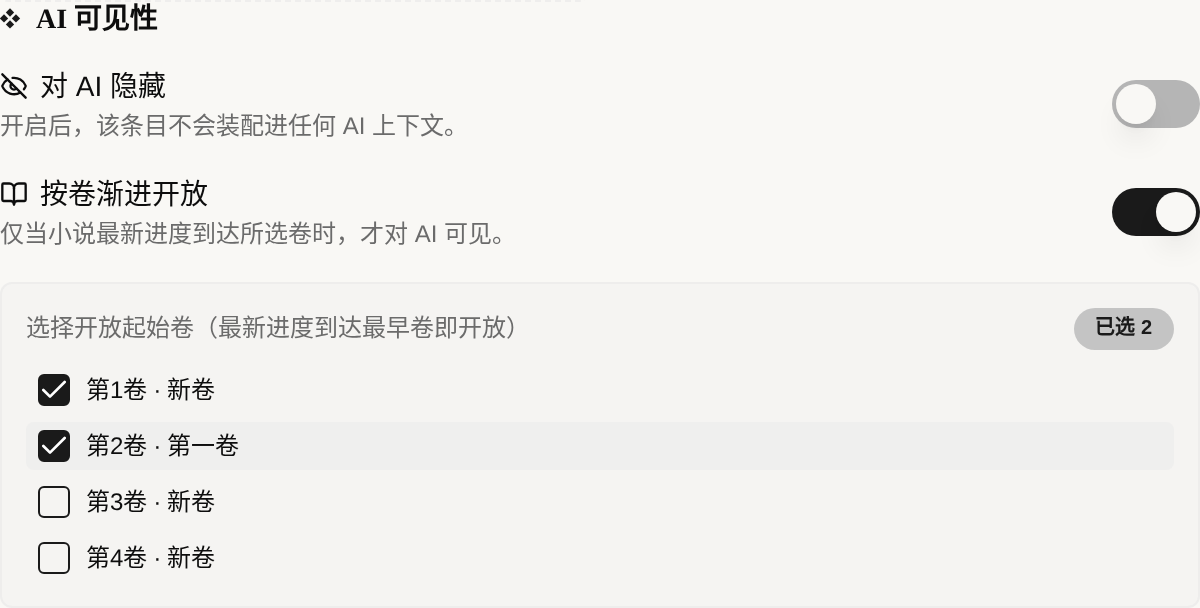
For example: check volume 2 for “the female lead’s true origin”. When writing volume 1, AI knows nothing and won’t leak it; once you reach volume 2, the origin automatically enters the context and AI starts writing according to it. No spoiler, and no need for you to toggle it by hand each volume.
“Selected N” in the top right counts how many volumes you checked. If you check none, the item stays hidden permanently, and an orange note below the panel will remind you; this is a common “forgot to check” trap, so watch for it.
Batch-Managing a Volume’s Foreshadowing Ledger
When there’s a lot of foreshadowing, clicking one by one is too slow, so use batch mode. Click the multi-select icon at the top right of the materials panel to enter multi-select, check the cards you want to handle, and an “AI Visibility” batch toolbar appears above.
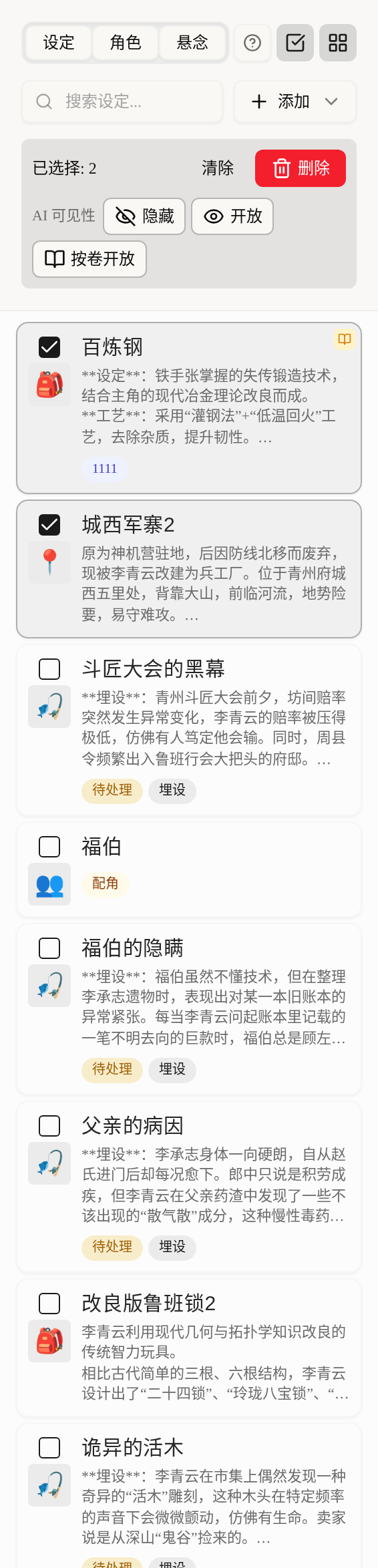
The three buttons each do their own job: “Hide” locks everything selected from AI, “Open” makes everything visible again, and “Open by volume” sets the same starting volume for all selected items at once. When sorting out a volume’s foreshadowing ledger, this is much faster than item by item.
Cards with visibility set get a small badge in the top right: a crossed-out eye means “Hidden from AI”, and an open book means “Opened progressively by volume”. A glance at the materials panel shows which content is shielded from AI.
How Do Progressive Disclosure and Context Assembly Divide the Work?
They work together, with the priority: visibility decides “whether it can be given”, and context assembly decides “how much to give”. This priority determines how you should combine them.
Context assembly decides “whether to give the settings category at all, in full or by name only”; visibility decides “whether this specific item can be given”. Items that are hidden or haven’t reached their opening volume never enter the context, no matter how assembly is set.
Practical advice: Feel free to turn on “settings full” in context assembly and leave the real spoiler points to visibility as a backstop. That way AI gets rich enough current information and never touches what it shouldn’t.
The Three Most Common Real-World Scenarios
Progressive disclosure is used most for these three kinds of content that “must never come early”. Setup ideas you can copy directly:
First, the true culprit / mastermind. Set it to “Hide from AI” until the volume where you are ready to reveal it, then change it to visible, or open it by volume straight to the reveal volume. Second, a hidden cheat / the protagonist’s trump card. Open it progressively by volume in the early stage, so AI learns the protagonist has this card only in the volume where it should awaken. Third, a character turning dark / a faction reversal. Open the “true stance after turning” by volume up to the turning volume, and before that AI writes only according to the “surface persona”.
Our tip: Progressive disclosure doesn’t just prevent spoilers; it also controls pacing. Split one piece of foreshadowing into two settings, “visible in the clue volume” and “visible in the truth volume”, opened at different volumes, and AI can scatter clues first and reveal the truth later, so the sense of pacing comes naturally. Combined with the character state management in the Character Management Handbook, the effect is steadier.
FAQ
Q: What’s the difference between progressive disclosure and just deleting the setting?
A big one. After you delete a setting, that information is gone for good and you can’t look it up either; progressive disclosure means “the information is still there, AI just can’t see it for now”. You can consult it and change its opening volume at any time, it unlocks automatically on schedule, and you never have to delete back and forth.
Q: Is opening by volume judged by the “current writing-progress volume” or the “reader’s reading volume”?
By your writing-progress volume. When your writing progress reaches the earliest volume you checked, the setting unlocks for AI. So it follows wherever you’ve written to, with no manual switching.
Q: If I want to both hide a setting and open it by volume, will they conflict?
“Hide from AI” has the highest priority; turning it on means locking it completely, and opening by volume takes no effect. For “hide first, release later”, use “Open progressively by volume” and set the starting volume to the reveal volume, without also turning on “Hide from AI”.
Q: After batch-opening by volume, can I still change a single item?
Yes. Batch just sets the same starting volume at once; afterward each item is still independent, and you can open any one and adjust its opening volume or change it to hidden separately, without affecting the others.
Q: With visibility set, do I still need to care about ordinary context assembly?
Yes. Visibility handles the “red line” and assembly handles the “quota”; you need both. Visibility guarantees no spoilers, and assembly guarantees AI gets current information that is both sufficient and doesn’t waste credits. We suggest reading the two tutorials side by side: first context assembly, then setting visibility.
Final Words
Good suspense lets readers learn something “exactly when they should”. Progressive disclosure does the same thing: it makes AI obey that timeline too, hiding what should be hidden for good and releasing what should be released fully, by volume.
Leave the true culprit to “Hide from AI”, origin foreshadowing to “Open progressively by volume”, and trust the remaining current information to context assembly. With all three in place, AI will never flip the table early for you. Go to the setting visibility tutorial now and put a lock on your single most critical piece of foreshadowing.