
Write to a Hit Book's Rhythm: Using Imitation Writing
Learn a hit book's rhythm in the home page imitation area: pick a reference, set parameters so AI learns structure not content, then rework the result.

In this article 9 sections
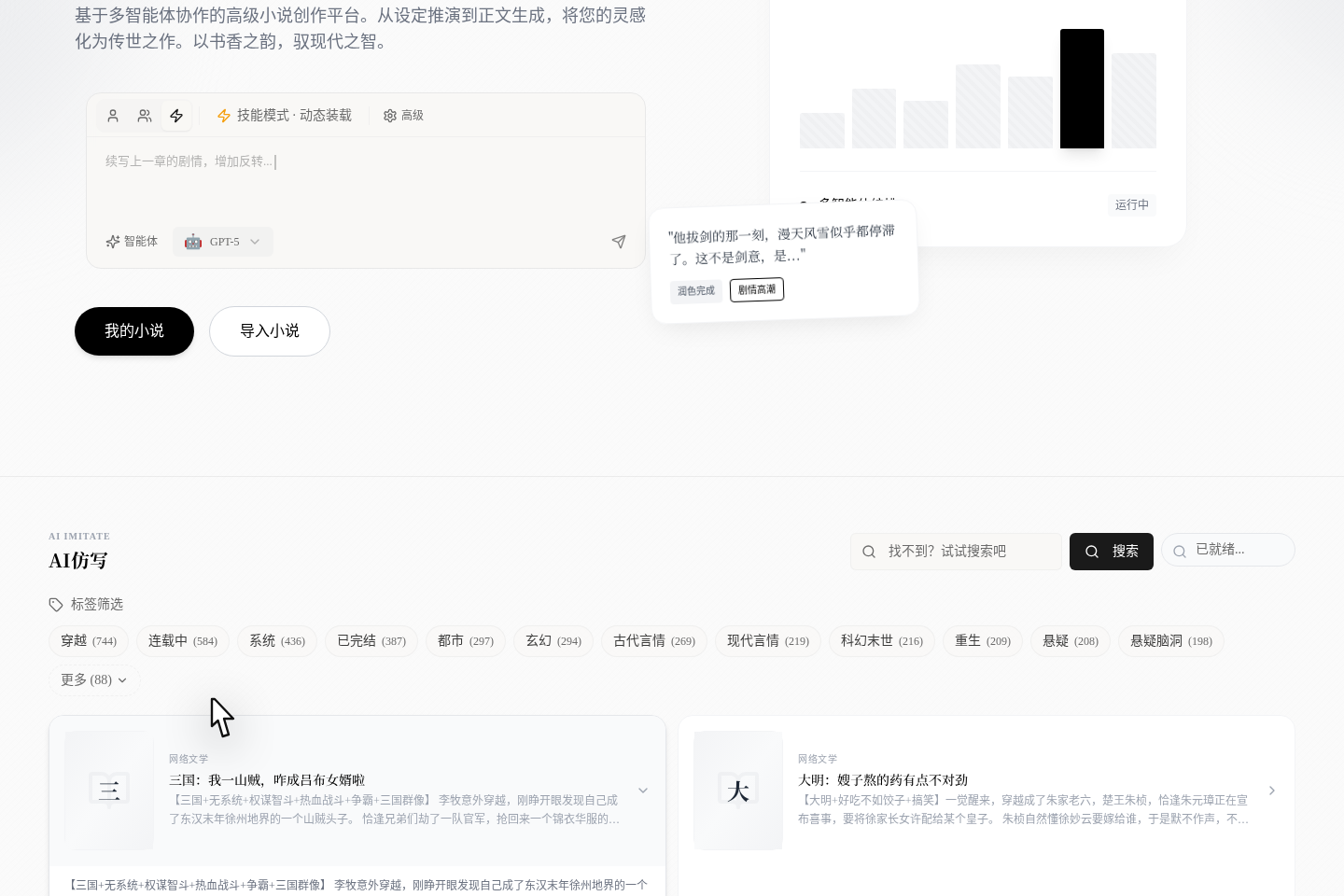
The imitation entry that actually works now is not the /features/imitate-writing feature introduction page, but the AI Imitation area on the home page. What it really does is not "copy a hit in one click" either: you first pick a Fanqie novel whose style, rhythm or genre is close to yours, then bring the reference tag and a template prompt back into the home page input bar, so you can keep generating according to your own requirements.
What this feature actually does for you
When you click this feature on the home page, the platform really does only three things:
- Lets you pick on the home page a Fanqie novel with a similar style as your reference.
- Lets you make clear whether this time you want to learn
Settings,Outline,ProseorStructure. - Fills the Fanqie reference tag and a template prompt back into the home page input bar and automatically switches to the matching single-Agent mode.
The last step does not send automatically, so you still need to check the prompt yourself and then click Send.
First, tell the two search boxes at the top apart, and know what "Ready" means
- The long search box at the top searches Fanqie novels directly; it is not specifically for searching "new books".
- The small search box and tag filters on the right mainly filter books that have already been fetched and can be imitated right away.
- These two searches do not stack. When you switch to the site-wide search on the left, the ready filter on the right is cleared; the ready search on the right usually starts only when you press
Enter. - If a book is not ready yet, you will see
Pending DownloadorFetch Data. The home page currently does not give you a continuous progress bar; more often you click download, watch the toast, and come back to refresh after a few minutes.
This matters because many people mistakenly think "once you find a book you can imitate it right away", but the real process is to prepare the data first and then start imitating.
What task each of the four buttons corresponds to
| Button | Better for learning | The Agent it actually switches to |
|---|---|---|
Imitate Settings | Worldbuilding rules, character frameworks, character relationships | Story Bible Agent |
Imitate Outline | Plot progression, conflict rhythm, chapter reversals | Chapter Outline Agent |
Imitate Prose | Sentence density, sharpness of dialogue, emotional progression | Generation Agent |
Imitate Structure | Whole-book structure, volume-level rhythm, long-line arrangement | Structure Agent |
If you mix the four needs into one instruction, the result usually gets worse. What real authors more often do is learn one layer at a time.
What the platform actually fills in after you click a button

After you click a button, two kinds of content appear in the home page input bar:
- A Fanqie novel reference tag, carrying the novel ID and title.
- A template prompt, such as "Please refer to this book's writing style/plot/structure and generate ... for me, while avoiding plagiarism; it must have its own innovation and changes".
At the same time, the home page input area is switched to the single-Agent mode better suited to the current task. That is, the essence of this feature is "setting up the reference context for you", not completing the final generation for you.
What really happens after you click send
There is one more step here that many people don't realize:
- If you are not logged in yet, clicking
Sendfirst takes you to/login. - If you are already logged in, the platform creates a new draft novel.
- The imitation reference and prompt currently in the input bar are carried into the writing page as the initial message to send.
- The page jumps from the home page straight to the writing page of the new work, instead of staying on the home page waiting for results.
So, more precisely, this feature is "set up the reference on the home page, then send the task into the writing page to continue creating".
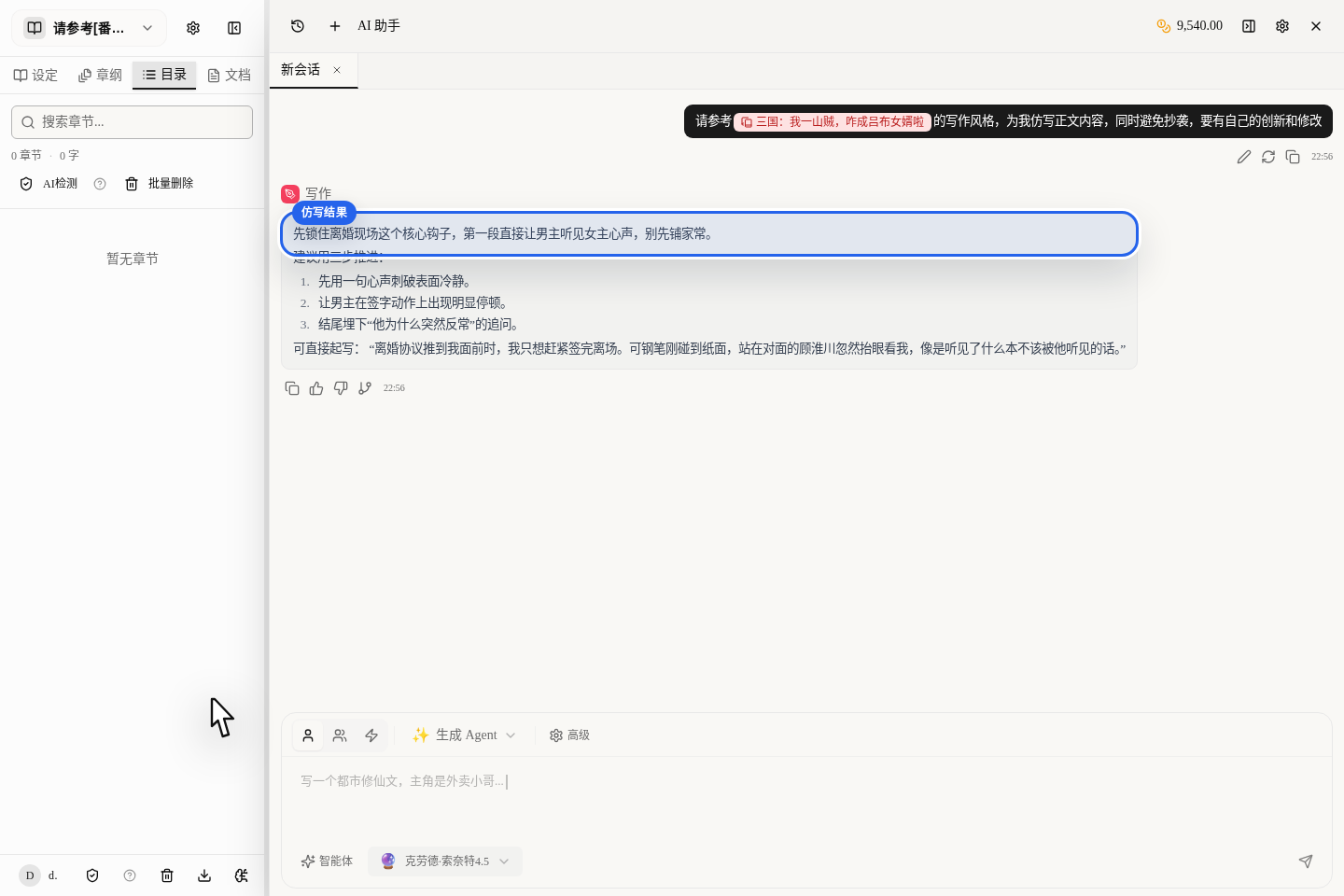
What you see on the home page is only the first half, "preparing the reference context". The real generation result keeps coming back in the newly created work's editor, so to judge whether this feature is useful, don't just look at whether the home page input bar auto-filled some words; look more at the imitation suggestions and starter examples given by the AI Assistant panel on the right after you jump into the editor.
An order closer to what real authors do
We recommend this order:
- First pick a Fanqie novel whose style is closest to your target genre.
- Pick only one imitation level at a time; don't ask for settings, outline and prose at the same time.
- After returning to the home page input bar, add your own genre limits, character goals and no-go requirements.
- Finally click
Send, and let AI generate original content within the reference context.
What you get this way is "an original result with references and boundaries", not a vague copy of a pile of surface features of hit books.
The 4 most common misconceptions
Treating it as a one-click generator for a whole book
What it really does is "pre-fill the reference and prompt, then send the task into the writing page"; it is not a stand-alone whole-book generator.
Asking AI to learn all four layers at once
Settings, outline, prose and structure are four different tasks, and sending them mixed together is the easiest way to go off track.
Not adding your own constraints
If you give only the reference book and don't add your own genre, protagonist goal and style boundaries, the result will be very generic.
Understanding imitation as getting close to the original text
What you should really learn is rhythm, structure, emotional progression and the placement of payoff points, not writing hugging someone else's sentences.
Which scenarios are most worth using it in
- You already know the genre direction, but don't know how to set up the opening rhythm for this genre.
- You want to learn the dialogue tension or the emotional progression speed of a certain kind of novel.
- You already have your own story and only want to borrow others' successful structure and rhythm to calibrate it.
Which article to read next
- To bring the reference style into your own first chapter: read Your First Chapter in 10 Minutes: The Fastest Path to Results
- To keep diagnosing where the pacing drops after you finish a chapter: read Find Your Weakest Chapters: Pacing Analysis and Comparison
- To first understand models, credits and mode switching: read Choosing AI Models and Managing Credits: Good Results, Lower Cost