
New to Maliang Writer? Start Here
What to click after signing up, how to create your first book and open the editor: about 10 minutes from the home page to your first paragraph, with screenshots.

In this article 8 sections
The first time you open Maliang Writer, you don't need to learn every feature at once. The easiest approach is to run through one shortest path: sign in and land on the home page, open "My Novels", enter an empty book, create the first volume and first chapter, then write the first paragraph.
This walkthrough uses a sample closer to what real authors write: a women's-audience urban romance, "After the Divorce, My Ex-Husband Can Hear My Thoughts". The goal is simple: test whether the premise has a hook, whether chapter one grips readers, and whether the story is worth continuing.
Promo Previews
If you would like to see versions closer to what ends up on the home page, YouTube or Xiaohongshu, here are two promo cuts, so you can compare the tutorial recording with the promo packaging.
Don't Overthink the First Time: Just Do These 5 Things
The first time, don't try to "set up the whole book". These five steps are enough:
- Sign in
- Open "My Novels"
- Click into the writing page of a book
- Create the first volume
- Create the first chapter
This way you quickly find out whether the tool feels comfortable, without being overwhelmed by settings and features from the start.
Step 1: Take a Look at the Home Page After Signing In
After signing in you return to the home page. No need to linger; just remember two things:
- The home page is where you come back to every time you write
- If you are signed in, the buttons at the top and on the home page take you to "My Novels" or let you start writing right away
If you only want to browse the tutorials first, open the tutorial home; if you want to start writing right away, go straight to "My Novels".
Step 2: Find or Create Your Book in "My Novels"
In "My Novels" you will see the books you have written, or you can create your first one here. For the first time, just remember:
- This is the bookshelf for all your books
- Every time you come back to write, you start here
- Once a book exists, click its card to open the writing page
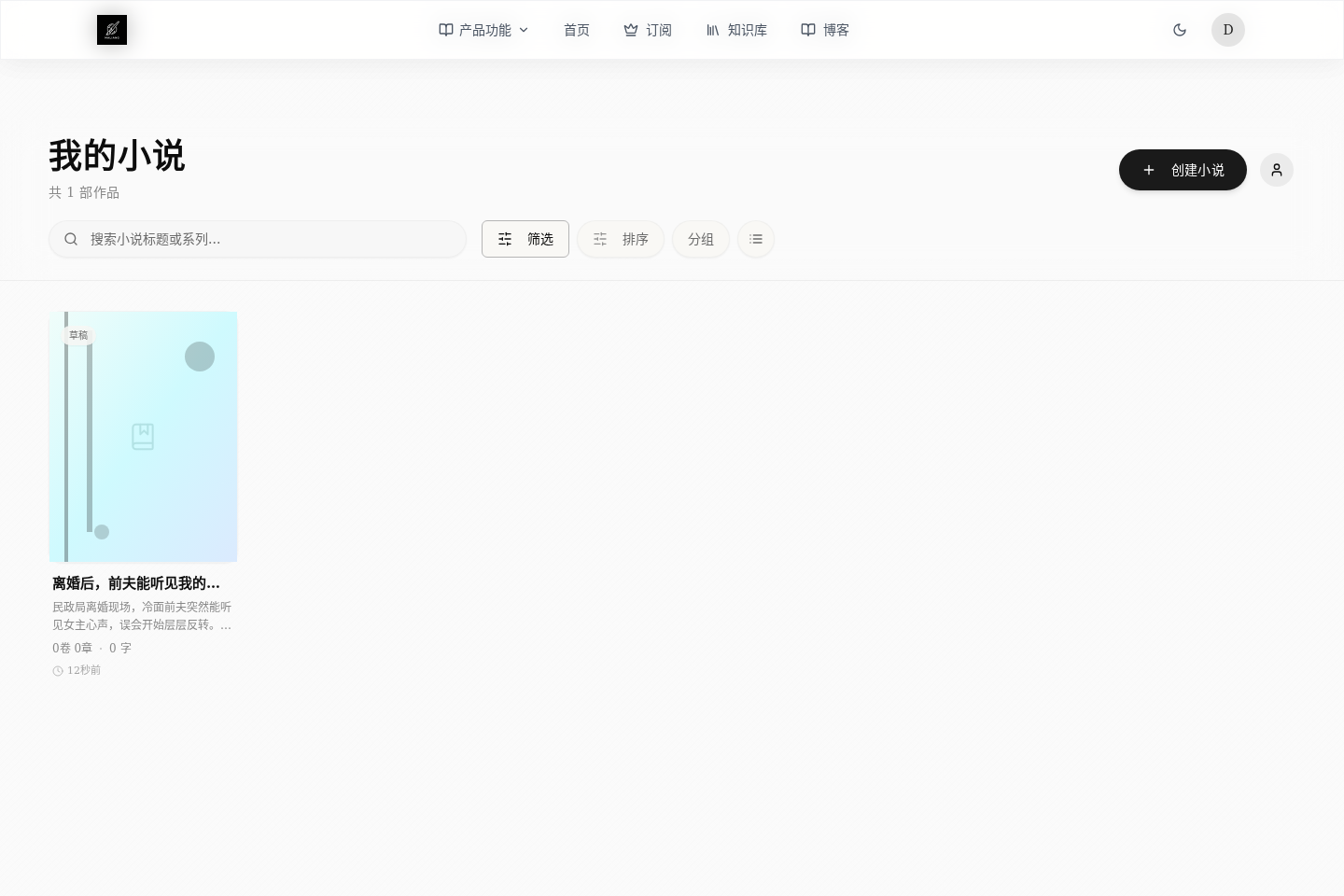
If you don't have a book yet, try one with a clear target readership, as in the demo. For example:
- Women's-audience urban romance: see whether emotional reversals and "chasing the ex" beats work
- Xuanhuan power-up fiction: see whether the pacing and the opening fight are exciting enough
- Mystery and detective fiction: see whether the opening puzzle hooks readers
Run through the whole process first, then decide whether the premise deserves a deeper dive. That is far more efficient than just thinking up settings.
Step 3: On the Writing Page, Create the Volume and Chapter First
The first time you enter the writing page, don't rush to click every button. For an empty book, the most important thing is not filling in settings but putting up the frame. You should do at least two things:
- Create the first volume first, so later chapters have somewhere to belong
- Then create the first chapter to confirm you can start writing prose
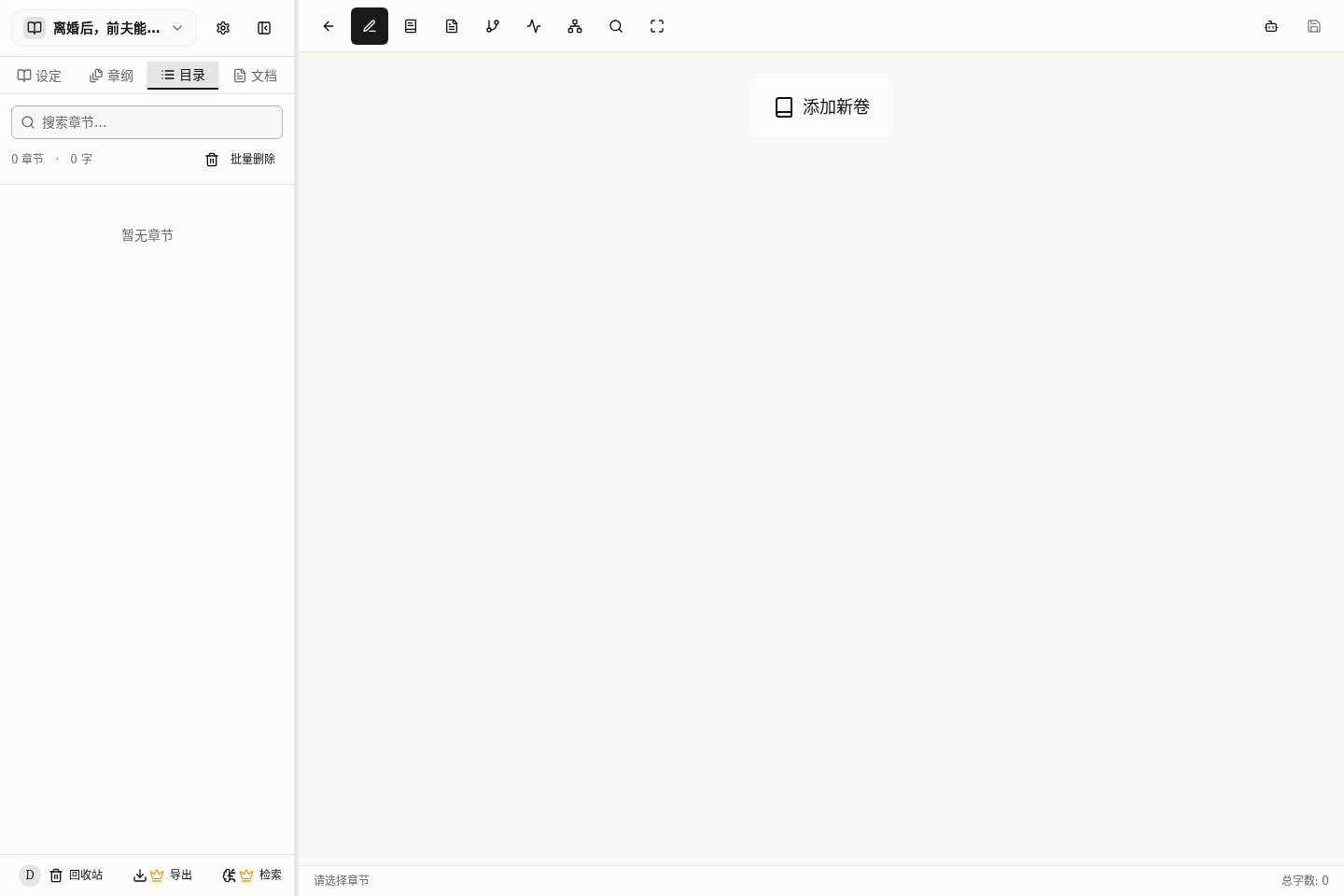
For a beginner, the best order is not "complete the settings first" but "have a starting point you can write from". Even just the default Volume 1 and Chapter 1 is better than an empty book.
The Simplest Steps
You can follow this order directly:
- Create a novel and write only one line about the premise
- On the writing page, click "Add Volume" first
- Once the volume appears, click "Add Chapter"
- After the first chapter exists, decide whether to write prose right away or go back and fill in the outline and settings
If what you want most right now is "how to produce a draft quickly", go straight to Your First Chapter in 10 Minutes: The Fastest Path to Results.
Three Pitfalls Beginners Hit Most
Trying to Finish the Worldbuilding Right Away
The result is usually a pile of notes and no prose yet. A better approach is to get the story moving first and fill in settings gradually.
Asking the AI to Do Too Much at Once
For example, asking it to think up the premise, fill in settings, build an outline and write prose all at the same time. When the task is too big, results tend to drift. Break it into small steps and the results are steadier.
Having Ideas but Never Starting
Many beginners stay stuck in the thinking stage. A more efficient way is to enter the writing page, write the first paragraph, and revise as you go.
What to Read Next
- To understand how the home-page quick entries, My Novels and importing old drafts each work: read Home Page Quick Start or Draft Import: Which One Fits You
- To produce a draft quickly: read Your First Chapter in 10 Minutes: The Fastest Path to Results
- To build the story skeleton first: read Building a Three-Level Outline: Master Plan, Volumes, Chapters
- To organize worldbuilding, characters and suspense: read Managing Characters, Worldbuilding and Suspense: The Left Sidebar
- To learn how the AI helps you write: read Choosing a Collaboration Mode: One AI or Several Working Together