
Character and Setting Cards: What to Write, What to Let AI Fill In
Which card fields you must fix yourself and which AI can expand, field by field: where the AI completion button is and how to proofread what it writes.
In this article 8 sections
The more clearly a material card is filled in, the less likely AI is to drift later. The most common problem is not "writing too little", but mixing information of different levels together: names, constraints, chapter positions and character goals.
First, remember one general principle
- Core facts such as
Name / Type / Role / Suspense Labelare best decided by you. - AI is better at expanding descriptions and enriching details; it is not suited to making the final call on rules.
- Information that affects chapter position and plot rhythm must always be checked by you in the end.
How to fill in a setting card
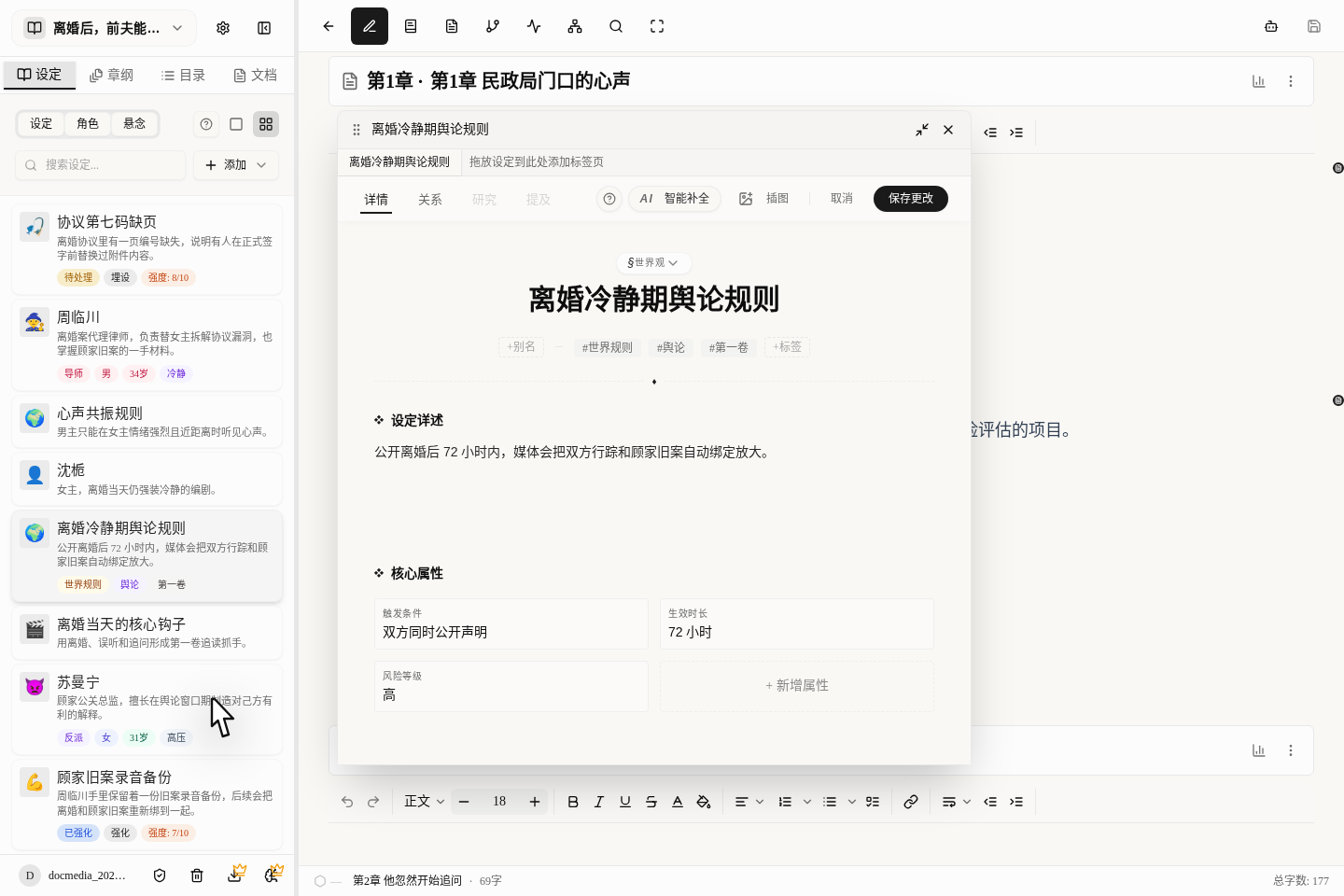
Type: first decide whether it is a location, an item, a rule, a faction or a worldview. This is the first thing to check after creating a setting.Name: write the most common, most stable name; don't put the real name in the aliases.Aliases: good for old names, nicknames, epithets and what different factions call it.Tags: good for a few keywords, such as faction, temperament and plot purpose.Detailed Description: good for the complete rules, background, boundaries, origin and usage limits.Core Attributes: good for breaking things into individual attributes, such as "faction / rank / taboo / location / source of power".Relationships: write them on the card's separateRelationshipstab; don't cram everything into a long description.Illustration: generate or upload with the dedicatedIllustrationbutton; AI text completion does not touch this.
What is best written yourself in a setting card
- The type and the main name.
- Rule boundaries, conditions under which it cannot be used, and fixed settings that cannot change.
- The names of the key attributes, a framework such as
Cost / Taboo / Faction / Source.
What AI can draft for you in a setting card
AI smart completion is currently better at filling in these places:
NameTypeDetailed DescriptionTagsCore Attributes
For now it is not very good at handling Aliases / Illustration / the Relationships tab; it is best to do those yourself.
How to fill in a character card
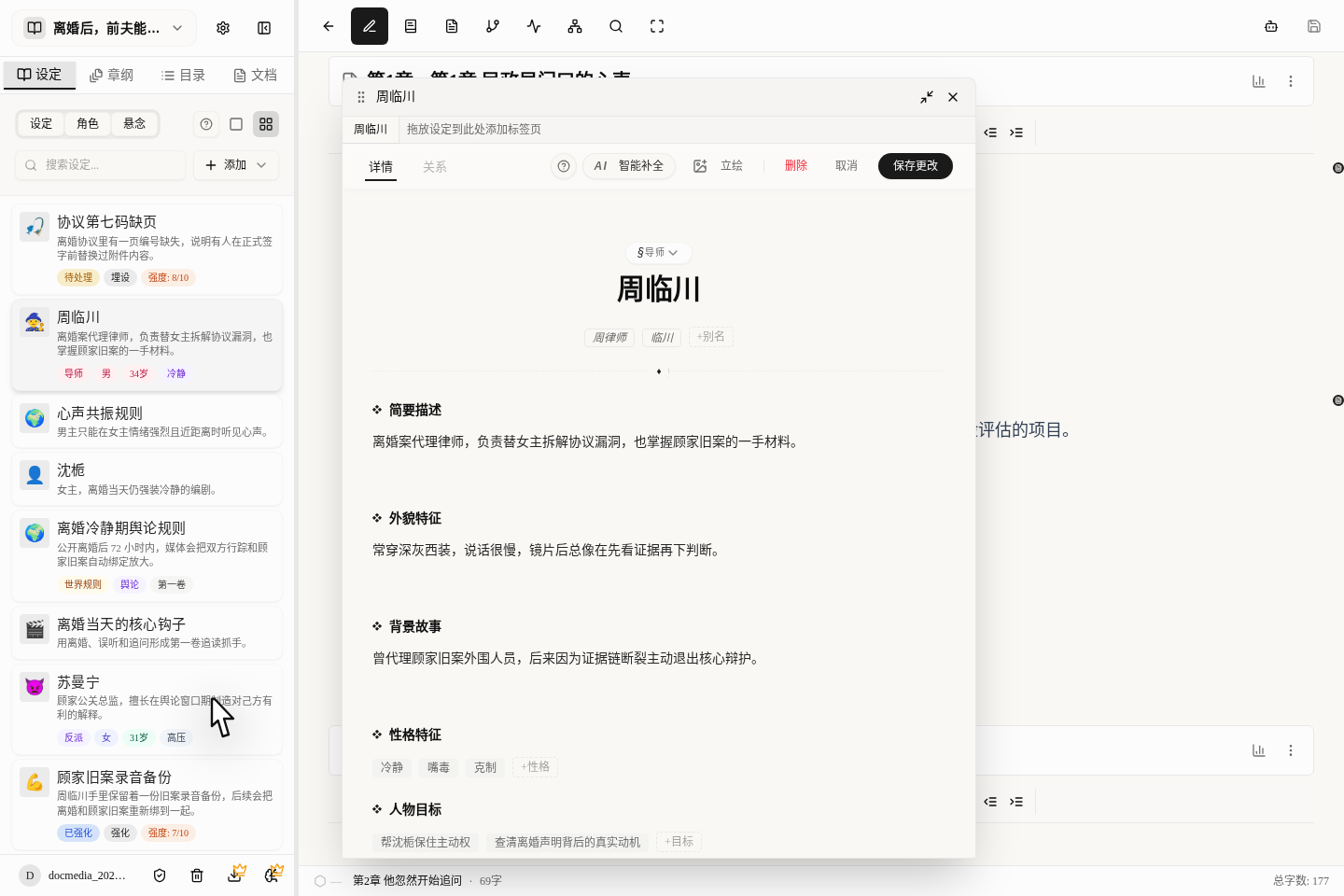
Role: first decide whether this is a protagonist, antagonist, supporting character, mentor or passer-by.Name / Aliases: write the most common name in the name field, and nicknames, pseudonyms and honorifics in the aliases.Short Description: sum up in a sentence or two the character's core traits and function.Appearance: write the appearance traits that will be mentioned again and again; you don't need to cram in a long description.Backstory: write the family background, experiences and past events, especially those that affect the decisions they make now.Personality / Goals / Conflicts / Secrets / Weaknesses: these five groups make up the character skeleton AI uses most; try to write them as short, separate lines.Age / Gender / Custom Attributes: good for hard facts and things specific to your book, such as occupation, cultivation level, weapon and faction.Relationships: likewise, write them on the card'sRelationshipstab rather than mentioning them in passing in the description.Portrait: generate or upload with the dedicatedPortraitbutton; it is best to do this after the short description and appearance are settled.
The most valuable parts of a character card are not appearance, but these 5
Short Description: quickly reminds you what this person's biggest role is right now.Personality: decides how they usually speak and act.Character Goals: decides what they most want to do right now.Inner Conflict: decides why they clearly want to do something but cannot.Hidden Secrets / Character Weaknesses: decide what will defeat them later.
What AI can fill in for you in a character card
AI smart completion is currently better at filling in these:
Name / Role / Age / GenderShort DescriptionAppearanceBackstoryPersonality / Goals / Conflicts / Secrets / Weaknesses / Aliases
For now it is not very good at handling the Relationships tab / Portrait / Custom Attributes; these are still best done yourself.
How to fill in a suspense card
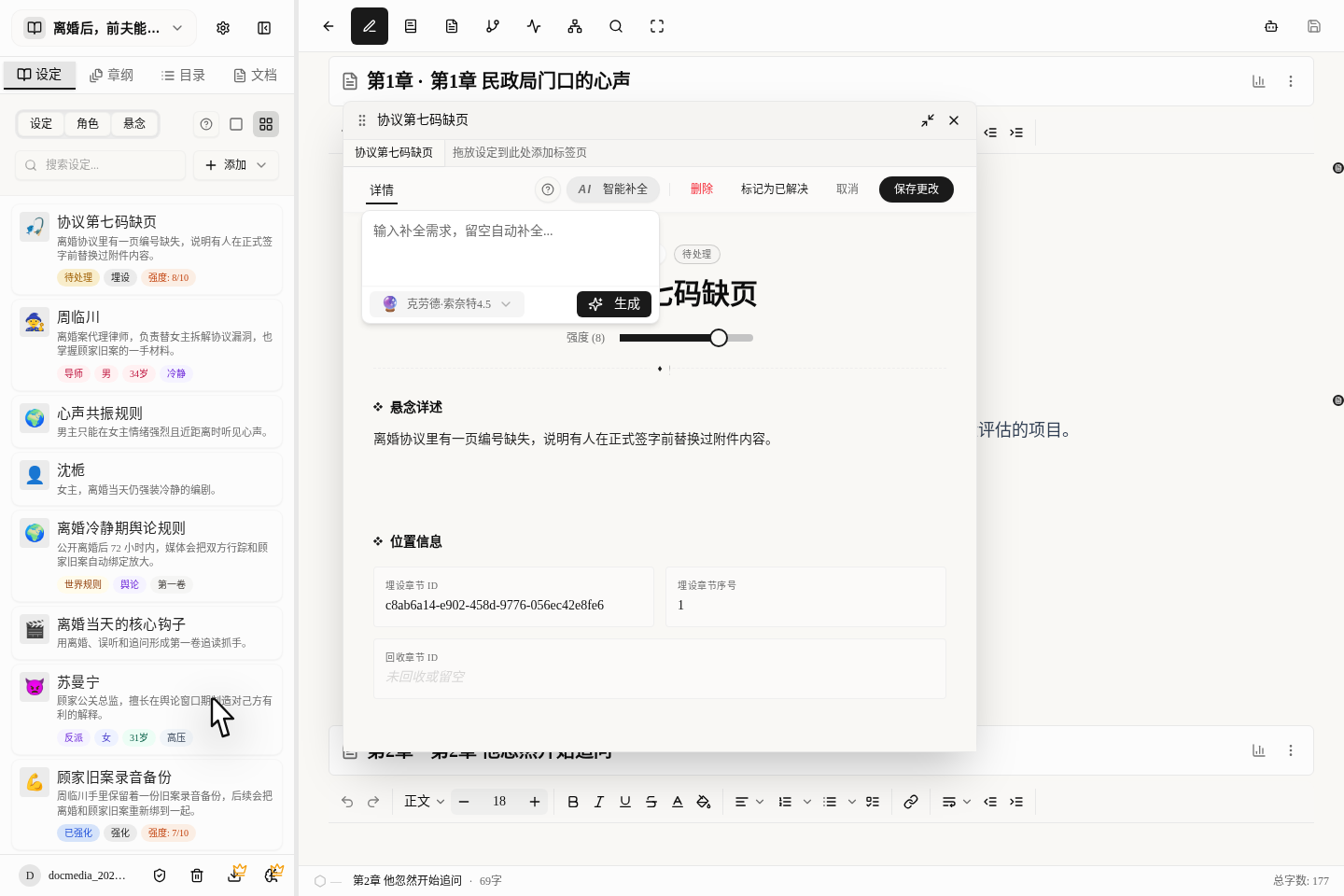
Label: the name of this suspense thread; write it so that you understand it at a glance.Type: choose one ofPlant / Reinforce / Resolve; these three stages actually govern the same suspense thread.Status: this is mainly for you to read; you don't need to change it every time. It changes automatically with the type and with "Mark as Resolved".Intensity: the bigger the number, the more readers should be feeling this suspense thread right now.Suspense Details: spell out what this suspense is teasing, how it is meant to develop and what will finally be revealed.Plant Chapter ID / Plant Chapter No.: state exactly which chapter it is in, so you can find it later.Resolve Chapter ID: fill it in as soon as you have decided in which chapter it will be revealed.Mark as Resolved: after you have actually written the plot where it is revealed, clicking this is the safest.
What is best written yourself in a suspense card
Label: best written as a short phrase you understand at a glance.Type: it directly decides what stage this suspense thread is at now.Plant Chapter ID / Plant Chapter No. / Resolve Chapter ID: don't be lazy and skip these position fields.Mark as Resolved: after the actual reveal, it is best to click this yourself rather than only writing it in the description.
What AI can fill in for you in a suspense card
AI is currently better at filling in:
LabelTypeIntensitySuspense DetailsPlant Chapter IDResolve Chapter ID
You should still confirm the Plant Chapter No. yourself, because it is the easiest to change when you reorder chapters.
How to use AI smart completion
- First fill in the fixed settings you are sure will not change.
- Click
AI Smart Completionat the top right of the card. - You can write nothing and let it work from what you have already filled in, or type directly what you want.
- It completes the whole card, not just one blank.
- Below you can switch models; if you are not happy, switch to another and try again.
- What AI writes is only filled into the card and is not saved automatically; don't forget to click "Save changes" at the end.
How to get more accurate completions
- Tell it which parts you want filled in first; don't just say "please improve this".
- Give it 2 or 3 fixed points first, then let it enrich the details.
- If some settings absolutely cannot change, tell it directly "do not change X, only add Y".
- If a character or setting needs repeated edits, edit it in the same card; don't create a pile of duplicates.
Pitfalls beginners fall into most often
- Don't expect AI to make decisions for you. It is better at expanding descriptions and enriching details.
- As for whether a suspense thread has been revealed, it is best to click "Mark as Resolved" yourself rather than trust the status AI wrote.
- For chapter positions, enter real chapter numbers, not code names you made up.
- Illustrations and portraits are separate features; AI cannot handle them when it fills in text.
- If a newly created setting has the wrong type, change the type first, then let AI fill in the text.