
Find Your Weakest Chapters: Pacing Analysis and Comparison
Pacing Analysis scores each chapter on density, emotion and suspense, benchmarks it against hits, and sends the weakest chapters to the Agent for revision.

In this article 10 sections
This article is not about the analysis of hit books in the case library. It teaches you how to find the weakly written chapters in your own book, and then decide whether to add some conflict, plant some suspense, or just let the AI revise them for you.
When to use this feature
This feature lives right on the writing page. If your screen is wide enough, there is a Pacing Analysis button at the top; on a small screen it may show only the word Pacing.
It suits the following situations best:
- You have written several chapters in a row and one stretch feels a bit slow.
- The writing feels "fine", but it lacks that urge to keep reading in one go.
- You know something is wrong, but cannot say whether there is too little information, flat emotion, or a chapter end that did not land.
If you have not even finished one chapter, go write the prose first and come back to test it afterwards.
Check the range and the credits first
After you click in, do not rush to the charts. Look at the settings at the top first:
Analysis Rangelets you pick which chapters to test. By default it tests the earlier chapters.- For a first run there is usually an
Analyze First 10 Chaptersshortcut, so you do not have to test the whole book at once. - It tells you roughly how many credits this run will cost.
- If a job is already running in the background, progress is shown here, and you can click
Refresh Statusto see whether it has finished. - If only a few chapters were left untested, it automatically tests just those and does not redo everything.
This feature charges credits per chapter, roughly 9 credits a chapter, so do not test the whole book the first time.
One more detail: if you refresh the page, it automatically picks up the job that had not finished, so you do not have to click start again.
The curve and the overall advice are what really help
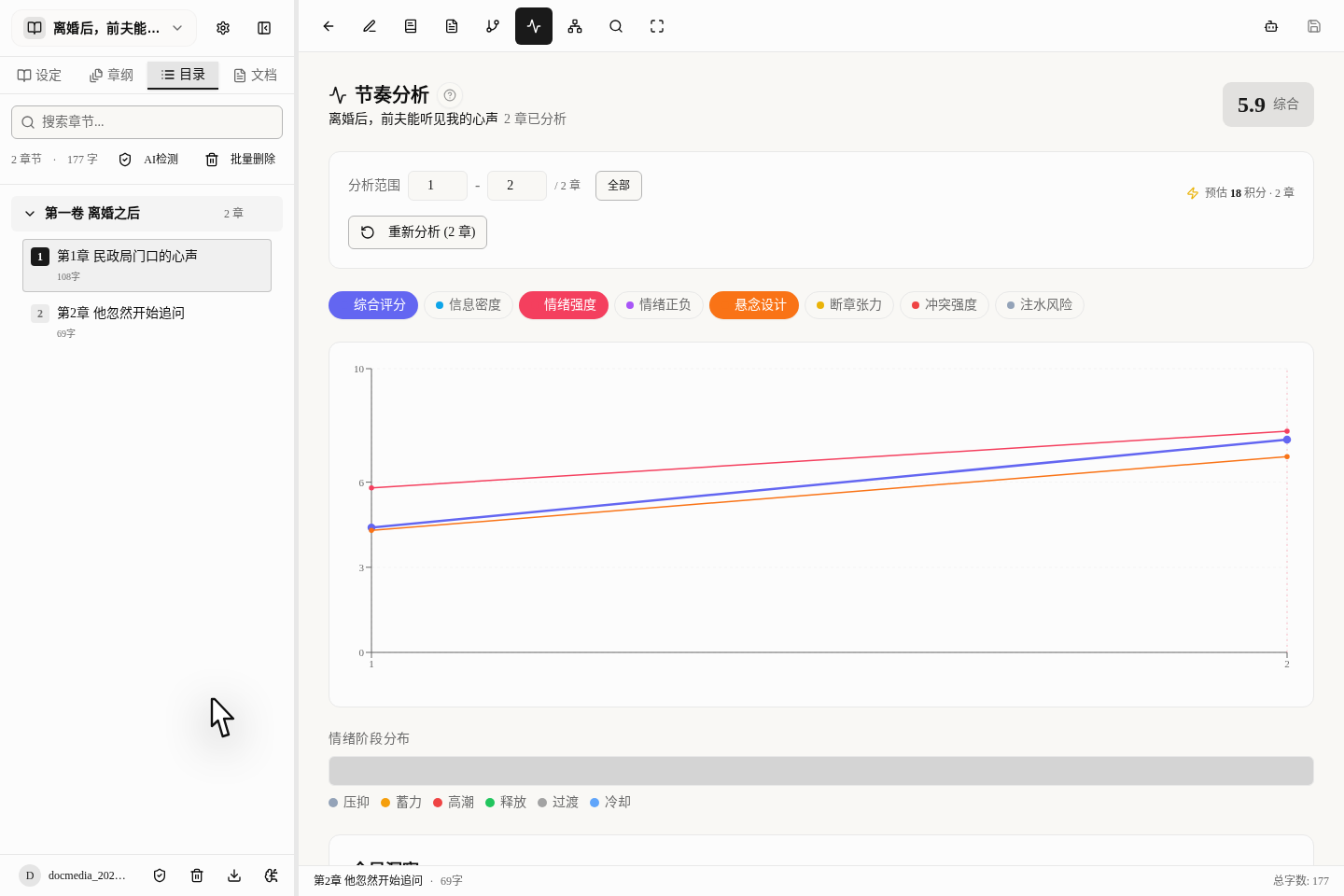
Many people think this feature is just a "total score". What is actually useful is this:
- How the overall score rises and falls across this stretch of chapters.
- Whether the emotion stays stuck in one state without changing.
- The strengths, weaknesses and fixes named in the overall advice.
- Which chapters score especially low and drag down the whole stretch of the plot.
The results page lays these out separately for you:
- Overall Score
- Information Density
- Emotion Intensity
- Emotion Polarity
- Suspense Design
- Chapter-End Tension
- Conflict Intensity
- Padding Risk
It does not draw all 8 lines at once, otherwise it would be too cluttered. Usually you look at the few that are on by default first, and click the others yourself if you want them.
So the smartest way to read it is: first look at the overall trend, then decide which chapter to fix first.
Each chapter's diagnosis is not just for reading; you can act on it directly
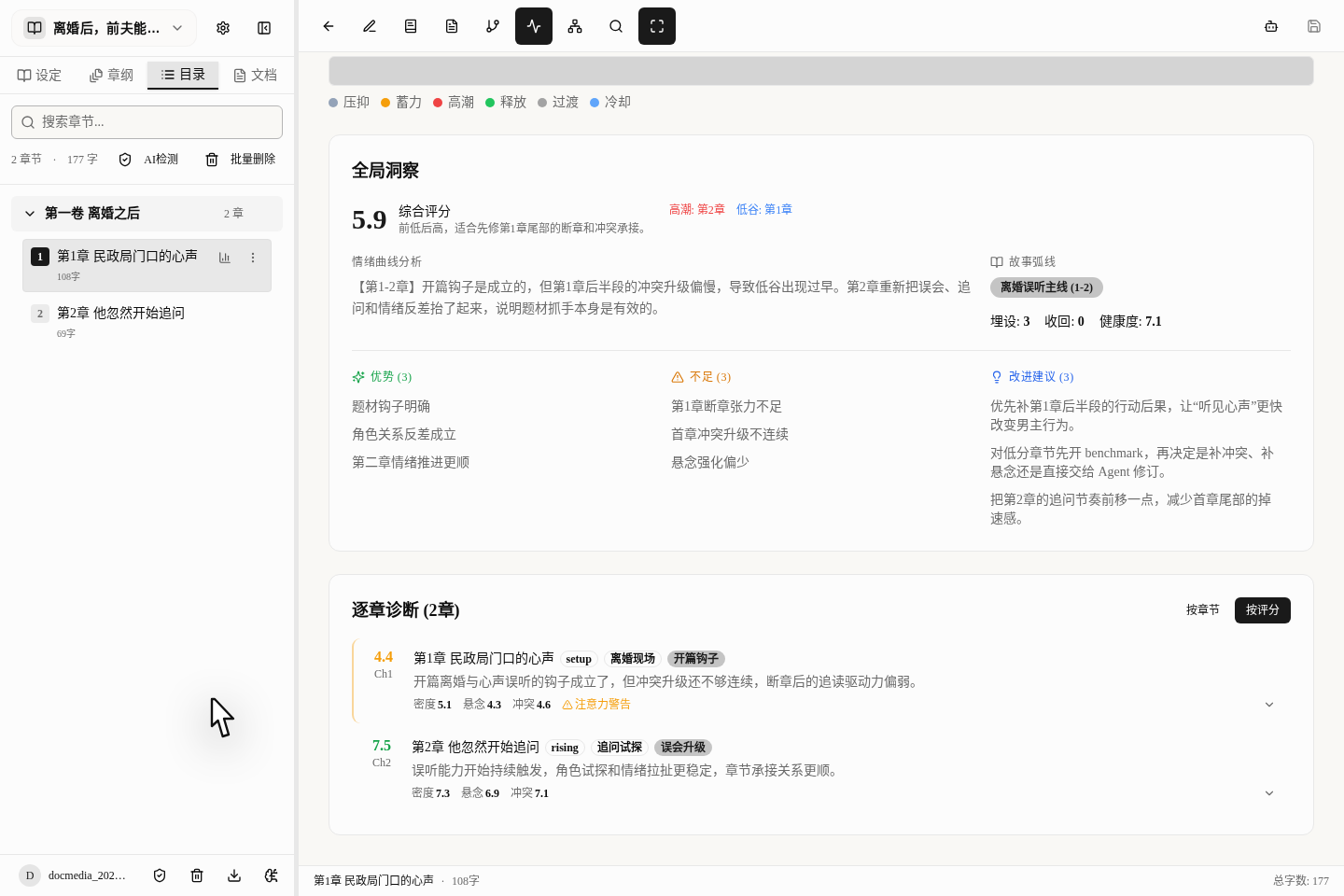
Each chapter's diagnosis not only tells you what is not working, it also gives you tools to fix it.
Here you can do three things:
Re-analyze This Chapter: click it after you revise, to see whether the score went up.Benchmark Comparison: compare this chapter with well-written chapters of the same kind in the case library.AI Revise: hand the chapter straight to the AI and let it revise it for you.
This list can also be sorted by Chapter or Score. We suggest sorting by score and picking out the lowest few chapters to fix first, which saves the most time.
Two more small details:
- While another chapter is being tested in the background, the
Re-analyze This Chapterbutton cannot be clicked. AI Reviseis not available for every chapter. It only appears for chapters whose score is too low and that really need revision.
Where else you can open Benchmark Comparison
We suggest running Pacing Analysis first and then opening Benchmark Comparison from the low-scoring chapters, but you can also open it from other places:
- Click the button to the right of each chapter in the chapter list.
- You can also open it directly from the top of the prose page.
Still, we recommend "look at the overall pacing first, then compare individual chapters", because the comparison feature is for fine-tuning a few chapters, not for testing the whole book.
Benchmark Comparison is a small card, not a new page
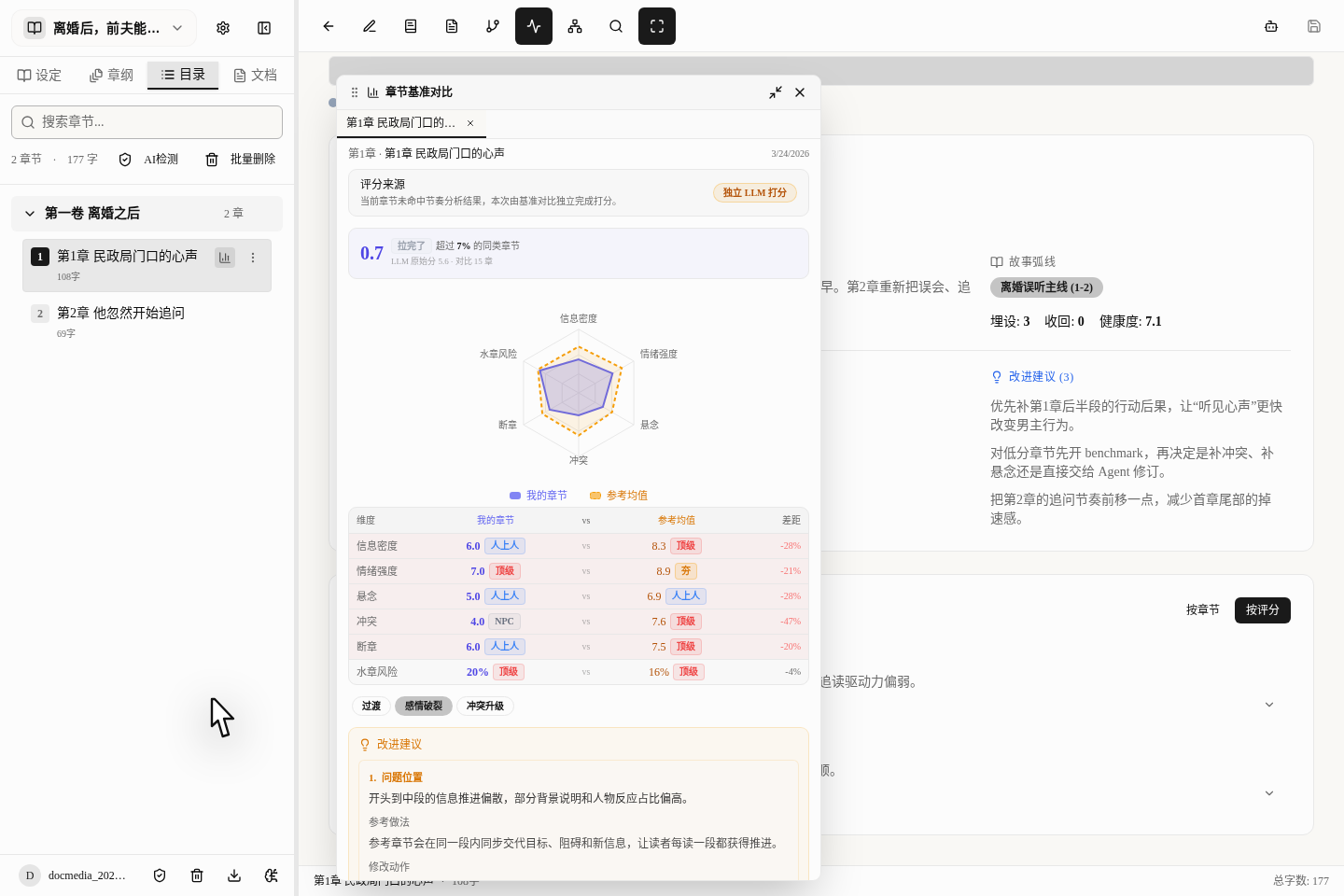
After you open Benchmark Comparison, on a computer a small draggable card pops up; on a phone it is full screen.
It works like a "revision compass", and the first time you open it there may be no result yet. Usually you use it like this:
- Open the card first.
- If this chapter has not been compared yet, you will see a
Start Analysis · 30 creditsbutton. - Once it finishes, you can see the radar chart, the gap between you and the hit books, and advice on how to revise.
- After one run, the result is stored for a while, so opening it again does not cost credits.
The card tells you:
- How many chapters of the same kind your chapter beats.
- A radar chart comparing your chapter with the average.
- Exactly where the gap is.
- What kind of scene this chapter is and what stage of the story it is in.
- How to revise it, specifically.
- Which books' chapters were used for the comparison.
If this chapter has already been through Pacing Analysis, it also tells you whether this time the result is Reused pacing analysis or was re-tested with Independent LLM scoring.
Know the limits of Benchmark Comparison in advance
Before using this feature, know these points:
- It is a member-only feature and requires a subscription.
- One run costs
30credits. - A chapter must have at least
100characters, otherwise it will not be tested. - At most the first
50000characters are tested; it cannot be unlimited. - It mainly tells you "where the gap is", not the standard answer.
So the best-value way to use it is: run Pacing Analysis first, find the chapters that score low and that you do not know how to fix, and only then open Benchmark Comparison.
Suggested revision order
If you have already finished a long stretch, we suggest revising like this:
- First run Pacing Analysis once on the writing page.
- Look at the curve and the overall advice, and find the chapters that clearly drag things down.
- Open these low-scoring chapters and see what it says is wrong.
- If you still do not know how to fix them, open
Benchmark Comparisonto see how others write. - Finally, go back to the prose and revise it yourself, or let the AI do it for you.
This is far more efficient than "grinding away chapter by chapter".
The 4 pitfalls beginners fall into most
Looking only at the score, not the reason
Knowing the score is low does not help; you need to know whether the conflict is too weak or the suspense was not left well.
Deleting the whole chapter at the first low score
Often it is enough to fix the chapter end or add some conflict; there is no need to rewrite everything.
Running Benchmark Comparison on every chapter
Benchmark Comparison is relatively expensive. It is for tough cases, so do not test every chapter with it.
Treating someone else's way of writing as the only standard
The hit books in the case library are only a reference. Your book still has to follow your own style.
What to read next
- To learn how to write your first chapter quickly: read Your First Chapter in 10 Minutes: The Fastest Path to Results
- To learn how to study hit books: read After a Case Book: Bring Another Author's Methods Into Your Own
- To learn how to pick up a hit book's rhythm: read Write to a Hit Book's Rhythm: Using Imitation Writing