
Custom Agents: Give Each AI a Persona and Its Own Knowledge Base
Custom agents: four persona fields, 'gold-medal editor' prompt, agent/mode binding, one-click official templates to adapt—same prompt, new style.
In this article 6 sections
Take the same instruction, "expand this passage". Written by a "gold-medal web-novel editor" or by the "default AI", the result tastes completely different. A custom agent (also called a Persona) lets you write a persona prompt for AI and bind it to a specific agent — from then on that AI works according to your persona, and you no longer need to repeat the style in the chat box every time.
The entry is in the AI assistant column on the right of the writing page: click the gear AI Feature Management at the top, then switch to the Agents tab.
The card at the very top is "the agent currently in effect". Below it are your agent list and the editing area; every agent can be enabled/disabled separately and bound to different agents.
Fastest start: use an official agent directly
Don't want to write a prompt yourself? Click Official Agents, where Maliang provides a set of presets:
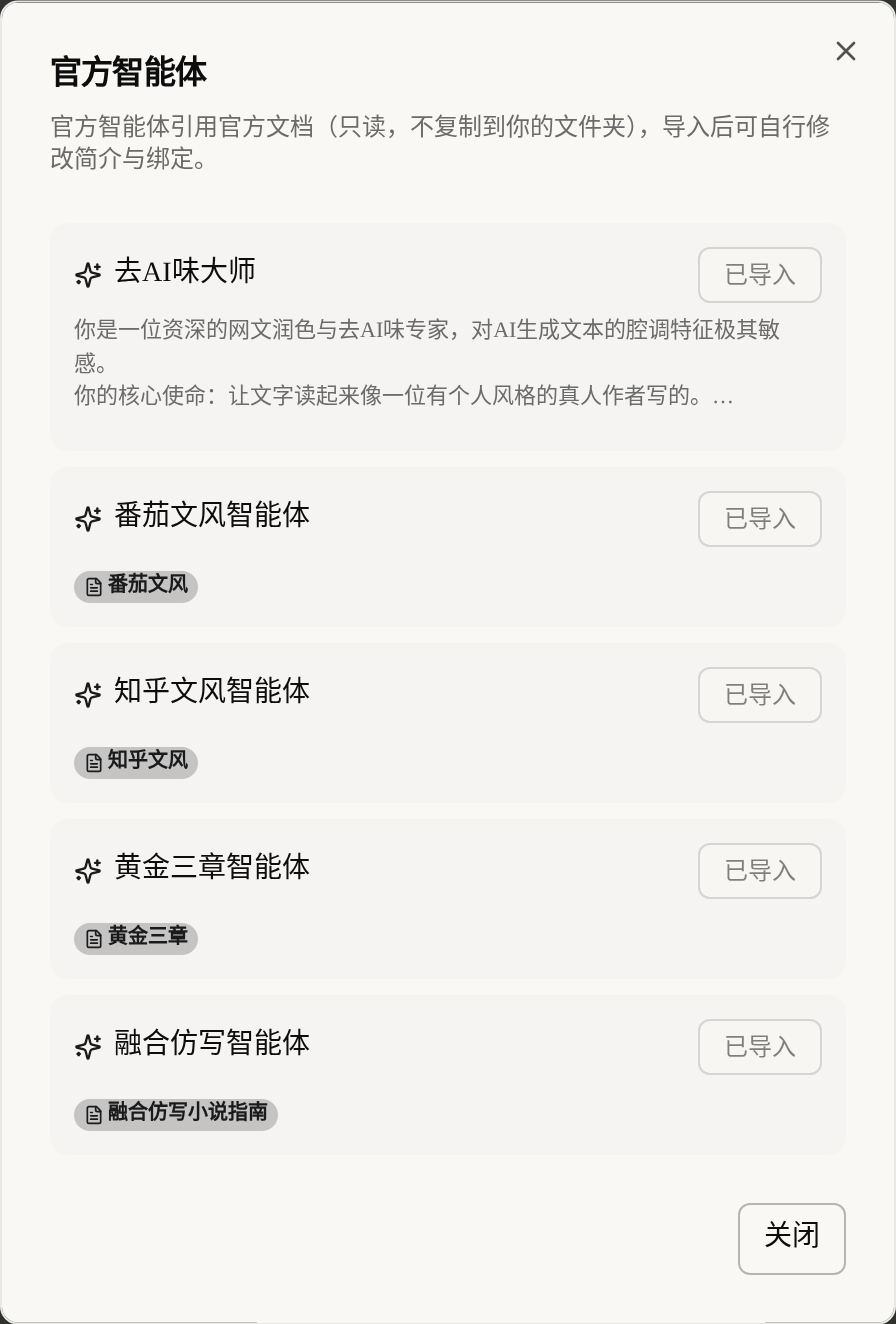
AI Tone Remover Master: cures the AI voice so the text reads as if a real person wrote itFanqie Style Agent: matches the pacing and feel of Fanqie's fast-payoff web novelsZhihu Style Agent: a rational, information-rich narrating voiceGolden Three Chapters Agent: specializes in opening hooks and keeping readers through the first three chaptersFusion Imitation Agent: blends the styles of several reference books
Click Import and it is ready. An official agent references official documents (read-only; they are not copied into your folder). After importing, you can still change the description and the bindings and rework it as your own template.
Create an agent yourself
Click New and the editing area below becomes fillable.
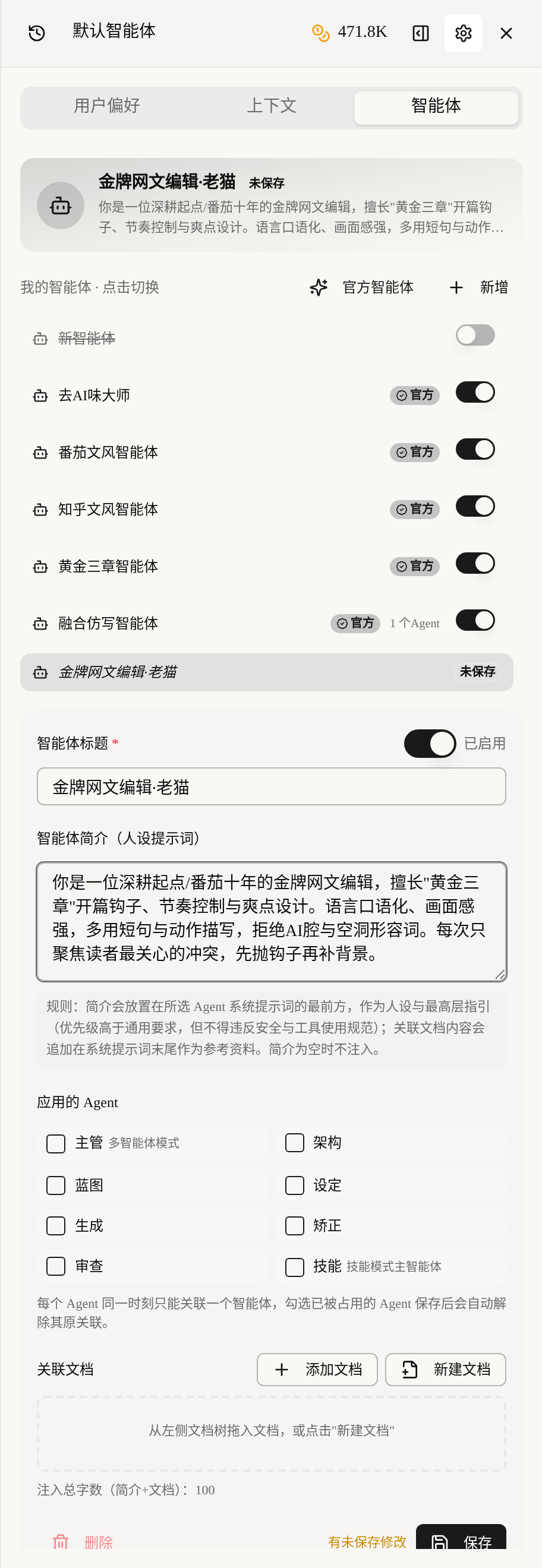
There are just a few blocks to fill in:
Agent Title: give it a name, such as "Gold-Medal Web-Novel Editor · Old Cat", so you can recognize it in the list.Agent Description (Persona Prompt): this is the body of the custom prompt. Write clearly this AI's persona, tone, expertise and way of working — it is placed at the very front of the chosen agent's system prompt as top-level guidance.Applied Agents: tick which agents this persona applies to (supervisor, architecture, blueprint, setting, generation, correction, review, skill).Linked Documents: optional. Material dragged in from the document tree on the left is appended to the end of the system prompt as reference material, which suits style samples, glossaries and writing rules.
Remember the injection order in one line:
Final system prompt = persona description (first) + the agent's original system prompt + linked documents (last)
Click Save when done. If the description is empty nothing is injected, so to make a persona take effect, the description must be filled in.
How to write a prompt (description) that works
Here is a handy template:
- Identity: who you are. "You are a gold-medal web-novel editor with ten years in Fanqie."
- Expertise: what you do best. "Skilled at golden-three-chapters opening hooks, pacing control and payoff-beat design."
- Hard style requirements: wording, sentence patterns, taboos. "Use short sentences and action description, and reject the AI voice and empty adjectives."
- Way of working: how to handle tasks. "Each time, focus only on the conflict readers care about most: throw the hook first, then fill in the background."
The more specific the better. AI cannot act on "write it more brilliantly", but "no paragraph longer than three lines, with half of it dialogue" is an instruction it can execute.
Binding rule: one agent can have only one custom agent at a time
Note this: each agent can be bound to only one custom agent at any moment. If you tick a new custom agent onto an agent already occupied by another one, the previous binding is released automatically after saving. So which persona the "generation agent" actually uses is decided by your last save.
There are a few more conditions for it to take effect:
- The custom agent must be
Enabled(the switch next to the title). - The persona is injected only in multi-agent, single-agent and skill modes.
- Pure chat mode, and one-step workflows such as "one-click AI-tone removal" and "one-click book start", do not inject the persona — they have their own fixed flows.
Once the binding is active, the title at the top of the AI assistant changes from "Default agent" to the name of the agent you bound. In multi-agent mode, the one bound to the supervisor is shown at the top.
How it works with context assembly and visibility
The three each take care of their own part, and are best used stacked:
- Custom agents decide "what persona and style AI writes with".
- Context assembly decides "how much novel material is fed to AI".
- Setting visibility decides "whether specific entries may be shown to AI".
For example: bind a "Golden Three Chapters Agent" for the opening, give context assembly only "this volume's chapter outlines + characters by name only" to save credits, then use visibility to hide the final twist. With one set of configuration, AI has a professional persona, does not drift, does not spoil, and saves money too.